What to look for when buying
First, work out what limits you most at your small desk: room to move the mouse, access to commands, how it fits your hand, pointer control or cable management.
| Priority |
What to check before buying |
Who it matters most to |
| Room to move |
Clear space beside the keyboard; room to move the mouse and rest your forearm |
If I don’t want to reach too far or knock the mouse against something, the whole desk layout matters. This is the top priority for around 26% of consumers. |
| Commands within reach |
Does the game support button assignments? Can you reach the buttons you want to use? |
If I want to trigger recurring building or view commands quickly, I check the button assignments and layout. Around 21% of consumers prioritise having building commands within reach. |
| Fit for your hand |
Compare the size and shape with your hand and the grip you normally use |
For longer sessions, I want to hold the mouse without an unsuitable shape restricting my hand or wrist. Around 21% of consumers put a comfortable hand position first. |
| Pointer control |
Adjustable sensitivity and a pointer speed that suits your game |
If I want to place small components precisely, controllable pointer movement matters more than the highest possible DPI figure. Around 16% of consumers put this first. |
| Wired or wireless |
Cable routing and USB connection, or receiver, battery and charging arrangements |
If a cable gets in the way on my desk, I still need to make room for the receiver and power supply. Around 16% of consumers prioritise a clear cable route or a wireless connection. |
Joybuy models for a small desk
The Joybuy models below include wireless mice and wired options with programmable buttons. Before choosing, check that the shape, connection and button assignments suit your hand, desk and game.
 No image available
AJAZZ AJ200 AI MC Wireless Gaming Mouse
A wireless option if you want to avoid a mouse cable on your desk and assign recurring commands to the buttons.
- Bluetooth, 2.4 GHz wireless and USB-C
- Six buttons; button assignments and macros can be customised
- PAW3311 sensor with adjustable DPI settings
- Battery and charging dock: going wireless doesn’t remove the need to charge.
View at Joybuy
 No image available
AJAZZ AJ159 APEX Wireless Gaming Mouse
According to the product description, the symmetrical shape is designed for small to medium-sized hands. Check how it feels with your grip.
- Bluetooth, 2.4 GHz wireless and wired USB-C operation
- PAW3950 sensor; up to 42,000 DPI
- 8K Hz polling rate
- Magnetic charging dock; wireless operation still requires a power supply.
View at Joybuy
 No image available
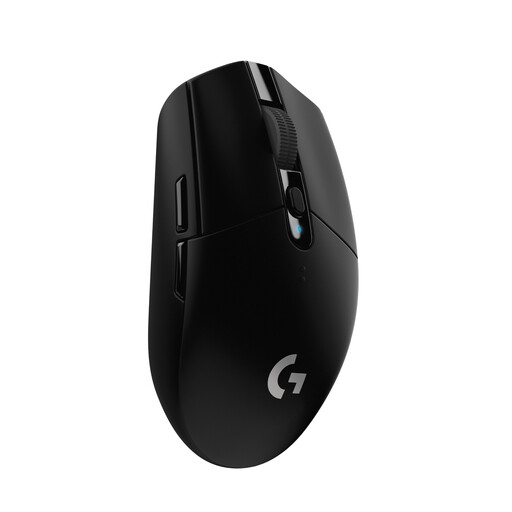
Logitech G305 LIGHTSPEED Wireless Gaming Mouse
A compact wireless mouse with programmable buttons, if you want to assign recurring commands.
- Six programmable buttons
- AA battery; allow for possible battery changes as part of your power arrangements.
- Sensor with up to 12,000 DPI
- Logitech G lists a battery life of up to 250 hours from one AA battery.
View at Joybuy
 No image available
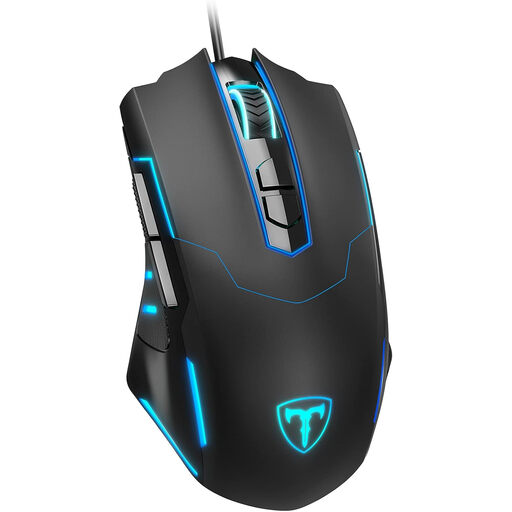
ET Wired Gaming Mouse
A wired model with several programmable buttons, if you want recurring commands within easy reach on your mouse.
- Seven programmable buttons
- Adjustable DPI up to 7200
- Polling rate of 125–1000 Hz
- According to the product description, programmable functions require software setup first.
View at Joybuy
 No image available
Logitech G G502 HERO
This wired mouse has plenty of programmable buttons. Check that you can use the layout comfortably and route the cable without it getting in your way.
- 11 programmable buttons
- Adjustable DPI range from 200 to 25,600
- USB connection
- PC-WELT reported accidental clicks with this model in its own test, relating to the extra buttons.
View at Joybuy
Frequently asked questions
Is a high DPI figure enough to place virtual components precisely?
No. What matters is whether you can control the pointer speed to suit the space you have to move the mouse and your in-game settings. Compare the adjustable sensitivity levels and test them in the game you actually play.
How should I set up my mouse on a small desk?
Place it beside the keyboard so you don’t have to reach too far, with enough room for your hand and forearm. The BAuA recommends leaving enough space for a flexible layout and to support your hand and arm; this is guidance, not a blanket purchasing requirement for private gaming setups.
How do I clean a gaming mouse?
For its devices, Logitech recommends unplugging wired models first, removing any removable batteries and not applying cleaning fluid directly to the device. You should also follow the instructions for your specific model.
Are a manufacturer’s warranty and your statutory rights for faulty goods the same thing?
No. Under § 443 BGB, a warranty is provided in addition to statutory liability for defects. If a product is faulty, § 439 BGB covers the right to have the issue remedied; check the warranty terms and seller information separately.
Where should I take an old mouse and its used battery in Germany?
Waste electrical equipment and used batteries must be collected separately from unsorted municipal waste. The Umweltbundesamt lists local collection points as one option for disposing of waste electrical equipment. The Battery Law Implementation Act came into force on 7 October 2025, so older guidance shouldn’t be treated as the sole source of current legal information.


