What should you look for when buying?
First, check how much room you have to move the mouse on your desk and whether it suits your hand. Then decide whether extra controls are worth the space they take up. A wireless mouse keeps a cable off your desk, while a wired mouse needs a suitable cable route.
| Consideration |
What to check before buying |
Who is this important to? |
| Room to move |
Available mouse space, body shape and cable routing; for wireless models, check the connection type and receiver port too. Logitech G and Razer offer wireless models with different shapes and connection options. |
If I want to move the mouse beside my keyboard without a cable getting in the way, a compact shape that still suits my hand matters to me. Around 33% of consumers prioritise space. |
| Commands and scrolling |
Easy-to-reach extra buttons, scroll-wheel features and software, as well as the button-mapping options in the game you play. Razer lists 10+1 programmable buttons and various scroll modes for the Basilisk V3. |
If I often want to trigger actions with my mouse, I need buttons that are easy to reach and can be mapped in the game. Around 27% of consumers prioritise access to commands. |
| Fit in your hand |
Body shape, grip style and the position of the side buttons; check whether you can hold the mouse comfortably with your hand relaxed. GameStar and CHIP list ergonomics as a buying consideration. |
If I play for longer periods, the mouse should feel comfortable in my hand and the important buttons should be easy to reach. Around 27% of consumers prioritise how the mouse fits their hand. |
| Power supply |
Check whether the model uses a replaceable battery or a rechargeable battery, and which connection options it offers. Logitech specifies an AA battery for the G305; the Razer Orochi V2 offers Bluetooth and 2.4 GHz wireless. |
If I want to avoid changing batteries or taking breaks to recharge, the ongoing power requirements matter to me. Around 13% of consumers prioritise this. |
Joybuy mice for small desks
The selection below includes wireless mice for gaming and related uses, with different body shapes, button layouts and connection options.
 No image available
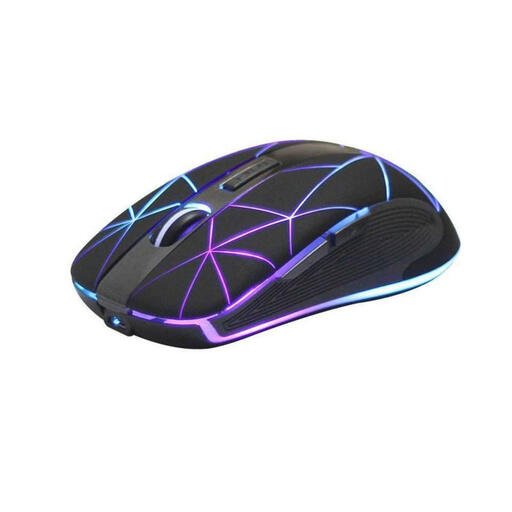
RM200 Wireless Optical Mouse, 5 Buttons
The wireless design keeps a mouse cable out of your movement area, while the five buttons give you extra controls.
Listed as an optical mouse with a rechargeable battery and USB charging; the product also describes its design as ergonomic.
View at Joybuy
 No image available
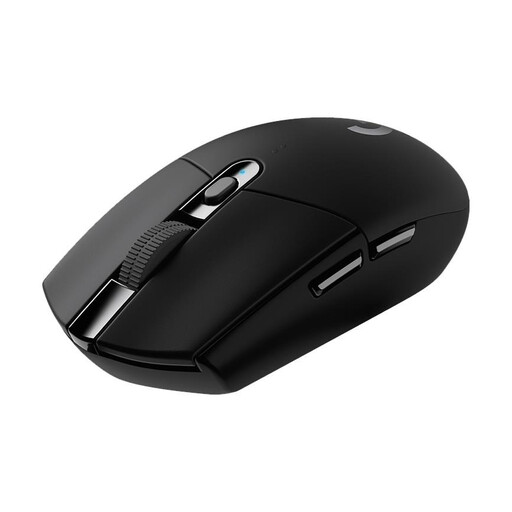
Logitech G305 LIGHTSPEED
The compact wireless G305 could be a good fit if a cable gets in the way on your small desk and you want programmable buttons.
The product name specifies a HERO sensor with 12,000 DPI and six programmable buttons. Logitech states a battery life of 250 hours from one AA battery; depending on how you use it, you may need to change the battery.
View at Joybuy
 No image available
AJAZZ AJ200 AI MC Wireless Gaming Mouse
The range of connection options can be useful if you want to switch between wireless and USB-C depending on how you use the mouse.
The product name specifies a PAW3311 sensor with up to 24,000 DPI, a weight of 63 g, Bluetooth, 2.4 GHz wireless and USB-C. A charging dock is also listed.
View at Joybuy
 No image available
AULA SC620 Wireless Gaming Mouse, White
The combination of wireless options and seven programmable buttons could suit you if you want to use extra mouse actions.
The product name specifies Bluetooth 5.0, 2.4 GHz wireless and USB-C, a PAW3311 sensor with 12,000 DPI, a weight of 67 g and a 400 mAh battery.
View at Joybuy
 No image available
AJAZZ AJ159 APEX Wireless Gaming Mouse
Bluetooth and 2.4 GHz wireless keep the mouse cable out of your movement area; the product name also mentions a magnetic charging dock.
The product name specifies a PAW3950 sensor, up to 42,000 DPI and tri-mode connectivity. Its shape is described as symmetrical.
View at Joybuy
Frequently asked questions
Are the highest possible DPI settings essential for management simulations?
No, not as the only buying consideration. First, check how the mouse feels in your hand, how much space you have and which controls you need. You can then adjust the DPI setting to suit how you use it. GameStar and CHIP consider ergonomics important alongside technical specifications.
Can I freely assign extra buttons in every management game?
You cannot assume that in every case. Check the button-mapping options in the game you play and the mouse software. A restriction documented by Paradox Interactive applies specifically to Teleglitch and cannot be assumed to apply to other games.
What do I need to have ready for a wireless mouse?
It depends on the model: according to Logitech, the Logitech G305 uses an AA battery; the Razer Orochi V2 uses a replaceable battery and offers two wireless modes. Make sure you have the right power supply and follow the instructions for your chosen model.
What are my rights when buying a mouse online in Germany?
For a typical online purchase by a consumer, you generally have a 14-day right to cancel from the date of delivery; exceptions and possible return costs should be taken into account. The European Union's Your Europe website explains these conditions. If goods are faulty, you are also entitled to a statutory guarantee from the seller for at least two years, regardless of any additional manufacturer's warranty.
Can I put an old mouse in my household rubbish?
No. Under Section 10 of the German Electrical and Electronic Equipment Act (ElektroG), old devices must be collected separately from unsorted municipal waste. If an old battery can be removed without damaging it, it must be separated before disposal under the conditions set out in the law.


