What should you look for when buying?
Start by checking the available space and how the mouse fits your hand. Then consider which extra buttons you really need, followed by the connection and power options.
| What matters |
What to look for |
Who is it especially important to? |
| Room for movement and cable routing |
Measure the clear space beside your keyboard; if you’re buying a wired mouse, allow for the cable route too. |
If there’s hardly any room beside my keyboard, I want to be able to move the mouse freely without the cable or casing getting in the way. Around 36% of consumers are likely to prioritise room for movement. |
| Easy-to-reach buttons |
Make a note of the commands you use often, then check the button positions and the mapping software for the specific model. |
If you want to trigger recurring flight or menu commands directly with your thumb, you’ll need buttons that are easy to reach and can be mapped in-game. Around 29% of consumers are likely to prioritise button mapping. |
| Fit and weight |
Check the shape and dimensions against your hand and grip style; only compare weight figures when they’re measured on the same basis. |
If I’m playing for a long time, I want a mouse that suits my hand and grip, rather than one that only seems light on paper. Around 21% of consumers are likely to prioritise fit and weight. |
| Power and connection |
Check the USB connection and space for the receiver; for wireless mice, compare the battery, rechargeable battery and connection options. |
If you want to keep a cable away from your movement area or avoid having to manage batteries or charging, weigh up the connection and power options. Around 14% of consumers are likely to prioritise connection and power. |
Joybuy product selection
This selection includes wired and wireless gaming mice for limited movement space, as well as models with mappable buttons for in-game commands.
 No image available
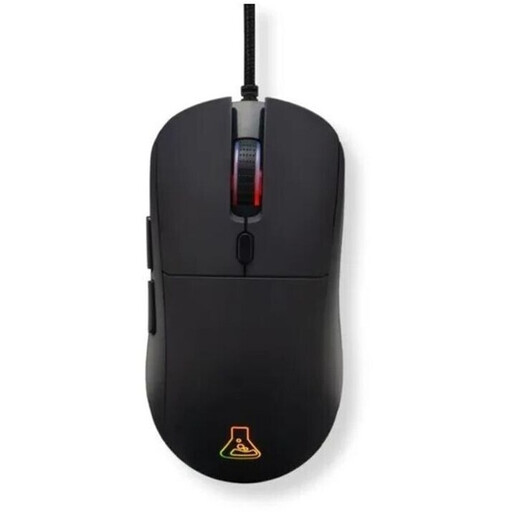
The G-Lab KULT-COBALT-B, wired gaming mouse
A wired option if you can route the cable freely beside your keyboard and want to assign extra in-game commands.
Six programmable buttons and macros; 123 × 63 × 40 mm; 80 g; 1.8 m cable.
View at Joybuy
 No image available
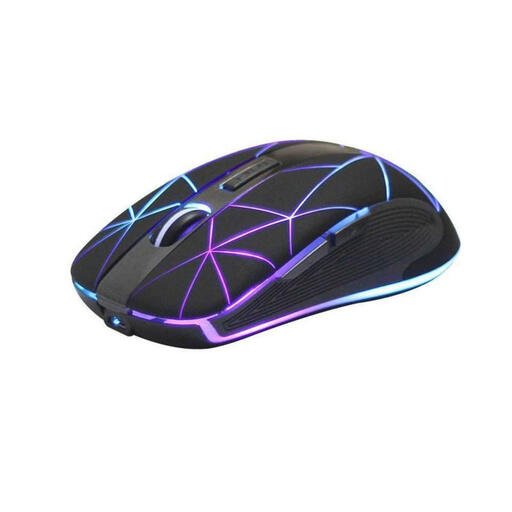
RM200 wireless optical mouse, 5 buttons
A wireless option if a cable gets in the way of mouse movement and you want to use extra inputs through the mouse buttons.
Five buttons; rechargeable via USB charging port; customisable controls.
View at Joybuy
 No image available
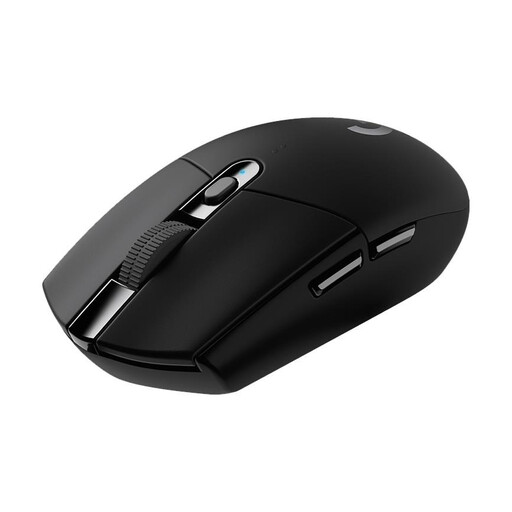
Logitech G305 LIGHTSPEED, wireless gaming mouse, black
A wireless option with mappable buttons if you want to keep the mouse cable away from your movement space.
Six programmable buttons; AA battery; USB nano receiver; 116.6 × 62.2 × 38.2 mm; 99 g with battery.
View at Joybuy
 No image available
AJAZZ AJ200 AI MC wireless gaming mouse
A wireless option if you want to use mappable buttons and macros; the stated fit is designed for medium to large hands.
Six buttons; Bluetooth, 2.4 GHz and USB-C listed as connection options.
View at Joybuy
 No image available
AULA SC620 wireless gaming mouse, white
A wireless option with several connection methods and programmable buttons for custom in-game actions.
Seven programmable buttons; Bluetooth, 2.4 GHz and wired USB-C operation; 67 g; 400 mAh battery.
View at Joybuy
Frequently asked questions
How do I set up a mouse for a space game?
Start with the control mapping in the game itself, and assign only frequently used actions that the game lets you map to buttons you can reach easily. A published personal post on the Frontier forum shows one setup for Elite Dangerous; it’s an example, not a one-size-fits-all recommendation.
Do I need an especially high maximum DPI for a small desk?
No. What matters is whether you can set a controllable sensitivity that suits your available movement space and the game you’re playing. Adjustable sensitivity doesn’t replace checking the fit or making sure the mouse will fit on your desk.
How do wireless and wired mice differ in terms of power and upkeep?
A mouse with a replaceable battery may need spare batteries, while charging is part of using a rechargeable model. Check the instructions for the model you choose: Razer says not to use AA and AAA batteries in the Orochi V2 at the same time. In Germany, used batteries should be taken to collection boxes at retailers or local collection points, not put in household waste; this is advice from the German Environment Agency.
What rights apply when buying a gaming mouse from a business seller?
For goods bought from business sellers in the EU, there is generally a legal guarantee period of at least two years from the date you receive the goods. This applies against the seller and is separate from any additional manufacturer’s warranty. Online purchases generally come with a 14-day right to cancel, subject to legal exceptions. This information is based on guidance from Your Europe and the Council of the European Union.
How should I dispose of an old mouse in Germany?
Take the mouse to a separate electrical waste collection point; local collection facilities generally accept these devices free of charge. Remove batteries or rechargeable batteries if you can do so easily, and take them to an appropriate collection point separately. The German Environment Agency provides information about the separate collection of electrical waste and batteries.


