For virtual spaceship building, choose a gaming mouse with buttons you can reach comfortably and reliably, and pointer settings that you can adjust for both precise placements and larger movements. Hand shape and posture also matter during long sessions. Choose between a wired, wireless or Bluetooth connection based on how much freedom of movement and which connections you need. Check in the game itself whether it supports your button mappings or macros.
Finding the right mouse for you
Builders who use lots of commands
If you regularly use building and view controls in your game, make sure you can comfortably and reliably reach the assigned buttons with your usual grip. It’s also important to check whether the game supports the button mapping you want.
Desk users who play for long sessions
For extended use, a comfortable hand position, a shape that suits your grip and enough room for your mouse and arm support all matter. A shape marketed as ergonomic won’t necessarily be the right fit for you.
Precision-focused builders
If you switch between precise placements and larger pointer movements, check that you can adjust the sensitivity to suit your needs. Don’t choose based on the highest stated DPI figure alone.
What to look for when buying
| What matters |
What to check before buying |
Who it matters most to |
| Reaching frequently used commands |
Button placement for your grip, the buttons you actually need and whether the game supports them. |
If I regularly use building or view controls, I want to reach the buttons I need reliably. Around 29% of consumers put quick access to frequently used commands at the top of their buying priorities. |
| Hand comfort during longer sessions |
Hand size, preferred grip, left- or right-handed use, and space for your mouse and arm support. |
For long sessions at my desk, I want a mouse that suits my hand and grip, rather than relying on an ergonomic label. Around 29% of consumers prioritise hand comfort during extended use. |
| Controlling the pointer and navigation |
Adjustable sensitivity and scroll-wheel behaviour in the game or programme you use. |
For precise placements and longer pointer movements, I want to be able to adjust the sensitivity and scrolling to suit me. Around 24% of consumers prioritise control they can adjust. |
| Connectivity and freedom of movement |
Available USB ports or Bluetooth, room for a cable and the charging method you need. |
If I need more freedom of movement at my desk or switch between devices, I want a wireless or Bluetooth connection that suits my needs. A cable, on the other hand, means I don’t need to charge the mouse. Around 18% of consumers prioritise connectivity and freedom of movement. |
Avoiding common buying mistakes
-
Overlooking a suffix in the model name
Similar names can refer to different mice: the G502 Lightspeed, G502 X LIGHTSPEED and G502 HERO are not the same model. Basilisk V3, Basilisk V3 35K and Basilisk V3 Pro 35K are also distinct model names.
Before buying, check the full model name, connection type and controls you need.
-
Assuming more buttons automatically mean easier use
A large number of buttons is only useful if you can assign enough commands to them and reach them reliably with your grip. If you only need a few commands, a crowded side panel may add unnecessary complexity.
Check how the buttons sit under your hand, and confirm that the game supports the mappings you want.
-
Choosing a supposedly ergonomic shape without checking the fit
Fit depends on your hand and grip. Simply choosing a different mouse shape won’t prevent an awkward posture during long periods at your computer.
Consider your grip, how easily you can reach the buttons and whether there’s enough room for your mouse and arm support. Don’t treat an ergonomic label as a guarantee of health benefits.
Brands to consider
Logitech G
The G502 HERO and PRO 2 LIGHTSPEED cater to different button and control needs.
- Logitech lists 11 programmable buttons and adjustable weights for the G502 HERO. The manufacturer describes the PRO 2 LIGHTSPEED as symmetrical, with interchangeable magnetic side buttons.
- The G502 HERO is wired. COMPUTER BILD describes the tested model as a right-handed mouse with a fixed cable; the PRO 2 LIGHTSPEED is a different model.
Razer
The Basilisk V3 is designed for users who want multiple assignable buttons and different scroll modes in a wired, right-handed design.
- Razer lists 10+1 programmable buttons for the Basilisk V3, along with tactile and free-spin scrolling.
- The value of the scroll modes depends on whether the application supports them. Basilisk V3, Basilisk V3 35K and Basilisk V3 Pro 35K are different models.
Corsair
The SCIMITAR ELITE WIRELESS EU is designed for situations where you need to assign many distinct commands to buttons.
- Corsair lists 16 programmable buttons and a movable side panel with 12 buttons.
- The button panel needs to suit your hand and the way you use the mouse; a large number of controls may take some getting used to. A manufacturer’s description of the shape is not independent evidence of an ergonomic benefit.
SteelSeries
The Aerox 5 Wireless is a middle-ground option if you don’t need a large panel of thumb buttons.
- SteelSeries lists nine programmable buttons, including five side controls.
- Whether you can reach the side buttons comfortably depends on your hand and grip.
CHERRY XTRFY
The M50 Wireless is designed for users who want several connection options and a mouse wheel that tilts left and right.
- CHERRY lists Bluetooth, 2.4 GHz wireless and wired connectivity, as well as five saved profiles and a 4D mouse wheel.
- Fit is still a personal matter. If you use the mouse wirelessly, you’ll also need to plan for charging the battery.
Joybuy products for spaceship building
The Joybuy products below are gaming mice for desk use. Depending on the model, they focus on programmable buttons, adjustable pointer settings or different connection options.
 No image available
Razer Basilisk V3 35K wired gaming mouse, black
Could suit you if you want to assign recurring commands supported by your game to the mouse buttons.
11 programmable buttons.
Optical sensor with 35,000 DPI.
Wired model for right-handed use.
View at Joybuy
 No image available
ATTACK SHARK X11 wireless gaming mouse
Could suit you if you want several connection options and a few assignable buttons for desk use.
Five programmable buttons and 22,000 DPI.
2.4 GHz wireless, Bluetooth and USB-C.
62 g; grip tape and RGB charging dock included according to the product name.
View at Joybuy
 No image available
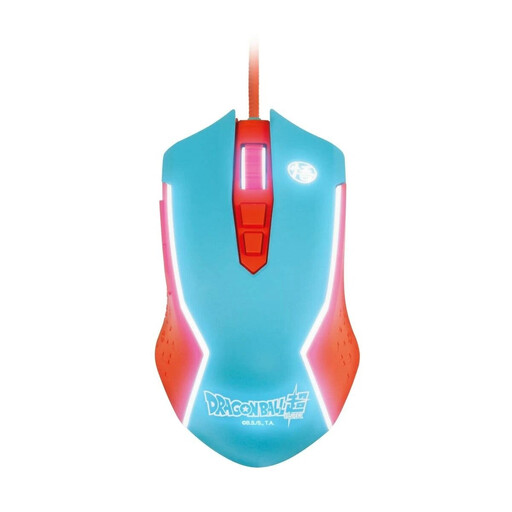
Blade Dragon Ball Goku wired gaming mouse
A wired gaming mouse for PC if a fixed USB connection suits your desk setup.
View at Joybuy
 No image available
AJAZZ AJ200 AI MC wireless gaming mouse
Could suit you if you want to assign recurring commands supported by your application to buttons and choose between different connection options.
PAW3311 sensor with 24,000 DPI.
Bluetooth, 2.4 GHz wireless and USB-C.
63 g; charging dock included according to the product name.
View at Joybuy
 No image available
AULA SC620 wireless gaming mouse, white
Could suit you if you want several connection options and assignable buttons for supported commands.
Seven programmable buttons, Fire Button and 12,000 DPI.
PAW3311 sensor; Bluetooth 5.0, 2.4 GHz wireless and USB-C.
67 g, 8KHz and 400 mAh according to the product name.
View at Joybuy
Frequently asked questions
How can you check whether extra mouse buttons will help with building?
Start by making a note of the commands you use most often in the game you play. Check whether the game lets you assign them to mouse buttons, and whether you can easily distinguish and reach those buttons with your usual grip. A manufacturer’s claim that a mouse has programmable buttons doesn’t, on its own, prove that the game will support your chosen mappings.
What should you consider when setting up and caring for your mouse at your desk?
Leave enough room beside your keyboard for mouse movements and a comfortable arm position. The German Federal Institute for Occupational Safety and Health highlights the importance of arranging your mouse and keyboard to suit you, with enough room to rest your hand and arm. For Logitech devices, the manufacturer recommends unplugging wired devices before cleaning and applying cleaning fluid to a cloth rather than directly to the device. For other models, follow the relevant care instructions.
What are your rights if you return a product or it develops a fault after an online purchase in Germany?
For an online purchase from a business, consumers generally have a 14-day right to cancel, starting from the day they receive the goods; some exceptions may apply. Separately, if goods are faulty, you have a statutory right to remedies from the seller for at least two years. This is distinct from any additional manufacturer’s guarantee.


