For squad survival matches while working from home, your mouse should suit your hand and grip. For fast aiming, the weight, tracking and click latency of the specific model also matter. If a cable gets in the way, choose a mouse with a dedicated USB wireless receiver. A wired mouse saves you from having to charge it, while extra buttons are only useful if you actually use them. In its latency tests, RTINGS.com generally found Bluetooth mice to have higher latency than wired models and wireless mice with a proprietary USB receiver.
Which mouse is right for you?
Players who make fast aiming movements
If you often change direction in survival battles, consider the shape, weight, tracking and click latency before the lighting or maximum DPI. RTINGS.com identifies hand size and grip style as important factors when choosing the right fit.
Players who share their workspace between work and gaming
If you use the same mouse for work and matches, look for buttons that are easy to reach and a connection that suits your devices. Logitech G and SteelSeries describe different button and connectivity options for their models.
Casual players on a budget
If you only want the features you’ll actually use, compare wired and wireless options, as well as the accessories you’ll need. The Sharkoon and Logitech G models described here differ in areas including connectivity and button layout.
What should you look for when buying?
Start by checking the fit and grip, then consider the connection and how the mouse feels to use in a match. RTINGS.com lists hand size and grip style as selection criteria. Its latency tests also show that Bluetooth mice generally have higher click latency than wired models and wireless mice with a proprietary USB receiver.
| What matters |
What to check before buying |
Who it matters most to |
| Aiming control |
Check that the shape and dimensions suit your hand and grip style; look at the weight and click latency of the specific model. |
If I often change direction in battles, I want to be able to control the shape and weight rather than focus on a high DPI figure. Around 36% of consumers say aiming control is their main buying concern. |
| Grip comfort |
Compare the shape with your hand size and grip style, and check that the buttons are within easy reach. |
If I use the same mouse at work and during longer matches, I want it to suit my hand. Around 29% of consumers prioritise grip comfort. |
| Connectivity and buttons |
For PC matches, check the USB receiver mode; make sure the button layout and connections meet your needs. |
If I switch between work and gaming, I want to choose the right connection and assign only the commands I need to easy-to-reach buttons. Around 21% of consumers prioritise connectivity and buttons. |
| Extra features and accessories |
Check what’s included and how the mouse charges; find out whether you can use it while it’s charging. |
If I want to choose only features I’ll actually use and avoid extra accessories, I’ll base my choice on those needs. Around 14% of consumers focus mainly on extra features and accessories. |
Common buying mistakes
-
Treating Bluetooth and a USB wireless receiver as equivalent modes for matches
In its latency tests, RTINGS.com generally found Bluetooth mice to have higher click latency than wired mice and models with a dedicated USB receiver.
When choosing a wireless mouse, check whether it comes with a dedicated receiver and whether your PC has a suitable USB port.
-
Using the highest DPI or polling rate as your only measure of quality
Fit and click latency are important considerations in their own right. PC-WELT notes that certain charging and HyperPolling features for the Razer Basilisk V3 Pro 35K require additional accessories.
First decide on the right grip and the features you actually need. Then check which modes you can use with the accessories included.
Brands to consider
These model examples showcase different designs and features. Their specifications apply to the models named here and should not be taken as representative of every product from each brand.
Logitech G
Logitech G describes the PRO X SUPERLIGHT 2 as a lightweight wireless mouse, while the G502 HERO has eleven programmable buttons and adjustable weight.
- The two models have different strengths when it comes to weight and commands you can access quickly.
- Extra buttons are only useful if you actually use them for gaming or work.
Razer
Razer lists the black Viper V3 Pro at 54 g, with an 8,000 Hz polling rate. The Basilisk V3 Pro 35K offers more advanced controls.
- The models mentioned differ in design and the range of controls they offer.
- According to PC-WELT, certain charging and HyperPolling features for the Basilisk V3 Pro 35K require additional accessories.
SteelSeries
SteelSeries lists the Aerox 3 Wireless Onyx at 68 g, with both a 2.4 GHz receiver and Bluetooth connectivity.
- Two connection options can make it suitable for use with different devices.
- According to RTINGS.com’s latency tests, Bluetooth is not equivalent to a dedicated receiver mode when it comes to click latency.
Sharkoon
Sharkoon describes the SKILLER SGM50W as offering 2.4 GHz wireless connectivity, wired use while charging and an included charging dock.
- Sharkoon says you can use the mouse while it’s charging with the cable supplied.
- The manual lists the mouse at 95 g without the cable, which is worth bearing in mind when considering its weight.
Joybuy products
Here you’ll find wireless gaming mice for gaming and working from home. Compare the shape, weight and connection with your grip and intended use.
 No image available
Razer DeathAdder V3 Pro Wireless Esports, White
Its right-handed shape could suit you if you use the same mouse for work and gaming.
64 g; Focus Pro 30K sensor; wireless connectivity.
View at Joybuy
 No image available
Razer Viper V3 Pro Wireless Esports, White
If you’re looking for a lightweight wireless mouse for fast movements, the product name lists it at 54 g.
Focus Pro 35K sensor; 8,000 Hz. According to the product description, a HyperPolling Wireless Dongle, sold separately, is required to achieve the advertised polling rate.
View at Joybuy
 No image available
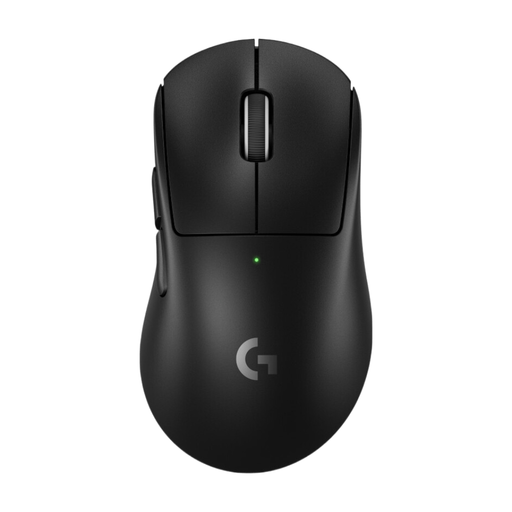
Logitech G PRO X Superlight 2 DEX, Black
This right-handed model could suit you if you’re looking for a wireless mouse for gaming and work.
Right-handed shape; RF wireless; optical tracking; colour: Black.
View at Joybuy
 No image available
ATTACK SHARK X11 Wireless Gaming Mouse, Black
The range of connection options could be useful if you use the mouse with different devices. For matches, the 2.4 GHz mode is worth distinguishing from Bluetooth; RTINGS.com generally found Bluetooth to have higher click latency.
62 g; PAW3311 sensor; 2.4 GHz, Bluetooth and USB-C; five programmable buttons; RGB charging dock.
View at Joybuy
 No image available
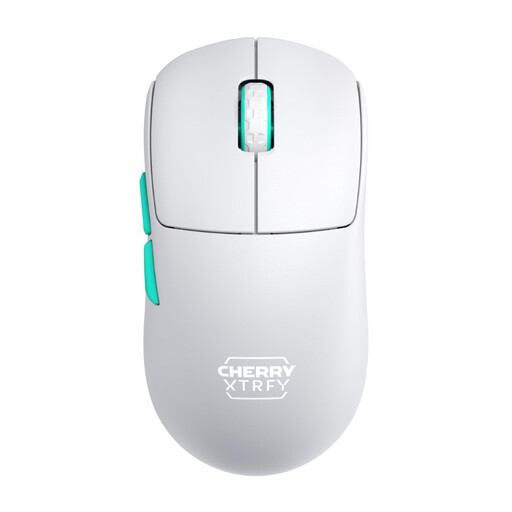
CHERRY XTRFY M68 Wireless, White
Its symmetrical design could be a good option if you’re looking for a wireless gaming mouse with a different shape.
53 g; symmetrical low-front design; 2.4 GHz connection; rechargeable.
View at Joybuy
Frequently asked questions
Is Bluetooth good enough for competitive squad matches?
If your mouse comes with a dedicated USB wireless receiver, that’s the obvious choice for latency-sensitive PC matches. In its latency tests, RTINGS.com generally found Bluetooth mouse connections to have higher click latency. This doesn’t mean every player will notice the difference.
What should I set up before my first match?
Check which connection mode you intend to use and assign only buttons you can reach comfortably. Logitech G specifies its G HUB software for adjusting the G502 HERO’s settings. Sharkoon says you can use the SKILLER SGM50W with the supplied cable while it’s charging.
How do I clean and charge a SKILLER SGM50W?
For this model, Sharkoon recommends using a dry cloth. To charge it, connect the supplied USB cable to a USB Type-A port on your computer. Sharkoon’s manual says not to replace the built-in battery yourself. These instructions apply to the SKILLER SGM50W and not necessarily to all gaming mice.
What are my rights when returning an online purchase or claiming for a faulty item?
When you buy online from a trader, European Union consumer information says you generally have 14 days from delivery to cancel your purchase. Some exceptions apply, and you may have to pay return postage. This is separate from your statutory rights if an item is faulty. EU consumer information states that the legal guarantee period is at least two years.
What should I know about wireless mouse labelling and disposal?
The Bundesnetzagentur explains that products covered by relevant EU harmonisation legislation and placed on the EU market must carry the CE mark. A CE mark is not an independent performance test. The German Environment Agency says that electrical and electronic waste must not go in household rubbish; take it to an appropriate collection point instead. Remove batteries or rechargeable batteries before disposal only if they can be taken out easily.


