For turn-based strategy games at your home-office desk, a mouse is a good fit when its shape, handedness and accessible buttons suit your hand and the commands you actually use. At a fixed PC workstation, a wired mouse can save you from having to recharge it. If you switch between a work device and a gaming device, multiple connection options can be useful, provided both devices support them. A high button count or sensor specification is no substitute for checking the fit or making sure you need those features in-game.
Who are these gaming mice for?
People who use the same desk for work and play
If you spend long periods working and gaming with the same mouse, its shape should suit your hand and grip. The DGUV advises choosing a mouse that fits your hand size. If you experience discomfort, it recommends assessing your workstation too.
Players who use lots of shortcuts
If you want to assign frequent in-game actions to mouse buttons, check whether you can reach them comfortably with your grip. Models also differ in their scroll-wheel features, which can come in handy when browsing maps and long documents.
People who switch between a work and gaming device
If you use several devices, check which connection types and saved profiles they actually support. A high sensor resolution on its own won’t tell you whether the mouse is right for your workstation.
What should you look for when choosing one?
First check that the shape suits your hand and whether the mouse is designed for your handedness. Then choose the buttons and connections you actually need. If you experience discomfort, the DGUV recommends assessing your input device and workstation together.
| What matters |
What to look for when buying |
Who it matters most to |
| Comfort over long periods |
Check the mouse’s fit for your hand size and grip, its handedness, and whether you can reach the important buttons. |
If you work and play at the same desk for long periods, the mouse should suit your hand and grip. For around 42% of consumers, fit comes first. |
| In-game commands and navigation |
Focus on the commands you actually use, and check the button positions and scroll-wheel features on the specific model. |
If you want to trigger frequent in-game actions comfortably, easily reachable buttons matter. Around 33% of consumers prioritise control of in-game commands. |
| Connecting to multiple devices |
Check the supported connections, and, if needed, the receiver, charging options and profile features of the exact model. |
If you switch between a work device and a gaming PC, you’ll want to be able to connect to both in a suitable way. Around 25% of consumers prioritise connecting to their devices. |
Which buying mistakes should you avoid?
-
Assuming similarly named models are identical
The Razer Basilisk V3 and Basilisk V3 35K, as well as the Logitech G502 HERO and G502 LIGHTSPEED, are different models. You can’t tell their connection types and features just from similar names.
Before you buy, compare the full model name, connection type and the specific items listed as included.
-
Prioritising maximum DPI over fit and ease of use
A sensor specification doesn’t tell you whether the mouse suits your hand. If you experience discomfort, the DGUV recommends an ergonomic assessment of your input device and workstation.
Check the fit, handedness and button reach first; high maximum specifications are no substitute for doing so.
-
Treating the manufacturer’s battery-life estimate as a fixed runtime
CHERRY quotes up to 100 hours of battery life for the M50 Wireless. That isn’t a guaranteed runtime for every setting and type of use.
Check how you can charge the specific model and whether using it while connected by cable suits your day-to-day needs.
Brands to consider
Razer
Basilisk models are worth considering if you want to compare documented button and scroll-wheel features.
- Razer says the wired Basilisk V3 has 11 programmable buttons and a tilting scroll wheel.
- The Basilisk V3 is designed for right-handed users. The Basilisk V3 35K is a separate model with different scroll-wheel features, which can be configured through Synapse 4.
Logitech G
The G502 HERO and G502 LIGHTSPEED are separate versions designed for different connection needs.
- Logitech lists profiles and adjustable weights for the wired G502 HERO. The G502 LIGHTSPEED is wireless and, according to Logitech, compatible with POWERPLAY.
- For the wireless version, check which charging accessories are actually included. The G502 HERO and G502 LIGHTSPEED are not the same as the G502 X LIGHTSPEED.
CHERRY XTRFY
The M50 Wireless is an option if you want to compare multiple connection types and profiles.
- CHERRY lists Bluetooth, 2.4 GHz wireless and wired connections, five on-board profiles and a 4D tilt wheel.
- The advertised battery life of up to 100 hours depends on how you use it. In its review, COMPUTER BILD noted that this model could lead to a cramped hand position in some cases.
SteelSeries
The Aerox 9 Wireless is worth considering if you’ll make use of its large side-button panel.
- SteelSeries lists 18 programmable buttons, including 12 side buttons.
- The number of buttons doesn’t prove that you need them for every strategy game or that they’ll suit every hand. Check that you can reach them securely with your grip.
Gaming mice at Joybuy
The models below include wired and wireless gaming mice with programmable buttons and a range of connection options.
 No image available
Razer Naga V2 HyperSpeed
If you want to assign lots of in-game commands to buttons, the product description lists 19 programmable buttons.
2.4 GHz wireless and Bluetooth; Focus Pro 30K optical sensor; up to 250 hours as stated in the product name; runs on one AA battery according to the product description.
View at Joybuy
 No image available
AJAZZ AJ200 AI MC Wireless Gaming Mouse
If you use work and gaming devices with different connections, you can check that the listed connection types work with both.
Bluetooth, 2.4 GHz wireless and USB-C wired connection; PAW3311 sensor with 24,000 DPI as stated in the product name; 63 g as stated in the product name.
View at Joybuy
 No image available
Logitech G G502 HERO
If you game on a fixed PC and want to use profiles or adjust the weight distribution, you can check these features on the model.
Logitech lists profiles and adjustable weights for the G502 HERO. This version is wired.
View at Joybuy
 No image available
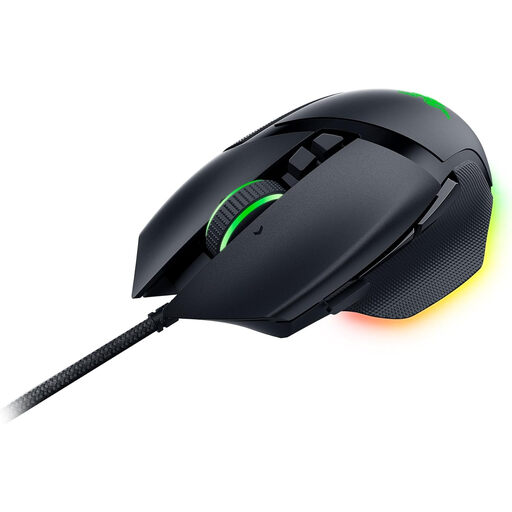
Razer Basilisk V3
If you want to use buttons for recurring actions and a tilting scroll wheel, check that the shape and controls suit your hand.
Razer lists 11 programmable buttons and a tilting scroll wheel. Wired and designed for right-handed users.
View at Joybuy
 No image available
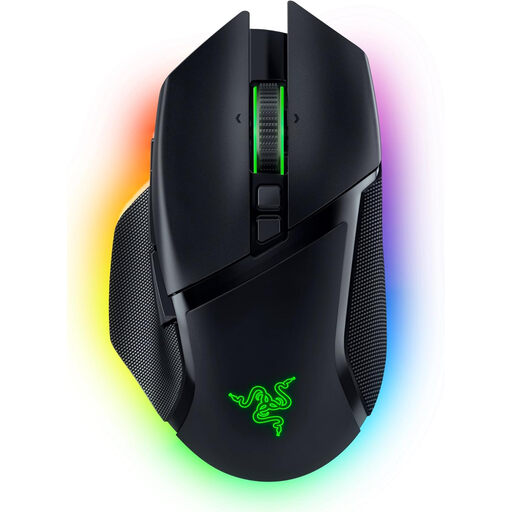
Razer Basilisk V3 Pro
If you’re looking for a wireless mouse with multiple connection options, check that the listed connections work with your devices.
2.4 GHz wireless, Bluetooth and USB-C wired connection according to the product description; 10+1 programmable buttons; Focus Pro 30K optical sensor; tilting HyperScroll wheel.
View at Joybuy
Frequently asked questions
How do I set up buttons for my strategy game?
Start with the commands you use most often, then check the button-mapping options in your game and mouse model. Razer lists programmable buttons for the Basilisk V3, while CHERRY lists five on-board profiles for the M50 Wireless. This doesn’t mean there’s one standard button layout for a particular game.
Will a mouse marketed as ergonomic automatically prevent discomfort?
No, there’s no evidence that it will have this effect for your hand. If you experience discomfort, the DGUV recommends an ergonomic assessment of your input device and workstation; a product label is no substitute for an individual assessment.
Which connection should I choose if I switch between work and gaming devices?
It depends on which connections your devices support and whether you want to switch between them. CHERRY lists Bluetooth, 2.4 GHz wireless and wired connections for the M50 Wireless. For the specific model, also check the receiver, charging and profile features.
What are your rights in Germany if a mouse you bought online is faulty?
For a consumer purchase, the seller is generally responsible for defects. The Verbraucherzentrale states that Germany has a statutory two-year guarantee period from delivery. This is separate from the generally 14-day right to cancel an online purchase, which must be explained to you.
Can you put an old mouse in your household rubbish?
Waste electrical and electronic equipment should be collected separately. Your Europe – European Union explains the crossed-out wheeled-bin symbol. If your model has a battery, you should also follow the guidance on returning the device and battery.


