Which features suit different players?

Tactical gamers who play for long sessions

If you play several rounds in a row, first check that the mouse shape and grip suit your hand. Germany’s Federal Institute for Occupational Safety and Health highlights the importance of posture and room to move when working at a computer; this does not establish any medical benefit from using a particular gaming mouse model.

Players who use the same commands repeatedly

If you often perform the same actions, easy-to-reach, programmable buttons can help. What matters is whether you can reach them reliably with your grip – not how many features the mouse has.

Tactical teams using voice chat

If you use a microphone and push-to-talk as well as headphones, an easy-to-reach mouse button can be handy for talking. Headphones alone don’t make this feature necessary.

What should you look for when buying?

Buying priority What to look for Who should pay particular attention
Grip and fit Check your hand size, grip style and how easily you can reach the side buttons; if possible, try the mouse in your usual position. If I play several rounds, I want a mouse that fits my hand and remains comfortable to reach. Around 31 % of consumers put grip and fit first.
Commands and scrolling Assign only the commands you need, and check that the buttons and scroll wheel suit the way you control the game. If I want to perform recurring actions quickly, I need to be able to reach the right buttons reliably. Around 23 % of consumers prioritise these gaming commands.
Push-to-talk Check whether your voice chat supports an assignable button, and whether you can use it reliably with your grip. If I play with a microphone and push-to-talk, I want to reach the talk button without accidentally triggering other commands. Around 16 % of consumers put this communication need first.
Features Think about which features you’ll actually use; if you want extras, check how they’re set up and whether they require additional accessories. If I want straightforward controls, I don’t want to choose features I won’t use in the game. Around 15 % of consumers prioritise the right range of features and the effort involved in using them.
Connectivity and power Check that you have space for a cable or wireless receiver, that the necessary ports are available, and how the specific model is powered. If I want to keep my desk clear or use the ports I already have, the connection needs to suit my gaming setup. Around 15 % of consumers put connectivity and power first.

Avoid common buying mistakes

  • Making the highest DPI the main deciding factor

    A high sensor resolution alone doesn’t tell you whether the shape, buttons and sensitivity will suit your hand and the commands you use in-game.

    Start by choosing a mouse that fits your grip and has the inputs you need. Then adjust the sensitivity to suit your game.

  • Assuming more extra buttons automatically mean better control

    PC-WELT observed accidental clicks on the Logitech G502 HERO, linked to its many extra buttons. This finding applies to that model and shouldn’t be generalised to all mice.

    Check which buttons you can reach reliably with your grip, and start by assigning only the commands you use most often.

  • Choosing a wireless mouse just because you use headphones

    Headphones don’t determine whether your mouse should be wired or wireless. That choice depends on factors such as your desk, available ports and power supply.

    Choose based on your actual setup, and check the connections and power supply used by the specific model.

Key brands to consider

Logitech G

According to Logitech G, the wired G502 HERO has 11 programmable buttons. The wireless G305 is another option and runs on an AA battery.

  • Logitech G says the G502 HERO offers customisable button assignments and profiles.
  • PC-WELT reports accidental clicks on the G502 HERO linked to its many extra buttons. This observation is specific to that model.

Razer

According to Razer, the wired Basilisk V3 combines programmable buttons with selectable scroll modes. The Basilisk V3 X HyperSpeed is a wireless alternative, with nine programmable buttons and two wireless modes.

  • Razer lists push-to-talk as a possible button assignment for the Basilisk V3.
  • PC-WELT describes the Basilisk V3 as less suitable for very small hands and designed exclusively for right-handed users. This limitation applies to the model tested.

SteelSeries

According to SteelSeries, the wired Rival 5 has nine programmable buttons, including a side panel for frequently used commands.

  • The manufacturer says you can customise the button assignments.
  • The number of programmable buttons alone doesn’t prove that they’re easier to reach or that the mouse is generally better than models with fewer buttons.

Joybuy products for different play styles

The Joybuy models featured here cover wired and wireless use, as well as different button layouts.

Razer Basilisk V3 35K Wired Gaming Mouse, Black

Razer Basilisk V3 35K Wired Gaming Mouse, Black

Could suit you if you’re looking for a wired mouse with several assignable buttons and different scroll-wheel modes.

11 programmable buttons; right-handed design.

View at Joybuy
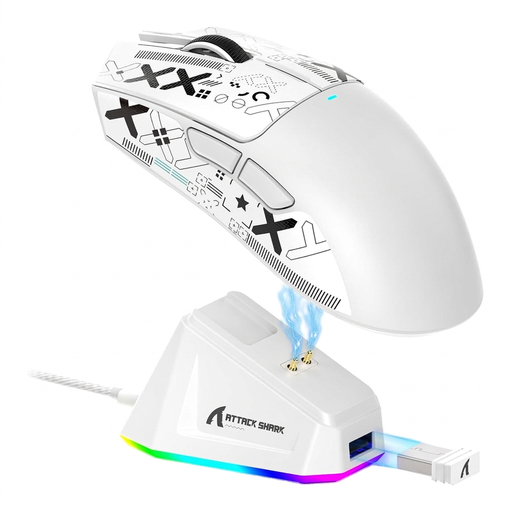
ATTACK SHARK X11 Wireless Gaming Mouse, Matte White

ATTACK SHARK X11 Wireless Gaming Mouse, Matte White

Could suit you if you want several connectivity options and a limited set of programmable buttons.

Five programmable buttons; 2.4 GHz wireless, Bluetooth or USB-C; charging dock and grip tape included; 62 g.

View at Joybuy
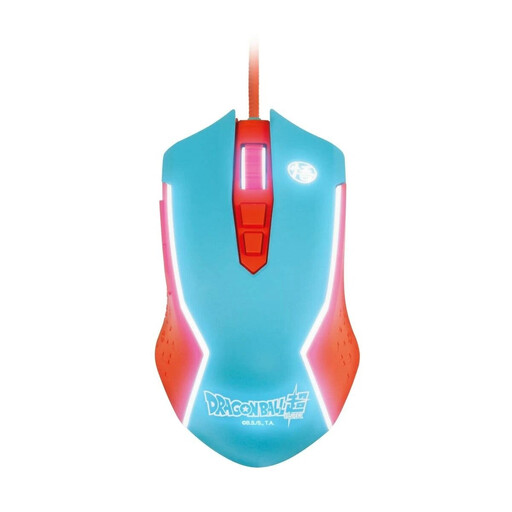
Blade Dragon Ball Goku Gaming Mouse, wired

Blade Dragon Ball Goku Gaming Mouse, wired

Could suit you if you’re looking for a wired gaming mouse for your PC.

USB connection; DPI adjustable up to 8000.

View at Joybuy

Razer Naga V2 HyperSpeed, wireless

Razer Naga V2 HyperSpeed

Could suit you if you want to assign lots of in-game commands to programmable buttons and prefer a wireless connection.

19 programmable buttons; 2.4 GHz wireless and Bluetooth; AA battery; right-handed design.

View at Joybuy

AJAZZ AJ200 AI MC Wireless Gaming Mouse

AJAZZ AJ200 AI MC Wireless Gaming Mouse

Could suit you if you’re looking for a wireless mouse with several connectivity options and customisable button assignments.

Six buttons; Bluetooth, 2.4 GHz wireless or USB-C; according to the product description, the shape suits medium to large hands and claw or palm grips.

View at Joybuy

Frequently asked questions

Do I need a mouse with its own audio controls because I use headphones?

No, not just because you use headphones. If you also use voice chat with a microphone and push-to-talk, an assignable mouse button may be useful. Check whether you can set up the button you want in your chat software.

How do I set up frequently used gaming commands?

Start by assigning only the commands you actually need to buttons you can reach reliably, then test the layout in-game. Logitech explains how to set up button assignments and game profiles in G HUB; for other mice, the setup depends on the software they use.

What should I know about power and consumer rights in Germany?

If your mouse uses replaceable batteries, factor the power supply into your day-to-day use. When buying from a trader, you’re generally entitled to a minimum two-year legal guarantee for faults, starting from the date you receive the goods; Your Europe, the European Union’s consumer portal, explains this protection. Online purchases generally come with a 14-day right to cancel, subject to the legal requirements and exceptions described by the Council of the European Union. The right to cancel and your rights for faulty goods are separate; a voluntary manufacturer’s warranty does not replace your statutory rights.

Can I put an old gaming mouse in household waste?

No. In Germany, waste electrical equipment must be collected separately. The Federal Environment Agency lists recycling centres and designated take-back points as places to drop it off; where possible, removable batteries should be taken out and disposed of separately.