What to look for when buying
Extra buttons that are easy to reach
A good fit if: you assign recurring commands in the game you play and can reach the relevant buttons without changing your grip.
The trade-off: The number of buttons quoted by the manufacturer doesn’t prove that their layout will suit your grip or in-game setup.
Wired and straightforward
A good fit if: you don’t mind a cable at your gaming station and don’t need a wireless setup.
The trade-off: A fixed cable can limit where you place the mouse; a positive review of its handling doesn’t guarantee a comfortable fit for you.
Wireless with multiple connection options
A good fit if: you want to position the mouse flexibly and choose between connection types.
The trade-off: CHERRY lists battery life of up to 100 hours for the M50 Wireless. This is a manufacturer’s maximum figure, not a guaranteed battery life for every setting.
The Federal Institute for Occupational Safety and Health recommends allowing enough room for mouse movements and supporting your hand and arm. Microsoft Support explains how to adjust pointer speed in Windows; check it alongside your in-game settings with your own setup.
| What matters |
What to check before buying |
Who it matters to |
| Fit and ease of use |
Check the shape of the mouse and its handedness against your grip; allow enough room for the mouse and your arm. |
I want to hold the mouse comfortably and use it without awkwardly changing my grip, even during longer sessions. Around 31% of consumers put fit and ease of use first. |
| Extra buttons that are easy to reach |
Check the position of the side buttons and scroll-wheel buttons, and compare them with the button-mapping options in your game. |
If I use the same game commands often, I want to reach them easily without constantly repositioning my hand. Around 25% of consumers prioritise extra commands they can reach easily. |
| Controlled pointer movement |
Adjust pointer speed in your operating system and game for your own screen; don’t make your decision based solely on the maximum DPI figure. |
On a large screen, I want to reach targets and menus with controlled hand movements. Around 25% of consumers prioritise pointer control. |
| A wireless setup |
Check the connection type, whether a receiver is needed, and how the specific model is charged or powered by batteries. |
If a cable gets in the way, I want to position the mouse without a fixed wired connection. Around 19% of consumers prioritise a wireless setup. |
Gaming mice at Joybuy
This selection includes wired and wireless gaming mice, as well as models with extra buttons and different adjustment options. Which one suits your game depends on factors including your grip, button layout and preferred setup.
 No image available
Razer DeathAdder V3 Pro Wireless, white
An option for a wireless setup if five buttons are enough for your recurring commands.
2.4 GHz wireless; five buttons; 64 g; Focus Pro 30K sensor.
View at Joybuy
 No image available
Razer Basilisk V3 35K, wired, black
A wired option if you want programmable buttons and different scroll-wheel modes.
11 programmable buttons; USB cable; tactile and free-spin modes, plus tilt clicks on the scroll wheel.
This is a wired connection and isn’t designed for a wireless setup.
View at Joybuy
 No image available
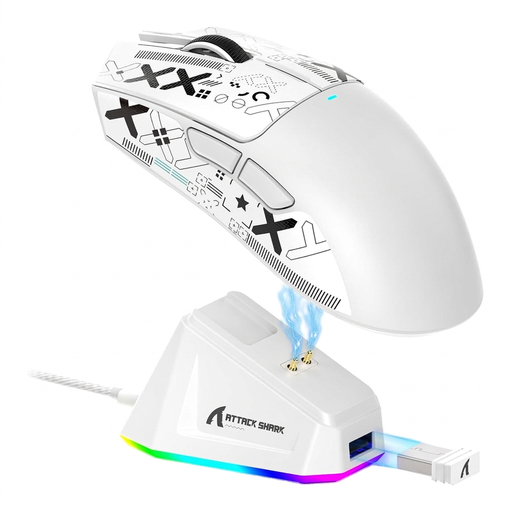
ATTACK SHARK X11, white
An option if you want to choose between wireless, Bluetooth and wired connections to suit your setup.
PAW3311 sensor; up to 22,000 DPI according to the product listing; five programmable buttons; 62 g; charging dock and grip tape listed in the product name.
View at Joybuy
 No image available
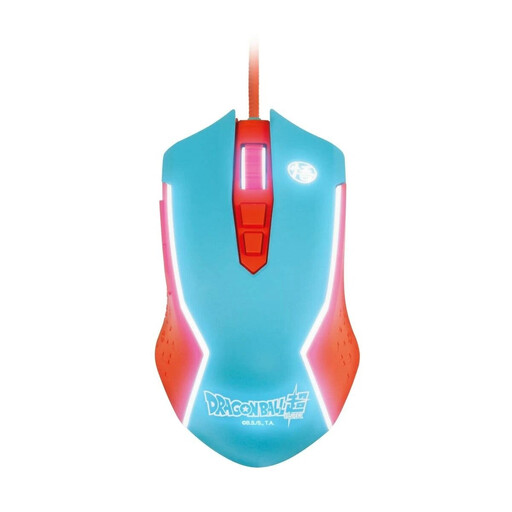
Blade Dragon Ball Goku gaming mouse, wired
A wired PC mouse for a setup that doesn’t need a wireless connection.
Adjustable DPI up to 8000; LED lighting.
View at Joybuy
 No image available
Razer Naga V2 HyperSpeed, black
A wireless option for players who want to assign recurring commands to extra mouse buttons; check that you can reach them comfortably with your grip.
2.4 GHz wireless and Bluetooth; right-handed shape; requires an AA battery; scroll wheel with free-spin and tactile modes.
View at Joybuy
Frequently asked questions
Do I need a mouse with a particularly high maximum DPI because I have a large screen?
No. Screen size alone doesn’t establish a minimum DPI requirement. Adjust the pointer speed to suit your actual setup; Microsoft Support explains how to do this in Windows. Also check your in-game settings.
How should I set up extra buttons?
First, make a note of the commands you use often in the game you play. Then check the game’s button-mapping options and whether you can reach the relevant mouse buttons without changing your grip. Simply having lots of programmable buttons doesn’t guarantee that the layout will suit you.
What should I check about a wireless mouse before setting it up?
Check the connection you need, your preferred connection mode and how the specific model is powered. CHERRY lists 2.4 GHz wireless, Bluetooth and wired modes for the XTRFY M50 Wireless, as well as a rechargeable battery.
What are my rights in Germany if I don’t like a mouse bought online or it’s faulty?
For online purchases, consumers generally have a 14-day right to cancel, starting from the conclusion of the contract or receipt of the goods ordered. You must notify the retailer that you wish to cancel, as explained by the Verbraucherzentrale. If an item is faulty, statutory consumer rights should be distinguished from a voluntary guarantee. For newly purchased goods, you can generally claim your statutory rights within two years of delivery or receipt.


