What should you look for?
First, check whether the scroll wheel and buttons support the navigation commands you use most. Then consider how well the mouse fits your hand, pointer control and the right connection for your setup.
The percentages below relate to consumers choosing a gaming mouse for reviewing tournament footage. Each person is assigned just one main buying priority.
| Buying priority |
What to check |
Who is it important for? |
| Navigating footage |
Sideways scrolling, scroll wheel modes and easy-to-reach buttons; check the button assignments in your video software. |
When I often jump to specific scenes or points in time, I want the right controls close at hand. Around 36% of consumers put navigation first. |
| Comfort during longer viewing sessions |
Handedness, grip style, dimensions and how easy the side buttons are to reach. |
For longer viewing sessions, I want a shape that suits my hand and grip. Around 29% of consumers put comfort and fit first. |
| Precise pointer control |
Check that you can adjust the sensitivity to suit your needs, taking screen resolution, scaling and the user interface into account. |
When I’m selecting small controls on a large screen while also covering longer distances, an adjustable pointer speed is important. Around 21% of consumers prioritise this level of control. |
| Connectivity and setup |
Supported ports on your playback device, whether a wireless receiver is needed, cable length and charging options. |
If my seat is some distance from the computer or I switch between compatible devices, the right connection matters. A flexible setup is the main priority for around 14% of consumers. |
Joybuy product selection
This Joybuy selection includes wired and wireless gaming mice with different scroll wheels, buttons and connection types for reviewing tournament footage.
 No image available
Razer Basilisk V3 35K Wired
May suit you if you want a tilting scroll wheel and assignable buttons for searching through footage.
11 programmable buttons and a four-way HyperScroll wheel.
Wired; designed for right-handed use, according to the product description.
Optical sensor with 35.000 DPI.
Joybuy
 No image available
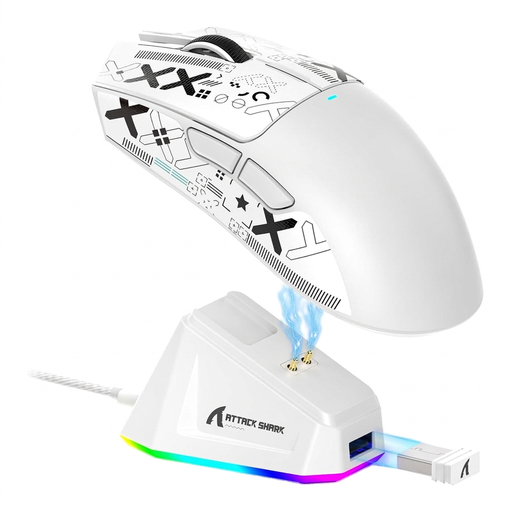
ATTACK SHARK X11
May suit you if you’re looking for a wireless mouse with several connection options and assignable buttons.
Bluetooth, 2,4-GHz wireless and USB-C; five programmable buttons.
PAW3311 sensor with 22.000 DPI; stated weight: 62 g.
Joybuy
 No image available
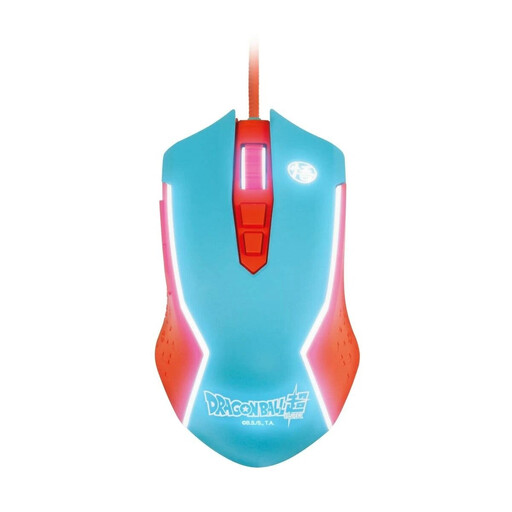
Blade Dragon Ball Goku gaming mouse
May suit you if you want a wired mouse with adjustable sensitivity for a fixed workstation.
Wired PC mouse with a USB connection.
Adjustable sensitivity up to 8.000 DPI.
Joybuy
 No image available
Razer Naga V2 HyperSpeed
May suit you if you want to explore several assignable buttons and different scroll modes for frequent navigation commands.
19 programmable buttons and a HyperScroll wheel with two modes.
2,4-GHz wireless and Bluetooth; powered by one AA battery. Designed for right-handed use, according to the product description.
Up to 250 hours of battery life, according to the product information.
Joybuy
 No image available
AJAZZ AJ200 AI MC
May suit you if you want to choose between several connection types and adjust the sensitivity to suit your screen.
Bluetooth, 2,4-GHz wireless and USB-C.
PAW3311 sensor with up to 24.000 DPI; stated weight: 63 g.
Joybuy
Frequently asked questions
Can I use a mouse wheel that tilts sideways to scroll horizontally along any video timeline?
No, you can’t assume that. CHERRY lists horizontal scrolling for the XTRFY M50 Wireless, but you’ll need to check whether your video software uses that input for its timeline. Adobe documents dedicated controls for moving along and zooming in and out of the timeline in Premiere.
How do I set up mouse buttons for frequently used actions?
First, check the commands available in your video software, then assign the inputs you want to supported mouse buttons. Adobe lets you customise keyboard shortcuts, while Logitech G describes button assignment for the G502 HERO through G HUB. This doesn’t mean that every assignment will work in every application.
What should I check before a long viewing session with a wireless mouse?
Check the charge level and have a connection option ready that’s compatible with your playback device. CHERRY lists wireless, Bluetooth and wired connections for the CHERRY XTRFY M50 Wireless.
What are my rights if I buy a faulty product online in Germany?
Your statutory rights against the seller for faulty goods are separate from any voluntary guarantee. According to Germany’s Federal Ministry of Justice, claims for defects in new goods are generally subject to a two-year limitation period from delivery. The Verbraucherzentrale describes a general 14-day right to cancel online purchases; the conditions and exceptions depend on the contract.
Can I put an old mouse in my household rubbish?
No. The German Environment Agency advises that old electrical equipment must not be put in household rubbish. Use an appropriate return option, such as a recycling centre or retailer. Where possible, remove batteries and take them separately to a battery collection point.


