What to look for when buying
First check the grip and the inputs you need. Then choose between wired and wireless based on your desk setup.
| What matters |
What to check before buying |
Who is this important to? |
| Handling and button reach |
Using your usual grip, check that you can reach the main buttons, scroll wheel and any side buttons you need. |
If I play for a long time and click often, I want to be able to hold and use the mouse with confidence. Around 31% of consumers put ease of use first. |
| Assignable buttons and scroll wheel |
Check which actions your game lets you assign and whether the mouse software supports the assignments you want. |
For recurring actions, I want easy-to-reach shortcuts rather than extra buttons I won’t use. Around 25% of consumers prioritise assignable inputs. |
| Space for your mouse and headset |
Count the ports you’ll need and test the planned receiver positions with both devices. |
If I use my wireless headset at the same time, I want to know whether the ports and receivers will fit my desk setup. Around 19% of consumers pay particular attention to how the mouse works with their headset. |
| Power and connectivity |
Compare battery life figures only for the same wireless mode, and check whether you can use the specific model while it’s charging. |
During longer gaming sessions, I don’t want the mouse to stop unexpectedly because its battery has run out or it hasn’t been charged. Around 13% of consumers prioritise predictable power. |
| Features and extra requirements |
Check whether the necessary charging accessories are included and whether you’ll actually use the extra features. |
I only want to plan for features and accessories I really need. Around 12% of consumers pay particular attention to essential equipment and potential extra costs. |
Gaming mice at Joybuy
This selection includes wired and wireless gaming mice, some with programmable buttons. Check that the shape, button assignments and connection suit your gaming and headset setup.
 No image available
Razer Basilisk V3 35K, black
Suitable for recurring actions if your game supports the assignments you want and a cable works with your desk setup.
Wired; 11 programmable buttons; optical sensor with 35,000 DPI; ergonomic right-handed shape.
View at Joybuy
 No image available
ATTACK SHARK X11, black
For players looking to explore programmable buttons and several connection options; the controls available in your particular game are still key.
Five programmable buttons; 2.4 GHz wireless, Bluetooth and USB-C; PAW3311 optical sensor with 22,000 DPI; 62 g; charging dock and grip tape included.
View at Joybuy
 No image available
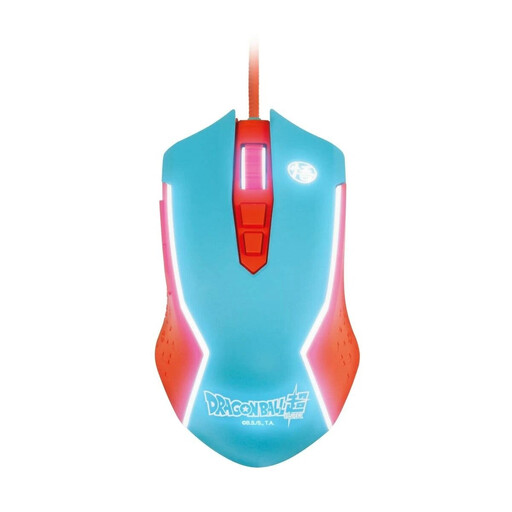
Blade Dragon Ball Goku gaming mouse
A wired option if the USB cable can reach comfortably across your desk.
Wired gaming mouse for PC; USB connection.
View at Joybuy
 No image available
Razer Naga V2 HyperSpeed, black
For players who want several programmable buttons and are considering both 2.4 GHz wireless and Bluetooth.
19 programmable buttons; 2.4 GHz wireless and Bluetooth; Focus Pro 30K optical sensor. Uses one AA battery; a USB receiver is required for 2.4 GHz wireless.
View at Joybuy
 No image available
AJAZZ AJ200 AI MC gaming mouse
For buyers looking to explore different connection options and customisable button functions.
Bluetooth, 2.4 GHz wireless and USB-C; charging dock; 63 g; PAW3311 sensor with 24,000 DPI.
View at Joybuy
Frequently asked questions
How can I tell whether extra buttons will be useful in my tower defence game?
First check which commands you can assign in the specific game you play. Then choose only buttons you can reach with your grip; a manufacturer’s button count doesn’t mean every game supports them.
What should I check if I’m using a wireless mouse and headset at the same time?
Check which USB ports you need and test both devices in the positions where you plan to use them. For reception issues, Logitech Support recommends moving the MX Master 4 receiver away from potential sources of interference; that doesn’t mean the headset is the cause.
What power supply does a wireless gaming mouse need?
It depends on the model: HyperX says the Pulsefire Haste 2 Core Wireless needs an AAA battery, while Sharkoon says the SKILLER SGM50W can be used with its cable while charging. Check the details for the specific mouse before relying on a particular battery life or charging option.
Can I return a mouse bought online in Germany if the shape doesn’t suit me?
For consumer contracts made online, Germany’s consumer advice centre says you generally have 14 days from receiving the goods to cancel; you must notify the seller that you’re cancelling. Check the terms of your specific purchase and make sure you meet the applicable deadlines.
How should I dispose of an old mouse and its batteries?
According to the German Environment Agency, electrical waste must not go in household rubbish. Batteries should be returned separately to a battery collection point if they can be removed easily by hand; you can take the old device to a recycling centre or an appropriate retailer collection point, for example.


