What should you look for when choosing?
SEGA recommends the middle and right mouse buttons for camera controls in Two Point Hospital. For long sessions, the shape of the mouse and enough room for your hand and forearm matter too. The table below groups possible buying priorities for this home-office setup by the factor that matters most to each person.
| Priority |
What to check when buying |
Who it matters most to |
| Comfortable fit for long-term use |
Try the size and grip; make room for the mouse and your forearm. |
If I work and play for long periods at the same desk, I want my hand and forearm to rest comfortably. Around 36% of consumers put a comfortable fit for long sessions first. |
| Camera and object controls |
Try the middle and right mouse buttons; check the button configuration on the specific model you want. |
If I often move the view or place objects, I want to be able to reach and press the required buttons confidently. Around 29% of consumers prioritise camera controls and easy-to-reach buttons. |
| Switching between devices |
Check the ports, wireless receivers and connection modes required by both devices. |
If I switch between my mouse, gaming PC and work device, I want to change connections without running into compatibility issues. Around 21% of consumers prioritise switching between devices. |
| Left-handed use |
Check whether the specific mouse suits left-handed use and whether its side buttons are easy to reach. |
If I use the mouse with my left hand, its shape and button layout need to suit me. Around 14% of consumers make left-handed use their top selection criterion. |
Joybuy products for your PC setup
This Joybuy selection includes wired and wireless gaming mice for PC, including models with multiple connection options.
 No image available
Razer DeathAdder V3 Pro Wireless, White
If you’re looking for a wireless mouse for right-handed use, its shape is described as ergonomic in the product listing, making it worth considering.
64 g; Focus Pro 30K sensor; five buttons.
View at Joybuy
 No image available
Razer Viper V3 Pro Wireless, White
If you’re looking for a wireless mouse with a symmetrical design and programmable buttons, check whether its shape and button layout suit your hand.
Six programmable buttons; Focus Pro 35K sensor. According to the product description, the advertised 8,000 Hz polling rate requires a HyperPolling wireless dongle, sold separately.
View at Joybuy
 No image available
Logitech G PRO X2 SUPERSTRIKE LIGHTSPEED
If you’re looking for a wireless mouse that can also be used with a USB-C cable, according to the product description, check whether these connection options suit your setup.
LIGHTSPEED wireless; USB-C wired use; five programmable buttons; 61 g.
View at Joybuy
 No image available
ATTACK SHARK X11 Wireless Gaming Mouse, Black
If you want to choose between wireless, Bluetooth and cable, check that your devices’ available ports are compatible with the connection modes on offer.
2.4 GHz wireless, Bluetooth and USB-C; five programmable buttons; 62 g; RGB charging dock according to the product name.
View at Joybuy
 No image available
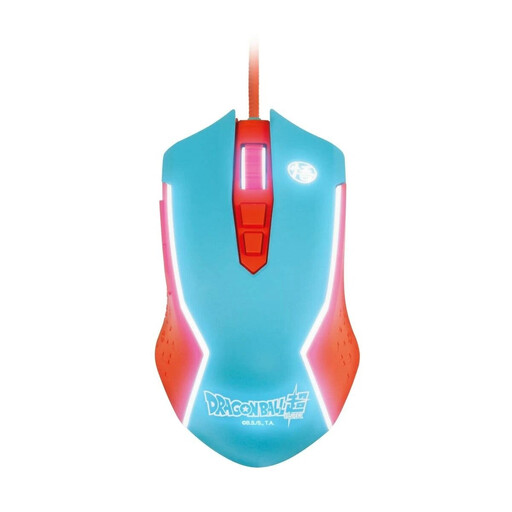
Blade Dragon Ball Goku Gaming Mouse, wired for PC
If the mouse will stay at a fixed PC setup and you prefer a wired connection, check that the cable can move freely across your desk.
Wired USB connection; adjustable sensitivity up to 8,000 DPI; the product description calls the shape ergonomic.
View at Joybuy
Frequently asked questions
Do I need lots of extra buttons for Two Point Hospital?
No. The camera actions described by SEGA use the middle and right mouse buttons held down; extra buttons aren’t listed as a requirement in its guide. They can be useful if you want to assign commands you use frequently.
How should I set up my mouse at my home-office desk?
Leave room next to your keyboard for the mouse and support for your hand and arm, and check that the size and shape suit your hand. The Federal Institute for Occupational Safety and Health recommends leaving enough room to arrange your workstation flexibly. This doesn’t mean that any particular gaming mouse will prevent discomfort.
What should I check before switching devices with a wireless mouse?
Check that the ports on both devices work with the connection mode you need. For the CHERRY XTRFY M50 Wireless, the manufacturer lists Bluetooth, 2.4 GHz wireless and cable connections, as well as a rechargeable battery. CHERRY says battery life depends on the settings.
What are my rights if a product develops a fault in Germany?
Your statutory rights against the seller are separate from any voluntary manufacturer’s guarantee. The Verbraucherzentrale says that, if a product is faulty, your initial right is to have it put right. The details depend on the specific purchase and fault.
Can I put an old mouse in my household rubbish?
No. Waste electrical equipment must be collected separately from unsorted household waste. The Federal Environment Agency points to designated collection points; if the batteries can be removed, they should be taken out and disposed of separately where possible.


