For precise work on a big screen, choose a mouse with a shape and pointer speed you can adjust to suit you. Extra buttons and a versatile scroll wheel are only useful if your particular game supports the shortcuts you want; wireless models do away with the mouse cable, but you’ll need to check connectivity and power requirements.
Which mouse controls matter most to you?
Precise garden designers
If you place and move objects on a big screen, look for adjustable pointer speed and scrolling. Microsoft Support explains how to adjust mouse settings in Windows; you’ll need to check separately which inputs your game supports.
Frequent clickers who switch tools
If you want to access in-game commands often, check that the buttons are easy to reach with your grip and that the game supports your chosen shortcuts. Button counts vary by model; Logitech G and Razer, for example, list programmable buttons on the G502 HERO and Basilisk V3.
Players looking for the right fit or more space
If you use a mouse for long periods, consider its size and shape, and how you hold your hand and arm. The German Federal Institute for Occupational Safety and Health recommends choosing a mouse that isn’t too large and is as flat as possible. If a cable restricts your movement, you could also compare wireless models.
What should you look for when buying?
Wired mouse with extra buttons
A good choice if: You often switch tools or views, can assign the commands in your game and don’t mind having a cable on your desk.
Things to consider: Check the grip, button reach and cable management; extra controls can’t make up for a shape that doesn’t suit you.
Lighter wired mouse with fewer buttons
A good choice if: You mainly move the pointer and only need a few extra commands.
Things to consider: A low weight listed by the manufacturer doesn’t guarantee a better fit or make it easier to place objects; you’ll still have a cable.
Wireless or multi-connection mouse
A good choice if: A cable gets in the way when you move the mouse, or you want to connect it to different devices.
Things to consider: Check the connection mode, receiver and power supply for the specific model; these have no bearing on how well it fits your hand.
| What matters to you |
What to check when buying |
Who should pay particular attention |
| Precise placement and pointer control |
Test adjustable sensitivity, pointer speed and scrolling in the game you play. |
If you want to place objects precisely on a big screen, easy-to-control pointer movement should be your priority. Around 33% of consumers focus above all on precise placement and navigation. |
| Easy-to-reach buttons and switching tools |
Check your most-used actions, the shortcuts supported by the game and where the buttons are positioned. |
If you want to switch tools or views often, the relevant controls should suit your grip and work with your game. Around 27% of consumers prioritise easy-to-reach commands and navigation. |
| Comfort during extended use |
Consider the size, grip, side buttons and how you hold your hand and arm. |
If you use the mouse for long periods, it should feel comfortable to hold and move, rather than prioritising extra features. Around 27% of consumers put fit first. |
| Freedom of movement and connectivity |
Check the connection types, ports, cable management and power supply for the specific model. |
If a cable gets in the way when you move the mouse, a suitable wireless connection is especially important. Around 13% of consumers focus primarily on greater freedom of movement. |
Buying decisions to think through
-
Choosing a mouse based on its maximum DPI alone
A high maximum DPI doesn’t tell you whether the pointer speed will be easy to control when placing objects.
Check whether you can adjust the sensitivity, then test pointer movement and scrolling in your application.
-
Choosing lots of buttons without checking your game’s shortcuts
A programmable mouse button doesn’t guarantee that your game supports the command you want or that you can reach the button comfortably.
Compare your most-used actions with the game’s settings, and check the button positions with your usual grip.
-
Assuming similarly named mouse variants are the same
Models with similar names can differ in connectivity and features. For example, details for the Basilisk V3 don’t automatically apply to the Basilisk V3 35K.
Before buying, check the full model name, connection type and specific features.
Brands and models to consider
Logitech G
The G502 HERO is a wired option; the G502 LIGHTSPEED is a separate wireless model.
- Logitech G lists 11 programmable buttons and adjustable weights for the G502 HERO. The manufacturer lists wireless connectivity and POWERPLAY compatibility for the G502 LIGHTSPEED.
- Details for the HERO, LIGHTSPEED and G502 X LIGHTSPEED aren’t necessarily interchangeable. Check the shape and button positions on the model you’re considering.
Razer
The wired Basilisk V3 is an option with customisable controls.
- Razer lists 10+1 programmable buttons and a smart scroll wheel for the Basilisk V3.
- These manufacturer specifications don’t guarantee compatibility with your game or confirm the features of the differently named Basilisk V3 35K.
CHERRY XTRFY
The M50 Wireless is worth considering if you’re comparing different connection types and a tilt wheel.
- CHERRY lists a wired connection, 2.4 GHz wireless, Bluetooth, five onboard profiles and a 4D tilt wheel for this model.
- Check that the shape and grip suit your hand and that your device supports the connection mode you want to use.
SteelSeries
The Aerox 5 Wireless is a wireless option with several assignable buttons.
- SteelSeries lists nine programmable buttons for the Aerox 5.
- The manufacturer’s overview gives the wireless version a weight of 74 g and the wired Aerox 5 a weight of 66 g. Take care not to confuse the two variants.
HyperX
The wired Pulsefire Haste 2 is an option with six programmable buttons.
- HyperX lists a weight of 53 g and six programmable buttons for the wired version.
- These specifications don’t guarantee a better fit or greater precision in your game.
Gaming mice at Joybuy
This selection includes wired gaming mice with different button and scrolling features, as well as wireless models for greater freedom of movement.
 No image available
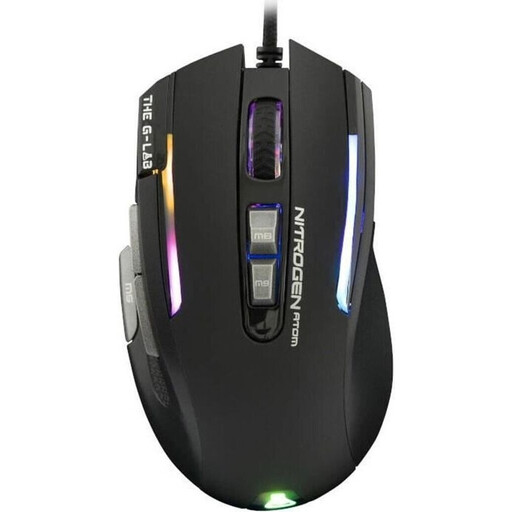
The G-Lab KULT-NITRO-ATOM gaming mouse, 7200 DPI
This wired model is an option if you regularly use commands and scroll to navigate.
The product description lists nine programmable buttons, a two-way touch scroll wheel and a 180 cm cable.
View at Joybuy
 No image available
HyperX Pulsefire Haste 2, wired, white
If you’re considering a wired model with six buttons, compare its weight and features here.
The product title lists a 26K sensor, 26,000 DPI, an 8000 Hz polling rate and RGB. The description gives a weight of around 52–53 g without the cable and four DPI presets.
View at Joybuy
 No image available
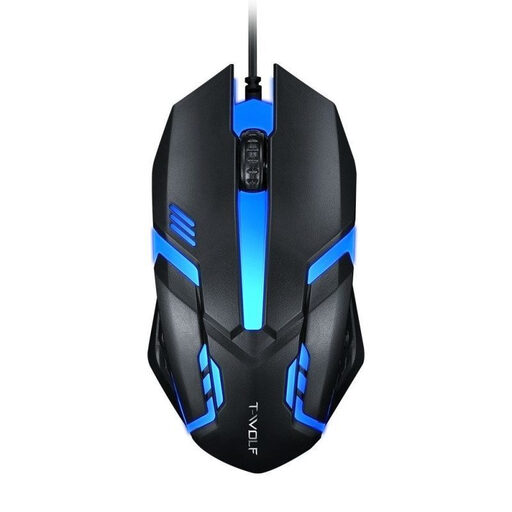
Wired optical USB mouse with four-way scroll wheel
If scrolling matters more to you than having lots of extra buttons, this straightforward wired model could be a good option.
The product description lists three sensitivity settings, three buttons, a four-way scroll wheel and a 1.3 m USB cable.
View at Joybuy
 No image available
ATTACK SHARK X11 wireless gaming mouse
If you want to avoid a mouse cable, the product title lists several connection options for this model.
The product title lists five programmable buttons and 22,000 DPI. The product description lists 2.4 GHz wireless, Bluetooth, USB-C and a weight of 62 g.
View at Joybuy
 No image available
Razer Naga V2 HyperSpeed, wireless
If you want to access lots of commands using the mouse buttons, check that their number and layout suit your grip and the shortcuts available in your game.
The product specifications list 19 programmable buttons, 2.4 GHz wireless, Bluetooth, and tactile and free-spin scrolling. The mouse is described as a right-handed model and runs on one AA battery.
View at Joybuy
Frequently asked questions
Do I need the highest possible maximum DPI because I have a big screen?
No. Screen size alone doesn’t mean you need a particular minimum DPI. Check whether you can adjust the sensitivity and pointer speed to place objects precisely; Microsoft Support explains how to adjust mouse settings in Windows.
How do I set up extra buttons for garden tools?
First, check the button and mouse settings in the game you play. Then use the software for your chosen model to assign supported commands, and test them in the game. For example, Logitech G explains how to assign commands to the G502 HERO using G HUB.
What should I do if my mouse develops a fault or doesn’t fit my hand after buying it online?
For newly purchased faulty goods, the Verbraucherzentrale (German consumer advice centre) says you generally have two years of statutory consumer rights against the seller. Online purchases usually come with a 14-day right to cancel, starting when you receive the goods; these terms are separate from a manufacturer’s guarantee.
What should I know about wireless mice and disposal in Germany?
Wireless devices in the EU are subject to the requirements of the Radio Equipment Directive. CE marking applies to products covered by the relevant harmonised EU rules. Don’t put an old mouse in your household rubbish; take it to an appropriate collection point or recycling centre, as recommended by the German Environment Agency.


