When you’re repeatedly selecting, placing and rotating virtual furnishings, your mouse should feel comfortable in your hand and its main buttons should be easy to reach. There’s no proven benefit to an especially high maximum DPI. Extra buttons and scroll-wheel features can be useful if the game supports them and they’re comfortable to reach. A wireless mouse gives you a clear space to move it around, but depending on the model, it may mean extra charging or connection hassle.
Which mouse is right for you?
Frequent virtual home decorators
If you place and rotate lots of objects, the buttons you use most should be easy to reach. For The Sims 4 on PC, EA describes using the right mouse button to rotate and the left mouse button to place objects. Other games may use different controls.
Sharing a desk for work and play
If you use the same desk for work and gaming, consider whether a cable gets in the way when you move the mouse, or if you’d rather avoid charging and a receiver. Wireless mice offer different connection options, including 2.4 GHz wireless and Bluetooth.
Players who prioritise a good fit
If you use your mouse for long periods, you may want to prioritise its shape, whether it suits your dominant hand and how easy its controls are to reach over a high maximum DPI. Razer, CHERRY and SteelSeries describe different shapes and weights for their respective models.
What should you look for when buying?
First, check that the shape and buttons suit your hand and the controls in the game you play. Then decide whether a cable, USB receiver or Bluetooth is best for your shared workspace.
| Buying priority |
What to look for |
Who is this important to? |
| Fit in your hand |
Check the grip, hand size and whether the mouse suits your dominant hand; make sure the buttons are within easy reach. |
If I’m selecting and placing objects for a long time, the shape needs to suit my hand. Around 36% of consumers put fit first. |
| Building and decorating controls |
Check the controls for the specific game, along with the button mapping and scroll wheel. |
When placing and rotating objects repeatedly, I want to use the relevant controls comfortably. Around 29% of consumers prioritise control over these inputs. |
| Desk connectivity |
Check which ports are available and whether Bluetooth is supported. For wireless models, also consider the receiver and charging. |
If I use the same space for work and gaming, I don’t want a cable to restrict mouse movement. Around 21% of consumers put the right type of connection first. |
| Extra hassle |
Choose only the buttons and connections you need; check the software and what’s included. |
I don’t want to set up or charge features I won’t use day to day. Around 14% of consumers are most concerned with keeping extra hassle to a minimum. |
Pitfalls to watch out for when comparing mice
-
Assuming a high maximum DPI is an advantage for decorating
The mouse controls described for The Sims 4 on PC don’t demonstrate any benefit from a higher maximum sensor value.
First, check the shape and the controls for the game you play. Compare sensor specifications only between clearly identified variants.
-
Assuming similarly named versions of a model are identical
For the G502 X LIGHTSPEED, Logitech G lists a HERO 44K sensor, while a Joybuy product listing with the same model name specifies HERO 25K. The model name alone doesn’t explain this difference in specifications.
Before choosing a version, compare the full model number, sensor variant and what’s included in the specific offer.
-
Assuming wireless means you won’t need accessories
The Sharkoon SKILLER SGM50W uses a 2.4 GHz receiver and, according to the manufacturer, can be used with the included cable while charging. The cable and receiver may take up ports in your workspace.
Check that the receiver and connections suit your home office setup, and whether you can keep using the mouse while it charges.
Charging time and a potentially occupied USB port are part of the practical trade-off.
Brands and relevant model ranges
Razer
The wired Basilisk V3 35K is designed for right-handed users who want extra controls and scroll-wheel features.
- Razer lists a tilt-enabled scroll wheel and adjustable scrolling features through Synapse 4.
- The shape is designed for right-handed users. COMPUTER BILD describes the Basilisk V3 35K it tested as comfortable to use and equipped with extra buttons, but notes that its weight can’t be adjusted.
Logitech G
G502 models are available in wired and wireless versions, with specifications varying between models.
- For the G502 Hero, COMPUTER BILD lists extra function buttons and included weights.
- For the G502 Hero, COMPUTER BILD notes a fixed cable and no size adjustment. Don’t assume that details for one model version apply to another without checking.
Sharkoon
The SKILLER SGM50W and SGM30W are different models for buyers looking for extra input options.
- Sharkoon lists a charging dock and six assignable buttons for the SGM50W. According to the manufacturer, the SGM30W has seven programmable buttons and can be customised using software.
- These model-specific features don’t prove any particular advantage for decorating a virtual home. Check that the game supports the button mappings you want.
SteelSeries
The Aerox 3 Wireless combines a lightweight design with two wireless connection options for users who want to switch between devices.
- SteelSeries lists a weight of 68 g and Bluetooth and 2.4 GHz wireless connectivity for this model.
- The advertised battery life is a manufacturer claim. You’ll need to decide whether the shape and battery life suit your workspace and how you use the mouse.
CHERRY XTRFY
The M68 Wireless offers a low-profile, symmetrical shape rather than a pronounced right-handed design.
- CHERRY lists a weight of 53 g and a polling rate of 1,000 Hz for the M68 Wireless.
- The M68 Pro Wireless specifications, including 8,000 Hz, don’t apply to the standard version and don’t demonstrate an advantage for virtual home decorating.
Joybuy mice for your home office desk
This selection includes wired and wireless mice with a range of button and connection options.
 No image available
Razer Basilisk V3 35K, wired gaming mouse
A good fit if you’re looking for a wired mouse with extra controls; make sure the right-handed shape suits your hand.
The product title lists 11 programmable buttons and an optical sensor with 35,000 DPI.
Joybuy
 No image available
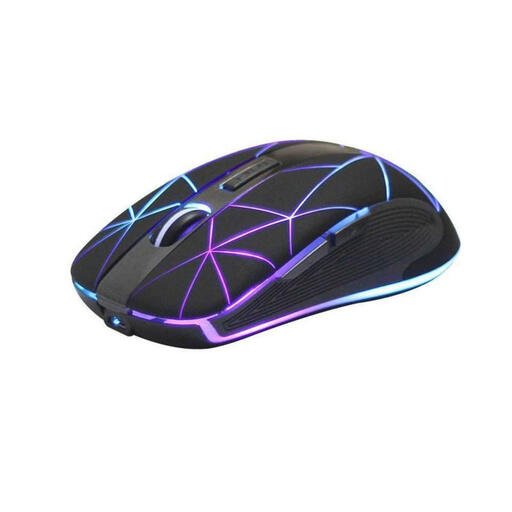
RM200 Wireless Optical Mouse, 5 Buttons
A good fit if you’re looking for a wireless mouse with a rechargeable battery for work and gaming.
The product title lists five buttons and USB charging; the product description calls the design ergonomic.
Joybuy
 No image available
ATTACK SHARK X11 Wireless Gaming Mouse
A good fit if you’re considering multiple connection options and programmable buttons; check which connection suits your devices.
The product title lists 2.4 GHz wireless, Bluetooth and USB-C, five programmable buttons and a weight of 62 g.
Joybuy
 No image available
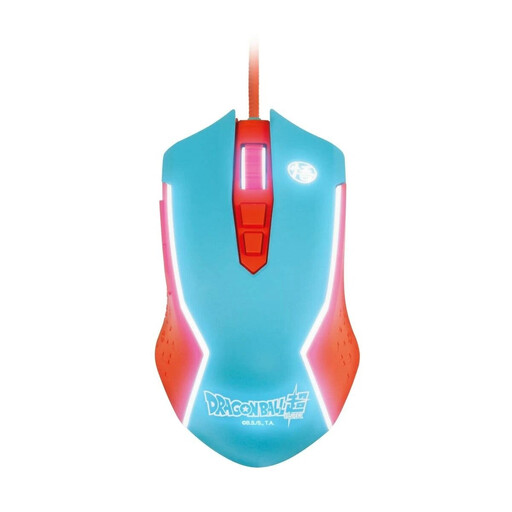
Blade Gaming Mouse Dragon Ball Goku
A good fit if you’re considering a wired mouse for PC gaming and don’t need wireless connectivity.
The product title describes it as a wired PC gaming mouse.
Joybuy
 No image available
Razer Naga V2 HyperSpeed
A good fit if you’re looking for extra programmable buttons and wireless connectivity; make sure the buttons are within easy reach.
The product title lists 19 programmable buttons, 2.4 GHz wireless and Bluetooth. It is powered by an AA battery.
Joybuy
Frequently asked questions
Do I need lots of mouse buttons to rotate virtual furniture?
Not necessarily. For The Sims 4 on PC, EA describes using the right mouse button to rotate objects and the left mouse button to place them. Check the controls for the game you actually play before setting aside extra buttons for this.
Can I use a wireless mouse while its battery is charging?
That depends on the model. Sharkoon says the SKILLER SGM50W can be used while charging with the included USB-C-to-USB-A cable. Check the specifications for other models separately.
How can I keep the controls consistent between work and gaming?
First, check which controls are available in the game and compare them with the button mapping for the specific model. Razer lists profiles and features for the Basilisk V3 35K through Synapse 4; you’ll need to set these up to use them.
What happens if a mouse develops a fault, and is a manufacturer’s warranty the same as your statutory rights?
No. Your statutory rights apply against the seller, while a warranty is an additional service offered voluntarily. The Verbraucherzentrale distinguishes between the two; if there’s a fault, the first step may be to ask for a repair or replacement.
Can I cancel an online mouse purchase in Germany?
Consumers generally have the right to cancel a distance contract, provided the legal requirements are met and no exception applies (§ 312g BGB). § 355 BGB sets a 14-day period; you must notify the trader that you wish to cancel. These rules are documented by the Federal Ministry of Justice and Consumer Protection and the Federal Office of Justice.


