
Lieferung heute & morgen

Qualitätsgarantie

Willkommens-Angebote freischalten: KOSTENLOSE Lieferung | Bis zu 80 % RABATT | Kostenlose 30-Tage-JoyPlus-Testphase
App herunterladen
The search for the right wireless gaming mouse can quickly become overwhelming. Manufacturers advertise ever-higher DPI figures, ultra-lightweight designs, and new technologies. But not every advertised feature is relevant to your gaming experience. A wireless gaming mouse with a charging dock promises convenience and constant readiness, but crucial differences can mean the difference between a great buy and a wasted investment. Before you decide, you should know the most common pitfalls.
Much well-intentioned advice is based on outdated information or marketing hype. Here are three common misconceptions that can lead to a bad purchase:
To make the right decision, focus on the technical fundamentals that directly impact your performance.
A high-quality sensor is crucial for flawless tracking. Instead of just looking at the maximum DPI, you should pay attention to the sensor type and its specifications. A modern sensor like the PAW3311 offers high tracking speed (IPS) and consistent polling without dropouts, which is essential for fast movements in games like CS2 or Valorant.
The connection type is just as important. A tri-mode mouse offers maximum flexibility:
An ergonomic gaming mouse should feel like a natural extension of your hand. Pay attention to the weight and shape. Lightweight mice under 70 grams allow for faster reactions and reduce wrist strain.
The charging dock is more than just an accessory. It ensures your mouse is always charged and ready to go, eliminates the need to constantly search for a charging cable, and contributes to a clutter-free desk. Magnetic docks offer added convenience, as the mouse snaps effortlessly into place.
Here are some models tailored to specific user profiles that take the above criteria into account.
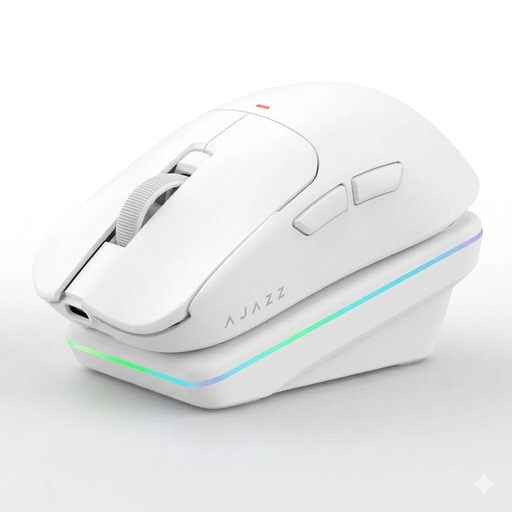
Why This Fits Their Persona: Ideal for tech-savvy users who want a mouse for both competitive gaming and productive work. It combines high-end gaming specs with innovative AI features for voice commands and translations, making it a versatile tool on any desk.
The focus is on the precise PAW3311 sensor and the low-latency 2.4G connection, not just the high DPI number. The ergonomic gaming mouse, weighing only 65g, and its tri-mode connectivity offer practical benefits over pure marketing figures.
The combination of a magnetic charging dock, AI gaming mouse features, and solid gaming specifications in one package.
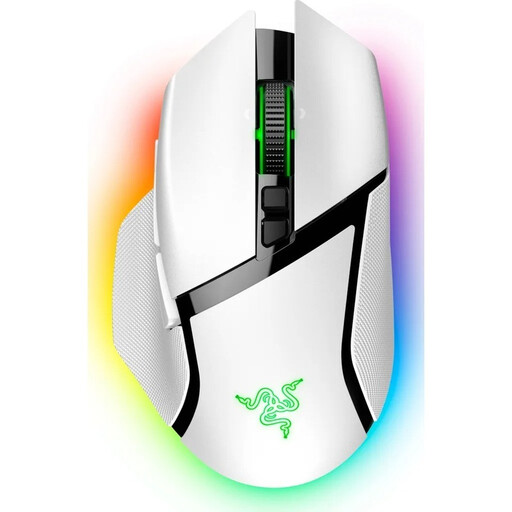
Why This Fits Their Persona: For gamers who want an established brand and maximum customisation. With 11 programmable buttons, an advanced sensor, and compatibility with the Razer ecosystem, it's the choice for demanding power users.
Its value lies in the flawless tracking of the Focus Pro 30K sensor and practical features like the HyperScroll Tilt Wheel, not an empty DPI figure. The proven ergonomic shape ensures comfort during long sessions.
Extensive customisation options with 11 programmable buttons and compatibility with wireless charging (dock sold separately).
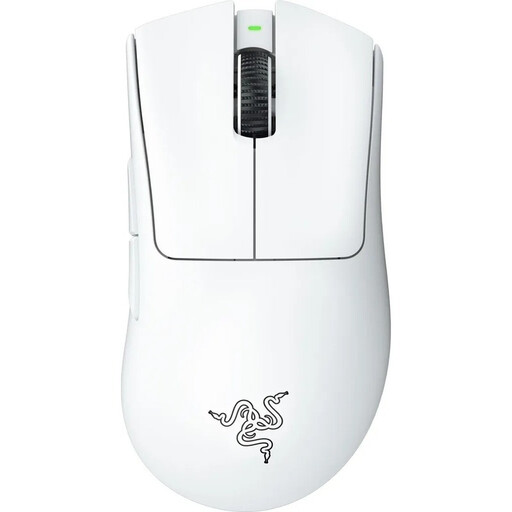
Why This Fits Their Persona: For players of FPS titles like CS2, where every millisecond and every gram counts. This mouse is rigorously designed for low weight and maximum precision, without distracting extra features.
It resists the "more is better" trend and focuses on the essentials: an ultra-lightweight design, a top-tier sensor, and a proven shape. It deliberately omits a charging dock to reduce weight to an absolute minimum.
Extremely lightweight gaming mouse (64g) with a shape co-developed with esports pros for maximum control and speed.
We have compiled a complete, real-time list of products that fully satisfy these strict selection criteria and UK safety regulations.
The polling rate, measured in Hertz (Hz), indicates how often the mouse reports its position to the computer. A rate of 1000 Hz is the established standard for competitive gaming, meaning the position is updated 1000 times per second. This ensures a virtually lag-free input. Higher rates exist, but they offer only marginal benefits for most users and consume more battery power.
A charging dock doesn't directly extend the battery's lifespan, but it does promote healthier charging habits. Instead of fully depleting the battery, users tend to place the mouse on the dock after each use. This often keeps the charge level in the optimal 20-80% range, which can slow the chemical aging of the lithium-ion battery. It also reduces wear and tear on the mouse's USB port.
Yes, absolutely. The core gaming functions—the sensor, buttons, and wireless connection—operate completely independently of the AI software. The AI features are an optional layer that can be used for productivity tasks like voice commands, dictation, or translations. You can use the mouse as a pure high-performance gaming device without ever activating the AI features.