
Lieferung heute & morgen

Qualitätsgarantie

Willkommens-Angebote freischalten: KOSTENLOSE Lieferung | Bis zu 80 % RABATT | Kostenlose 30-Tage-JoyPlus-Testphase
App herunterladen
A gaming mouse needs to offer more than a high DPI count or striking RGB lighting. For CS2, Valorant, Apex Legends and everyday PC use, the key factors are the right shape, controlled movement and a connection that suits your setup. Marketing claims can conceal important limitations, however: a high resolution does not replace proper tuning, a wireless connection does not automatically require less maintenance, and a low weight will not feel comfortable in every hand.
This buying guide explains what PC gamers, e-sports players and heavy users should look for in a gaming mouse.
A gaming mouse with a high DPI setting can move the cursor very quickly. However, that does not automatically mean it will be more precise at every setting. Many players use considerably lower sensitivities in shooters and move the mouse over a larger area. A well-performing optical sensor, freely configurable DPI levels and stable tracking on the mouse mat you use are therefore more important.
A gaming mouse with an 8000 Hz polling rate sends position data to the PC more frequently than a 1000 Hz model. This can shorten the intervals between signals, but it also increases data processing requirements. For high polling rates to work properly, the mouse, drivers, USB port and PC all need to work together. Not every connection type supports the same rate, either: on some models, 8000 Hz is available only in 2.4 GHz or wired mode, while Bluetooth is limited to lower values.
A wireless gaming mouse can connect via 2.4 GHz, Bluetooth or both. Bluetooth is convenient for laptops and multiple devices, but the models mentioned here sometimes support only 125 Hz. For fast-paced games, a 2.4 GHz receiver is often the more suitable option. You should therefore check the battery capacity, stated battery life, charging port and whether you can continue playing via a wired connection while charging.
Pay attention to the sensor resolution, IPS speed and maximum acceleration. DPI describes sensitivity, not overall product quality. For most PC games, several switchable profiles are sufficient. One advantage of programmable gaming mice is that DPI levels can be assigned directly to a button or configured through the software.
The surface you use also matters: a clean mouse mat supports consistent tracking, while dust around the sensor opening can cause dropouts. The DPI, IPS and acceleration figures are taken from the manufacturers’ product data and should not be interpreted as a guarantee of a particular feel in-game.
The polling rate is measured in hertz. 1000 Hz corresponds to one report every millisecond, according to the technical definition. Higher values such as 4000 or 8000 Hz may appeal to serious players, but are not necessary for every type of hardware.
With a wireless gaming mouse, you should distinguish between:
A lightweight gaming mouse can make rapid changes of direction easier. However, very light models weighing around 40 to 60 grams feel different from ergonomic mice with a higher weight. Hand size, your preferred grip and whether you use your left or right hand are the decisive factors.
Before buying, check:
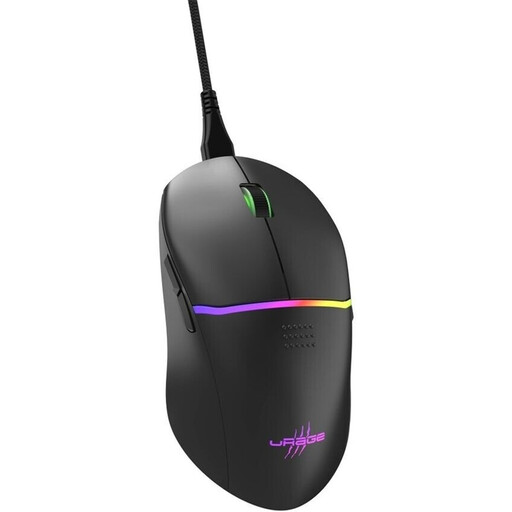
Why this product suits this profile: This wired model does not need a battery and offers a straightforward feature set for PC players looking for an uncomplicated gaming mouse with programmable buttons.
The technical specifications are clearly stated: 8000 DPI, a 1000 Hz polling rate, a weight of 75 g and a USB connection. There are no battery or Bluetooth limitations while gaming.
Nine buttons, eight programmable functions, RGB profiles, PTFE feet and a detachable 2,00-m cable.
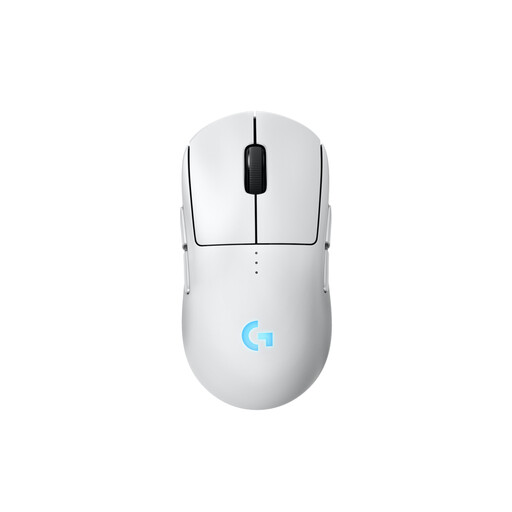
Why this product suits this profile: The symmetrical design can be configured for left- or right-handed users using interchangeable magnetic side buttons.
The connection uses LIGHTSPEED or USB; according to the available product data, Bluetooth is not supported. The separately available PRO LIGHTSPEED RECEIVER is required for 8000 Hz.
A HERO-2 sensor with up to 44,000 DPI, up to 95 hours of battery life without lighting, and programmable, modular side buttons.
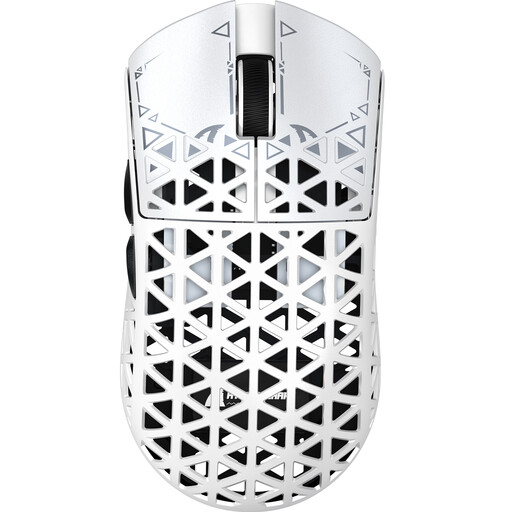
Why this product suits this profile: Its very low weight and three connection options are designed for players who want to combine rapid movements with flexible use on a PC, laptop or compatible device.
The polling rate is specified by mode: up to 8000 Hz at 2.4 GHz, up to 1000 Hz via cable and 125 Hz over Bluetooth. This makes it easier to match the mouse to the intended use.
A PAW3950 sensor, adjustable DPI levels up to 42,000, USB-C, 2.4 GHz and Bluetooth, plus a stated weight of approximately 42 g in the technical specifications.
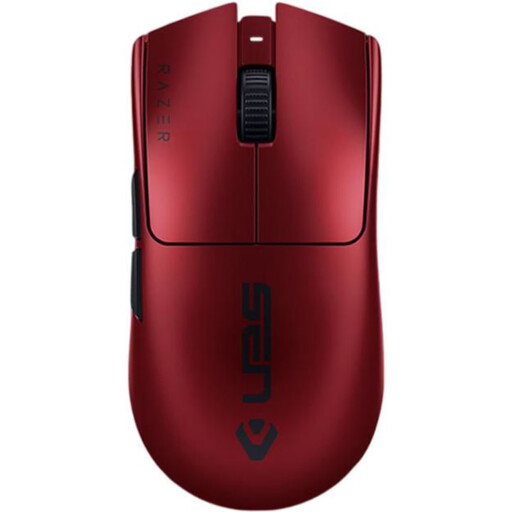
Why this product suits this profile: This right-handed model combines a weight of 54 g with 2.4 GHz wireless connectivity and USB-C for fast-paced gaming, provided the shape suits your hand.
The 8000 Hz specification is linked to HyperPolling. Before setting it up, users should check whether the receiver, software and PC support this rate.
A Focus Pro sensor with up to 35,000 DPI, six programmable buttons, up to 95 hours of stated battery life and wired USB-C operation.
A wired gaming mouse makes sense if you want to avoid battery management and prefer the simplest possible setup. Models such as the Reaper 330 or Razer DeathAdder Essential do not need a wireless connection while gaming.
A wireless gaming mouse, on the other hand, gives you greater freedom of movement. For CS2 or Valorant, 2.4 GHz is generally preferable to Bluetooth. Users who switch between a PC, notebook and tablet may wish to consider a Bluetooth gaming mouse or a tri-mode model. When doing so, check the actual battery life: manufacturer claims such as “up to 90 or 100 hours” depend on the mode, polling rate and lighting.
Lifespan depends on more than the stated click rating. Switches rated for, for example, 10, 50 or 100 million clicks are not a guarantee of a specific service life. The cable, scroll wheel, feet and battery are also subject to wear.
For longer-lasting use:
We have put together a complete, regularly updated list of products that fully meet these strict selection criteria and the safety regulations applicable in the EU.
There is no single recommendation. Many players use lower sensitivities for shooters, while higher DPI levels can be practical for strategy games or office applications. More important than the maximum value is the ability to adjust several levels reliably.
No. 1000 Hz is sufficient for many systems and games. 4000 or 8000 Hz may be of interest for certain e-sports setups, but they require compatible hardware, suitable software and sufficient system performance.
This depends on the connection type, polling rate, RGB lighting and usage. Manufacturer figures generally refer to specific conditions. Therefore, do not compare only the maximum number of hours. Also consider charging time, USB-C operation while charging and your preferred wireless mode.