
Lieferung heute & morgen

Qualitätsgarantie

Willkommens-Angebote freischalten: KOSTENLOSE Lieferung | Bis zu 80 % RABATT | Kostenlose 30-Tage-JoyPlus-Testphase
App herunterladen
Choosing a gaming PC case is a foundational decision when building or upgrading a computer. It not only defines the aesthetics of your entire setup but also has a significant impact on cooling performance, noise levels, and component compatibility. With the vast number of options on the market, making a decision can be challenging.
This guide is here to help. We'll introduce objective criteria to consider during your selection and present a curated list of models for 2026 that meet different demands for cooling, design, and functionality.
Before you decide on a model, several technical and functional aspects should be considered. These criteria will help you narrow down the selection to cases that are a perfect fit for your planned system.
Cooling is crucial for the stability and longevity of high-performance components like modern graphics cards and processors. An airflow case is designed to facilitate maximum airflow. Typical features include perforated front and top panels (mesh), which ensure unobstructed air intake and exhaust.
In contrast, some models focus on a sleeker, closed-off look with glass or solid metal fronts. With these, it's important to look for alternative air intakes on the sides. For systems with particularly heat-intensive components or for those using a case for liquid cooling, a chassis with enough space for large radiators (e.g., 280mm, 360mm, or larger) and multiple fan mounts is a wise choice.
The most common form factor for gaming PCs is the mid-tower case. It offers a great compromise between space for powerful hardware and a manageable size. Most of these cases support ATX case motherboards but are often also compatible with smaller Micro-ATX and Mini-ITX boards.
Before buying, you must check the dimensions of critical components:
Design is a subjective but important factor. A PC case with a glass window made of tempered glass allows for a clear view of the internal components. Models like a white PC case or an RGB PC case with pre-installed, controllable lighting offer additional opportunities for personalisation.
Thoughtful cable management, with ample space behind the motherboard tray, cable channels, and tie-down points, is essential for a clean build and unrestricted airflow. Newer cases also offer support for reverse-connection motherboards, where the connectors are on the back, leading to an exceptionally tidy interior.
Here is a selection of cases that stand out for their specific features in design, cooling performance, and functionality.
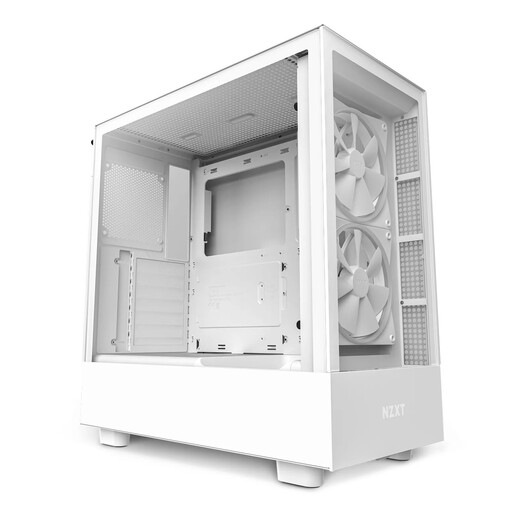
Why it stands out: The NZXT H5 Elite combines an elegant look with a sophisticated cooling concept. The tempered glass front and side panels showcase your hardware, while the integrated RGB lighting adds visual flair. A special feature is the dedicated, angled fan at the bottom of the case, which directs cool air straight to the graphics card.
Advantages:
Who it's for: For PC builders looking for a visually appealing white PC case with a glass window, who also value straightforward RGB integration and clever supplemental cooling for their graphics card.
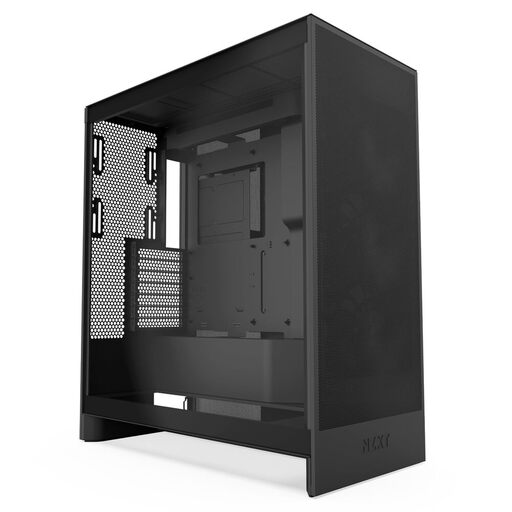
Why it stands out: The NZXT H7 Flow is designed as a pure airflow case. Its perforated front and top panels maximise air intake and exhaust. It offers exceptional space for cooling components, including the option to mount three 120mm fans at the bottom for direct GPU cooling.
Advantages:
Who it's for: For enthusiasts and gamers whose priority is maximum cooling performance for demanding hardware. It's an excellent foundation for complex air-cooling setups or an extensive case for liquid cooling.
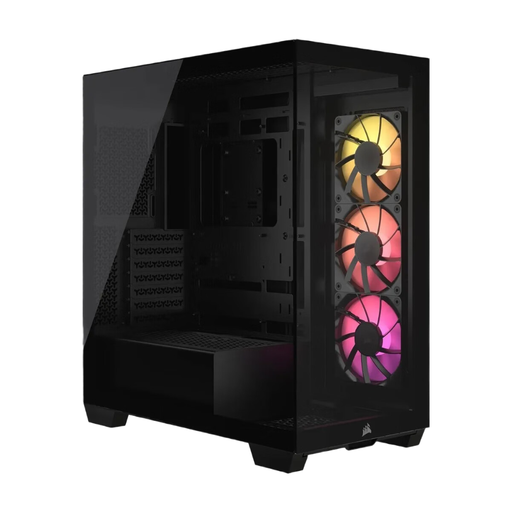
Why it stands out: The Corsair 3500X ARGB offers an unrestricted view of your components with its frameless panoramic glass panels on the front and side. A key feature is its compatibility with reverse-connection motherboards (e.g., ASUS BTF, MSI Project Zero), which allows cables to be hidden behind the motherboard tray for an extremely clean interior.
Advantages:
Who it's for: For PC builders who are aiming for flawless aesthetics and want to leverage the latest motherboard technologies for minimalist cable management. It's ideal for show builds where the RGB PC case and the components take centre stage.
Choosing the right case is just one step on the path to your ideal gaming PC. If a DIY build isn't the right option for you, or if you want to get an overview of pre-configured systems, you might find a suitable alternative in our selection of budget gaming desktops.
Both play a role, but function should lead form. For high-performance gaming systems, good airflow is essential to prevent overheating and the associated performance reduction (thermal throttling). Many modern cases, like the NZXT H5 Elite, strike a good balance by combining a PC case with a glass window with intelligent cooling solutions. For high-end components, however, an airflow case should be prioritised.
No. The physical size of graphics cards varies greatly. It is mandatory to check the "maximum GPU length" specification of the case and compare it with the length of your chosen graphics card. Top-tier models from GPU manufacturers, in particular, are often very long and will not fit in every mid-tower case.
A typical configuration for good airflow consists of two to three intake fans (usually at the front or bottom) and one exhaust fan (at the rear or top). The exact number depends on the heat output of the components and the case's design. A case with an open mesh front may require fewer fans for the same cooling performance than a model with a closed front. Many RGB PC cases already come with three or more fans, which is a good starting point for most systems.