
Lieferung heute & morgen

Qualitätsgarantie

Willkommens-Angebote freischalten: KOSTENLOSE Lieferung | Bis zu 80 % RABATT | Kostenlose 30-Tage-JoyPlus-Testphase
App herunterladen
Choosing a gaming PC case is a fundamental decision when building a new computer. It not only defines the aesthetics of your setup but also dictates cooling performance, noise levels, and the compatibility of your components. With a vast array of form factors, designs, and features available, finding the right model can be a challenge.
This guide is designed to help you understand the technical specifications and make an informed decision. We will outline objective criteria and present a selection of cases that meet various performance and design requirements.
Before you decide on a model, several technical aspects should be considered. These factors ensure that your hardware not only fits but also functions optimally.
The case's form factor defines which motherboard sizes are compatible. The most common standards are:
Always check for compatibility with your motherboard, as well as the maximum supported GPU length and CPU cooler height, before purchasing.
An efficient airflow PC case is crucial for dissipating the heat from high-performance components like the CPU and GPU, ensuring their performance remains stable. Look for the following features:
Beyond pure functionality, aesthetics and user-friendliness also play a significant role.
Here is a selection of cases that stand out for their specific features, making them suitable for different DIY PC building scenarios.
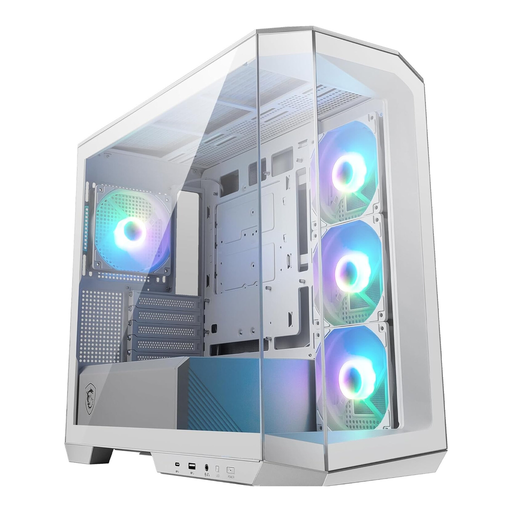
Why It Stands Out: This case combines a compact Micro-ATX case format with a panoramic tempered glass side panel, offering an unobstructed view of your components. It comes with four pre-installed 120mm ARGB fans, ensuring solid cooling performance right out of the box.
Pros:
Who It's For: Builders looking to create a visually stunning and compact system in a Micro-ATX or Mini-ITX format. It's well-suited for builds where aesthetics are a priority, without compromising on cooling or connectivity.
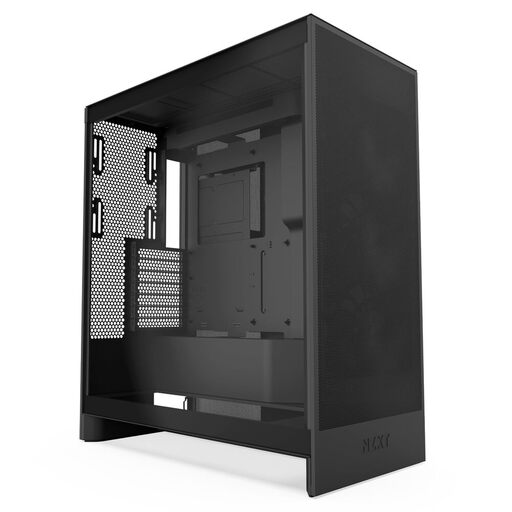
Why It Stands Out: As a mid-tower case, the NZXT H7 Flow is rigorously designed for maximum cooling performance. Its perforated front and top panels maximize airflow. A standout feature is the ability to mount up to three 120mm fans on the bottom, directing cool air straight to the graphics card.
Pros:
Who It's For: Ideal for enthusiasts planning a high-end ATX case build with power-hungry components. Anyone who prioritizes low temperatures and may want to install a large AIO water cooler will find this to be a very capable foundation.
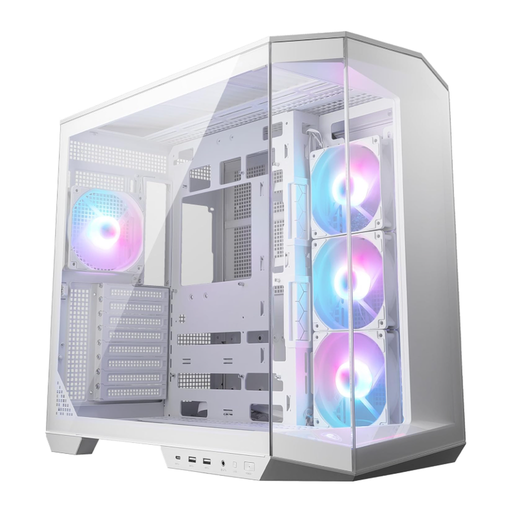
Why It Stands Out: This white PC case in an ATX format uses a dual-chamber design to separate the power supply and cables from the main heat-generating components. This creates a cleaner look and improves airflow. It also supports the new back-connect motherboard standard, where connectors are located on the rear.
Pros:
Who It's For: For PC builders who want to create an aesthetically sophisticated system with minimal visible cabling. Its support for back-connect motherboards and vertical GPU mounting makes it a great choice for showcase builds in the ATX format.
Choosing the right case is highly dependent on your individual components and personal preferences. If the models featured here don't perfectly match what you're looking for, there are many other alternatives to discover.
Browse our extensive selection to find the model that's a perfect fit for your next DIY PC build project.
? Discover More Computer Tower Cases
Both aspects are relevant, but function should be the priority. Good airflow is essential for the longevity and stable performance of your components. Many modern cases, such as an airflow PC case with a mesh front and a glass window, successfully combine high cooling performance with appealing aesthetics.
No. Compatibility is determined by the form factor. An ATX motherboard will only fit in an ATX case or larger, but not in a case designed exclusively for Micro-ATX. Always check the case manufacturer's specifications to ensure your motherboard is supported.
The number you need depends on the heat output of your components. For most gaming systems, a configuration with at least two intake fans (front) and one exhaust fan (rear) is a good baseline. More powerful systems can benefit from additional fans at the top or bottom. Many cases already come with a sufficient number of fans for common setups.