
Lieferung heute & morgen

Qualitätsgarantie

Willkommens-Angebote freischalten: KOSTENLOSE Lieferung | Bis zu 80 % RABATT | Kostenlose 30-Tage-JoyPlus-Testphase
App herunterladen
Choosing a new gaming PC case is a critical step when building or upgrading your system. It's more than just a box for your components; it's the foundation for cooling, aesthetics, and future expandability. However, the market is flooded with models whose marketing promises are often more style than substance. Before you make a decision, it's crucial to understand the common pitfalls that can lead to frustration and unnecessary expense.
This guide will help you separate the wheat from the chaff. We'll focus on the three most common mistakes made when buying a case and show you which technical specifications truly matter.
To avoid these mistakes, you should focus on objective, measurable criteria. These three parameters are essential for making an informed purchasing decision.
The form factor determines which motherboards fit into the case. The most common sizes are ATX, Micro-ATX, and Mini-ITX. A mid-tower case is the right choice for most ATX builds, offering a good compromise between size and space. However, don't just look at the form factor; pay close attention to three specific measurements:
Effective cooling is crucial for the longevity and performance of your components. The most important feature for good PC case airflow is a perforated or mesh front panel that allows for unrestricted air intake. Solid front panels made of glass or plastic are often problematic from a thermal perspective. Also, check the number and size of pre-installed fans and the options for mounting radiators for water cooling. A case should offer space for at least a 240mm or 360mm radiator in the front or top.
A case with a glass window offers a beautiful view of your system. Look for tempered glass, as it is more scratch-resistant and of higher quality than acrylic. When it comes to RGB lighting, compatibility is key. Look for cases whose fans or LED strips use the standard 5V 3-pin ARGB connector. This allows for control and synchronisation via the software of common motherboard manufacturers (e.g., MSI Mystic Light, ASUS Aura Sync) and prevents you from being locked into a proprietary ecosystem.
Based on the criteria above, we have identified several models that represent a smart choice for different needs and budgets.
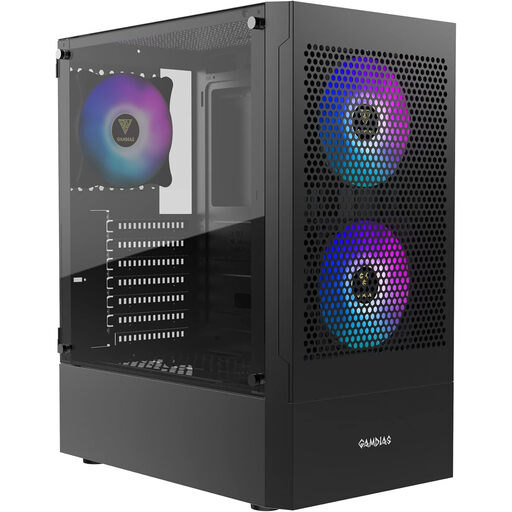
Why This Fits Their Persona: This case provides a solid foundation for budget-conscious buyers who don't want to compromise on cooling performance. It combines a modern aesthetic with functional features often found only in higher price brackets.
The perforated 5.0mm mesh front bypasses the "glass trap" and ensures high airflow. The three pre-installed ARGB fans are compatible with 5V motherboard headers, thus avoiding the "RGB lock-in."
Three pre-installed 120mm ARGB fans and an airflow-optimised front panel provide strong cooling performance right out of the box.
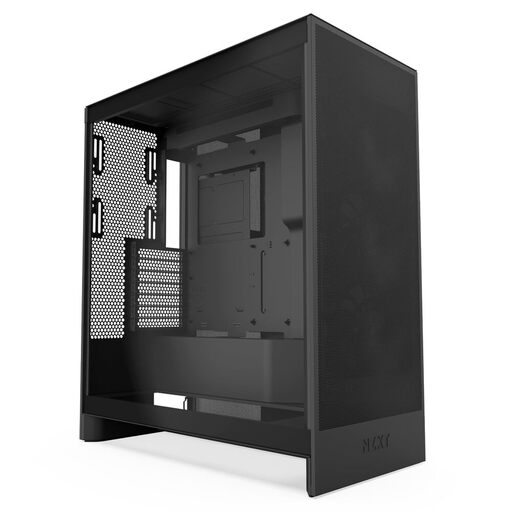
Why This Fits Their Persona: For users whose top priority is maximum, stable cooling performance for demanding high-end components. This case is consistently designed for performance.
The design with perforated panels is the antithesis of the "glass trap," maximising airflow. The generous interior and thoughtful layout prevent the "space illusion," even with the largest components.
Offers support for up to three 120mm fans at the bottom for direct GPU cooling and space for large 420mm radiators in the front.
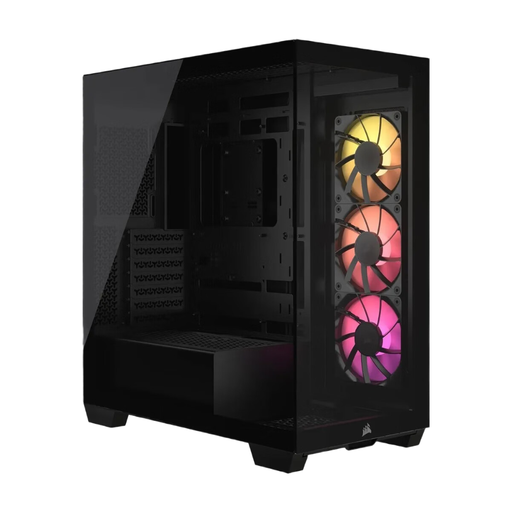
Why This Fits Their Persona: Ideal for PC builders who strive for a flawless, clean look with an uninterrupted panoramic view of their components and value innovative design solutions.
Despite the panoramic glass front, airflow is ensured through side and bottom air intakes. Compatibility with reverse-connection motherboards (e.g., ASUS BTF, MSI Project Zero) solves the problem of visible cables and bypasses the "space illusion" in the main chamber.
Support for motherboards with rear-facing connectors enables an extremely clean interior. The frameless panoramic glass design offers an unparalleled aesthetic.
We have compiled a complete, up-to-date list of products that fully meet these strict selection criteria and local safety regulations.
The optimal number depends on the components installed. A solid baseline for most systems consists of two or three intake fans at the front and one exhaust fan at the rear. For high-end systems, additional fans at the top (exhaust) or bottom (intake) can further improve temperatures.
No. Although ATX is a standard for motherboard size, the internal dimensions of cases vary significantly. It is essential to compare the maximum GPU length of the case with the exact length of your chosen graphics card. Always allow for a small buffer of a few millimetres.
The main difference is size. A mid-tower case is the most common form factor and is sufficient for most builds using ATX motherboards. A full tower is significantly larger and offers more space for advanced components like E-ATX motherboards, multiple graphics cards, or complex custom water-cooling loops with large radiators and reservoirs. For the majority of users, a mid-tower is the more practical choice.