
Lieferung heute & morgen

Qualitätsgarantie

Willkommens-Angebote freischalten: KOSTENLOSE Lieferung | Bis zu 80 % RABATT | Kostenlose 30-Tage-JoyPlus-Testphase
App herunterladen
The cornerstone of any custom-built gaming PC is the case. It's more than just a shell; it's the foundation for performance, cooling, and aesthetics. However, the market is flooded with options, and it's easy to fall into common traps. Many visually stunning models turn out to be "hotboxes" that choke airflow, while others promise ample space but fail to accommodate modern, oversized graphics cards. This guide will help you navigate these pitfalls and identify the crucial parameters for a future-proof choice.
To make an informed decision, you should focus on these non-negotiable technical aspects.
Your system's cooling performance is directly dependent on its airflow. An airflow case is characterized by perforated or mesh front and top panels. These allow fans to draw in cool air and exhaust warm air without obstruction.
The size of the case determines which components you can install. The Mid-Tower case is the most common form factor, offering a good compromise between space and footprint for most ATX PC case builds. However, always check these three measurements in the manufacturer's specifications:
A sturdy case made of steel (SPCC) with a solid material thickness reduces vibrations and noise. Details like decoupled hard drive cages, rubberized cable grommets, and easy-to-clean dust filters are hallmarks of high-quality models from brands like Corsair, NZXT, or MSI. A white PC case can be an elegant alternative to classic black models; look for a high-quality powder coating that is durable and resistant to yellowing.
Here are a few models tailored to specific user profiles that cleverly avoid the pitfalls mentioned.
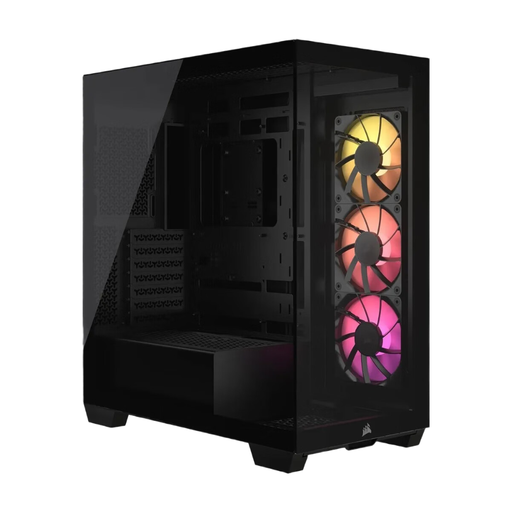
Why it's a great fit: Ideal for users who want to perfectly showcase their components through a frameless panoramic glass window. Compatibility with reverse-connection motherboards (ASUS BTF, MSI Project Zero) enables ultra-clean cable management by hiding the main cables behind the motherboard tray.
Despite its focus on glass, this Corsair case has room for up to ten 120mm fans. This bypasses the aesthetics trap, as cooling performance is not sacrificed for looks.
Unobstructed view of components; compatibility with reverse-connection motherboards for a tidy interior; three RS120 ARGB fans are pre-installed.
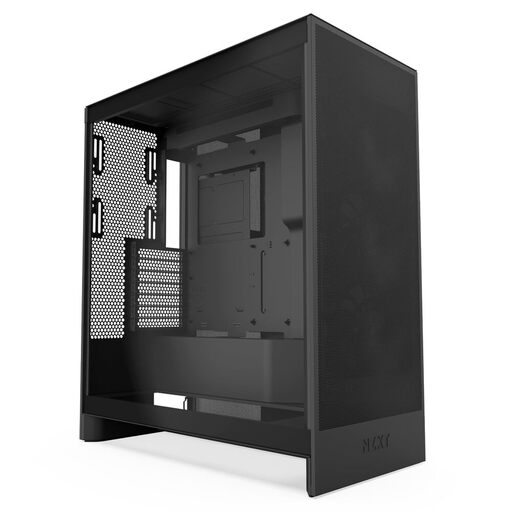
Why it's a great fit: This NZXT case is relentlessly designed for cooling performance. With perforated front and top panels and the option to mount three 120mm fans at the bottom for direct GPU cooling, it's built for power-hungry systems where low temperatures are the top priority.
It addresses the aesthetics trap by prioritising function over restrictive form. The mesh panels maximise air intake, ensuring components stay cool and quiet even under full load.
Dedicated bottom fan mounts for GPU cooling; support for large 420mm front and 360mm top radiators; wide cable channels for easy cable management.
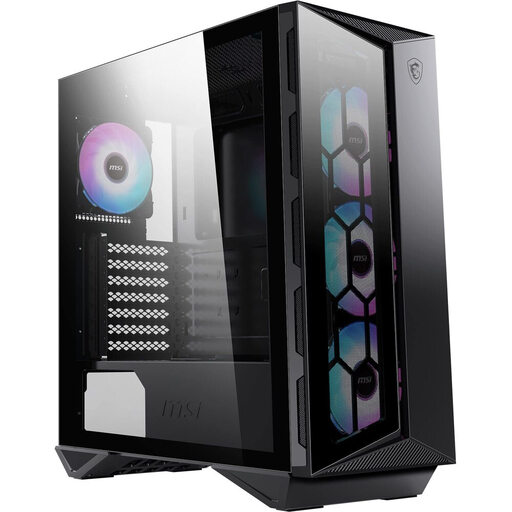
Why it's a great fit: This MSI case is an all-rounder for users seeking a good balance of aesthetics, cooling, and functionality. It comes with four ARGB fans and an integrated controller, simplifying entry into the RGB world and ensuring a cohesive look.
It solves the "RGB chaos" by providing an integrated, synchronisable lighting solution that is ready to use out of the box and compatible with MSI Mystic Light. No hassle with incompatible controllers.
Complete package with 4 ARGB fans and a hub; modern front I/O panel with USB 3.2 Gen 2x2 Type-C (20Gbps); magnetic top dust filter for easy cleaning.
We have compiled a complete, up-to-date list of products that fully meet these strict selection criteria and safety regulations.
A standard setup includes at least two to three fans: one or two at the front for air intake and one at the rear for air exhaust. For high-end systems, additional fans at the top (exhaust) or bottom (intake) can significantly improve temperatures and help preserve your components.
No. Although the ATX standard defines the motherboard size, the internal space varies greatly from case to case. Always check the maximum GPU length specified by the case manufacturer and compare it with the dimensions of your chosen GPU. Also, consider the card's thickness (number of slots it occupies).
An airflow case maximises airflow through mesh panels, which results in lower temperatures but can potentially be slightly louder. A silent case uses sound-dampened panels to minimise operational noise. However, this can restrict airflow and lead to slightly higher temperatures. The choice depends on your personal priority: maximum cooling performance or minimal noise levels.