
Lieferung heute & morgen

Qualitätsgarantie

Willkommens-Angebote freischalten: KOSTENLOSE Lieferung | Bis zu 80 % RABATT | Kostenlose 30-Tage-JoyPlus-Testphase
App herunterladen
A gaming PC case influences more than just the look of your build. Dimensions, airflow, connectivity and installation freedom determine whether powerful hardware can be housed effectively over the long term. If you only focus on RGB lighting or a glass front panel, you can easily overlook important details.
Typical buying problems arise from three pitfalls:
First, check the form factor of your motherboard. A mid-tower PC case often supports ATX, Micro-ATX and Mini-ITX. For larger boards you will need an E-ATX case. For compact builds, a Micro-ATX case is often sufficient, though with less room for expansion cards and cables.
Also relevant are the maximum dimensions:
As a practical buffer, it is advisable not to plan right up to the stated maximum measurement. Cables, front fans and radiator frames can reduce the usable space.
An airflow PC case usually has a perforated front panel or other large air intakes. A mesh front helps supply cool ambient air, while rear or top fans expel the warm air.
Pay attention to:
Four pre-installed fans can reduce installation effort. However, their actual effectiveness also depends on their orientation, speed control and the permeability of the case panels.
If you are looking for a PC case for water cooling, you should check the radiator position carefully. A PC case with 360 mm radiator support may, for example, allow mounting at the front or top. Whether the RAM, motherboard heatsinks and graphics card will collide depends on the specific layout.
A PC case with USB-C is practical for modern peripherals. Also check whether the case's internal connector matches the USB-C header on your motherboard. With PC cases with ARGB fans, you should clarify whether a controller is included and whether the lighting is controlled via a button or the motherboard software.
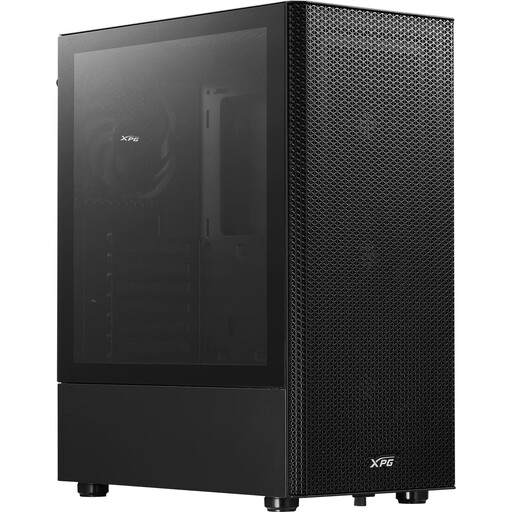
Why this product fits the profile: This ATX case supports ATX, Micro-ATX and Mini-ITX and comes with four pre-installed 120 mm fans. That makes it ideal for a straightforward gaming PC without needing to plan additional fans.
The perforated, removable front panel supports air exchange better than a fully closed glass front. The GPU can be up to 310 mm long.
Four 120 mm fans, support for a 360 mm radiator at the front and a magnetic dust filter.
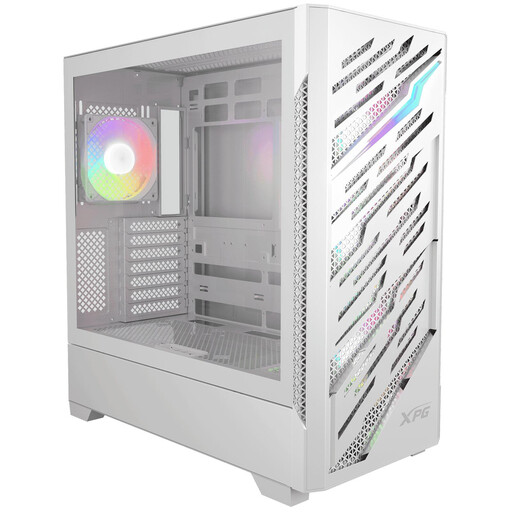
Why this product fits the profile: For powerful builds, this case offers support for E-ATX, ATX, Micro-ATX and Mini-ITX, plus compatibility with reverse-connector motherboards.
The manufacturer specifications state 390 mm maximum GPU length, 180 mm CPU cooler height and 220 mm power supply length. That makes it easier to check your build beforehand.
Four pre-installed ARGB fans, two possible 360 mm radiator positions and USB-C on the front panel.
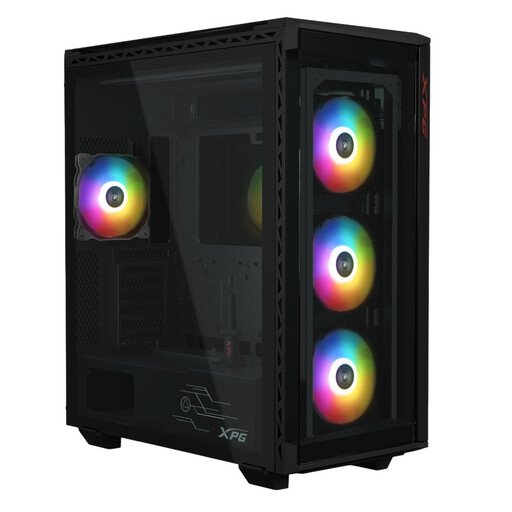
Why this product fits the profile: This large mid-tower model is aimed at users with multiple drives, long components and an E-ATX motherboard.
The specifications show 400 mm GPU length, 175 mm CPU cooler height and space for up to six 2.5-inch and three 3.5-inch drives.
E-ATX support, 360 mm radiator at the front and four pre-installed 120 mm ARGB fans.
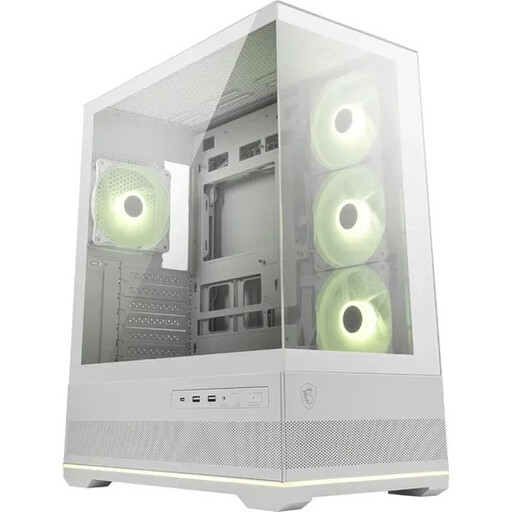
Why this product fits the profile: The 270-degree panoramic glass panels are aimed at users who want to showcase their components and RGB lighting.
Alongside the glass look, up to ten fans, a 360 mm radiator at the top and dust filters on the top and bottom are provided.
Support for ATX, Micro-ATX and Mini-ITX, up to 400 mm GPU length, four ARGB fans and USB-C.
We have put together a complete, regularly updated list of products that fully meet these strict selection criteria and the safety regulations in force in the EU.
For many gaming PCs, a mid-tower PC case offers a practical compromise between space and footprint. Before buying, check the dimensions of your graphics card, CPU cooler and power supply. For E-ATX boards or multiple drives, a larger model makes sense. A Micro-ATX case, on the other hand, suits compact systems if the expansion options are sufficient.
A mesh front can improve fresh air intake, provided there is enough free area and suitable fans behind it. However, it increases the need for cleaning if there is no easily accessible dust filter. With glass fronts, you should pay particular attention to alternative air intakes and fan positions.
ARGB fans require lighting control in addition to the motor power supply. The consumption depends on the fan model, speed and brightness, and is usually low in relation to the entire gaming PC. It is important to check the connections and the controller's power supply against your motherboard and power supply.