
Lieferung heute & morgen

Qualitätsgarantie

Willkommens-Angebote freischalten: KOSTENLOSE Lieferung | Bis zu 80 % RABATT | Kostenlose 30-Tage-JoyPlus-Testphase
App herunterladen
A gaming PC case does more than affect the look of your build. It determines which graphics card, CPU cooler and radiator sizes will fit. The front panel, fan configuration and cable management also affect assembly, maintenance and noise levels.
Many buyers, however, focus first on ARGB lighting or tempered glass. This can lead to some common buying mistakes:
A mid-tower PC case is a practical starting point for many gaming PCs. It usually has room for ATX, Micro-ATX and Mini-ITX motherboards. If you want to install a larger board, you’ll need an E-ATX case or a model that explicitly states it supports E-ATX.
It’s not just the motherboard that needs to fit. Check the maximum CPU cooler height, power supply length and the position of the cable cut-outs too.
A PC case with good airflow has as many open intake areas as possible, along with dust filters and suitable fan mounts. A typical layout uses front or bottom intake, with exhaust at the rear and top. The best arrangement depends on the case and the components you’re using.
Check the following:
A PC case with pre-installed fans can reduce the need to buy extra fans. Even so, check the connections. An integrated ARGB hub makes cable management easier, but it won’t necessarily work with every lighting controller.
With a PC case for RTX graphics cards, the actual installation depth matters. Modern graphics cards are often long and take up several slots. As well as GPU length, check the card’s thickness, whether you’ll need an anti-sag bracket and how much room there is for the power cables.
These features are also useful for everyday use:
A PC case with tempered glass or a PC case with panoramic glass puts your components on show. Place the glass carefully on a padded surface. The metal edges inside the case may be sharp, so take care when fitting components.
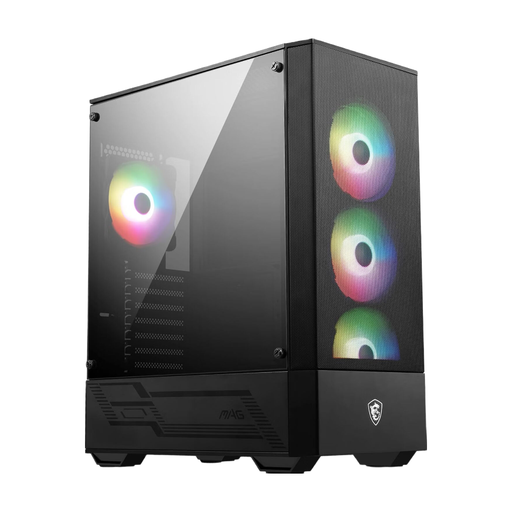
Why this product suits this type of user: This mid-tower model supports ATX, Micro-ATX and Mini-ITX. According to the product specifications, it includes four 120 mm ARGB fans and a 1-to-6 hub, with space for graphics cards up to 330 mm long.
The mesh front and four pre-installed fans reduce the need for immediate extra purchases. Before buying, check that your graphics card fits within the 330 mm limit.
ATX compatibility, four 120 mm ARGB fans, a tempered-glass side panel and support for radiators up to 240 mm.
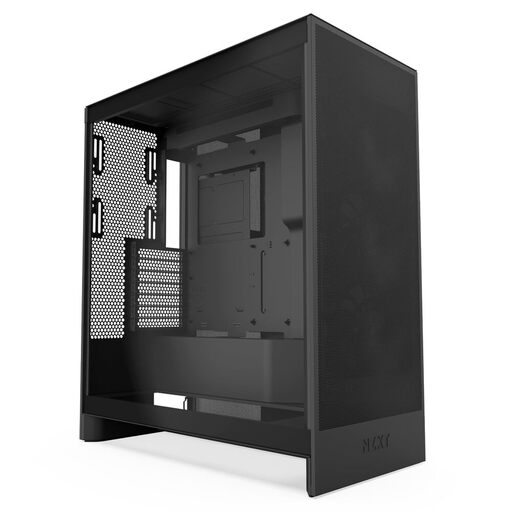
Why this product suits this type of user: This ATX case is designed for users with powerful hardware and a well-planned cooling setup. According to the product specifications, it supports three bottom fans for GPU cooling, front radiators up to 420 mm and top radiators up to 360 mm.
The mesh design prioritises airflow rather than relying solely on glass panels. The specifications list three pre-installed 120 mm front fans.
Support for large radiators, bottom fans for the graphics card, and integrated cable channels with hooks and straps.
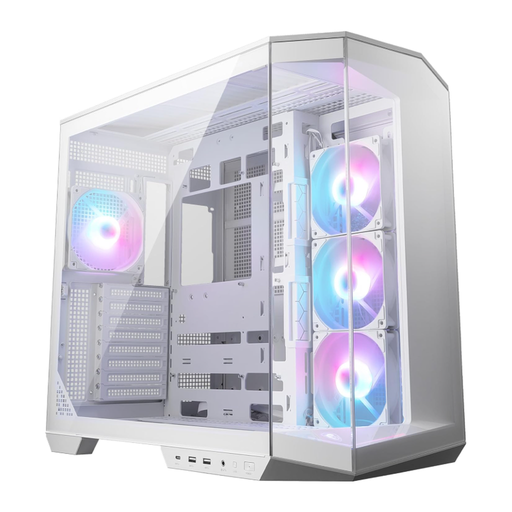
Why this product suits this type of user: This dual-chamber PC case is ideal if you want to showcase your components, enjoy modern connections and keep the back of your build tidy. It supports ATX and Micro-ATX, as well as back-connect motherboards.
The separate chambers provide extra space for cables and the power supply. According to the product specifications, it includes four pre-installed 120 mm ARGB fans, dust filters and a GPU support bracket.
USB-C at 20 Gbit/s, a vertical GPU mount with support, a dual-chamber design and support for back-connect motherboards.
We’ve put together a comprehensive, regularly updated list of products that meet these strict selection criteria and fully comply with the safety regulations in force in the EU.
The price depends on the materials, fan setup, range of connections and cooling options. Compare more than just the purchase price: consider the fans included, any extra components you’ll need and how long you plan to use the build. A model with suitable pre-installed fans can reduce the need for additional purchases.
There’s no set number. For many ATX systems, a setup with several intake fans and at least one exhaust fan makes sense. What matters is the direction of airflow, clear intake areas and the heat output of the CPU and graphics card. Only add extra fans where the case has suitable mounts.
No. Check the graphics card’s length, height and thickness, as well as the clearance around front fans or radiators. You’ll also need enough room to connect the power cables without bending them sharply. The maximum GPU length listed in the specifications is therefore a guide; check it against your specific cooling setup.