
Lieferung heute & morgen

Qualitätsgarantie

Willkommens-Angebote freischalten: KOSTENLOSE Lieferung | Bis zu 80 % RABATT | Kostenlose 30-Tage-JoyPlus-Testphase
App herunterladen
Choosing a gaming PC case is more than just an aesthetic decision. While marketing images often showcase flawless setups with vibrant RGB colours and gleaming glass, they frequently hide compromises that can impact your system's performance and longevity. An unsuitable case can lead to overheating, compatibility issues, and a frustrating build process. This guide will help you identify the most common pitfalls and make an informed decision.
Common Buying Mistakes and How to Avoid Them:
To avoid these mistakes, you should carefully examine three core areas. These parameters determine whether a case is suitable for your specific build.
The form factor defines the size of the case and which motherboards you can install. The most common formats are:
The most common format is the mid-tower case, which can usually accommodate ATX, mATX, and Mini-ITX motherboards. Always check the following dimensions before buying:
An effective cooling concept is crucial for the stability and performance of your gaming PC. Look for cases with a perforated front and top panel (airflow case) to allow for maximum airflow.
Modern cases offer a variety of design and convenience features.
Here are some recommendations tailored to different user profiles that specifically address the pitfalls mentioned.
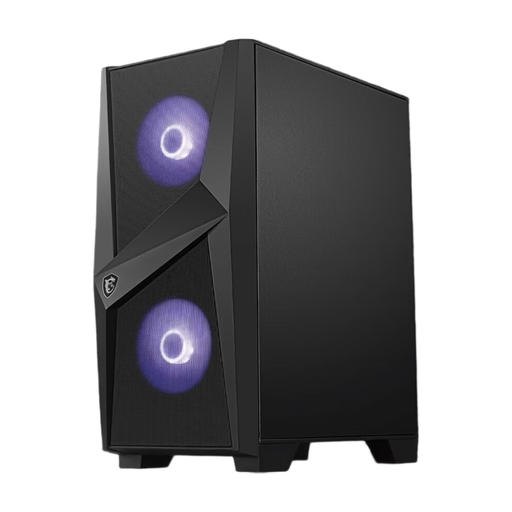
Why This Fits Their Persona: This case offers essential features like a glass window and pre-installed fans at an accessible price point. It's a solid foundation for entry-level and mid-range builds without compromising on basic ATX compatibility.
It bypasses the "glass palace" trap by providing side air intakes on the front. Paired with the two pre-installed fans, this ensures baseline cooling sufficient for hardware without extreme heat output.
Solid feature set with tempered glass, steel construction, and space for ATX motherboards. Supports graphics cards up to 330 mm in length.
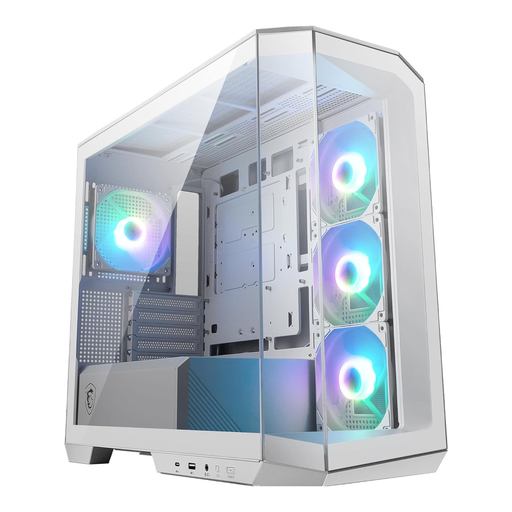
Why This Fits Their Persona: Ideal for users looking for a visually stunning white PC case. The panoramic glass design offers a nearly seamless view of the components, while the pre-installed ARGB fans provide instant, vibrant lighting.
Despite the strong focus on aesthetics, cooling is not neglected. Four pre-installed 120mm fans and a thoughtful dual-chamber layout ensure effective air circulation, avoiding the 'show over flow' trap.
Panoramic glass design for maximum visibility, four ARGB fans with an included hub, and a modern USB-C 20Gbps port on the I/O panel.
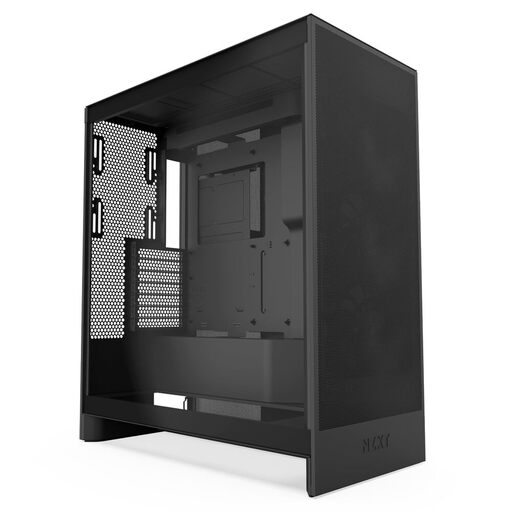
Why This Fits Their Persona: This case is engineered for maximum cooling performance. It's the top choice for users with high-end components who want to overclock or simply achieve the lowest possible temperatures for stable, high performance.
It's the direct answer to the "glass palace" trap. The perforated front and top panels maximise air intake, making it a prime example of an airflow case that makes no compromises on cooling.
Outstanding cooling potential with support for large radiators (up to 420mm in the front), dedicated bottom GPU cooling, and a well-designed cable management system.
We have compiled a complete, up-to-date list of products that fully meet these strict selection criteria.
There's no one-size-fits-all answer, as it depends on the components used. A good baseline configuration for most gaming systems consists of at least two intake fans at the front and one exhaust fan at the rear. For high-end systems, three intake fans and one to two exhaust fans (rear and/or top) are recommended to ensure optimal airflow.
No. Although "ATX" is a motherboard standard, the internal dimensions of cases vary significantly. Modern high-end graphics cards, in particular, are very long and wide. Therefore, always check the maximum graphics card length specified by the case manufacturer and compare it with the specifications of the graphics card you intend to buy. Plan to leave a few millimetres of buffer.
Dust filters are very important for the longevity and consistent cooling performance of your PC. Dust that settles on heatsinks and fans acts as an insulating layer and worsens heat dissipation. Easily accessible and removable dust filters on all air intakes (front, bottom, top) simplify regular cleaning and ensure your system stays cool and quiet for years to come.