
Lieferung heute & morgen

Qualitätsgarantie

Willkommens-Angebote freischalten: KOSTENLOSE Lieferung | Bis zu 80 % RABATT | Kostenlose 30-Tage-JoyPlus-Testphase
App herunterladen
A gaming PC case affects more than just the look of your computer. The internal layout, airflow, connectivity and cable management all determine how easy the build will be and whether there is enough room for high-performance components. Systems with a large graphics card, multiple fans or liquid cooling are particularly prone to avoidable issues during purchase.
A PC case with panoramic glass can showcase your components and ARGB lighting. However, glass panels do not replace effective airflow. The key factors are the available fan mounts, the position of the intakes and exhausts, and whether radiators can be installed.
Airflow can be restricted by closed front panels. Models with a glass front should therefore have ventilation options at the side, bottom or rear. The distance from walls and furniture is also important: ventilation openings must not be blocked.
“Four fans included” says very little about your eventual configuration on its own. Check whether they are PWM fans, which lighting connectors they use and whether a hub or controller is included. A gaming case with ARGB fans can incur additional costs if your motherboard lacks the necessary connectors or a suitable controller.
ARGB with 5 volts and 3 pins must not be confused with classic RGB with 12 volts and 4 pins. The connectors are not interchangeable. Before buying, compare the motherboard’s available connections with those provided by the case.
The stated graphics card length usually does not take front fans or radiators into account. A model offering 400 mm of clearance may provide less usable space once front cooling is installed. The same applies to CPU coolers: the permitted cooler height must be suitable for the height of your tower cooler.
You should also consider the power supply length, cable space and the position of drive cages. A spacious mid-tower case is not automatically suitable for every combination of E-ATX motherboard, radiator and large graphics card.
An ATX PC case should accommodate at least the ATX motherboard you are using. Micro-ATX or Mini-ITX will often be sufficient for compact systems. If you want to install an E-ATX board, you need a model explicitly designated as an E-ATX case. The mounting holes, cable routing and possible restrictions around cable pass-throughs can vary from one case to another.
You should also check:
For a gaming PC that produces a lot of heat, you should consider not only the maximum number of fans but also their mounting positions. A PC case for liquid cooling should support suitable radiator sizes and provide enough clearance between the radiator, motherboard and memory.
Useful features include:
A PC case with cable management should provide sufficient depth behind the motherboard tray, cable pass-throughs and mounting points. In a dual-chamber PC case, the power supply, drives and much of the cabling are housed in a separate chamber. This can keep the visible interior tidy and make installation more straightforward.
Panoramic glass also requires careful handling. Tempered glass side panels should be placed on a padded, soft surface when removed. Hard tiled or concrete floors can damage the edges. Before closing the panels, make sure the cables are secured properly and cannot come into contact with the fan blades.
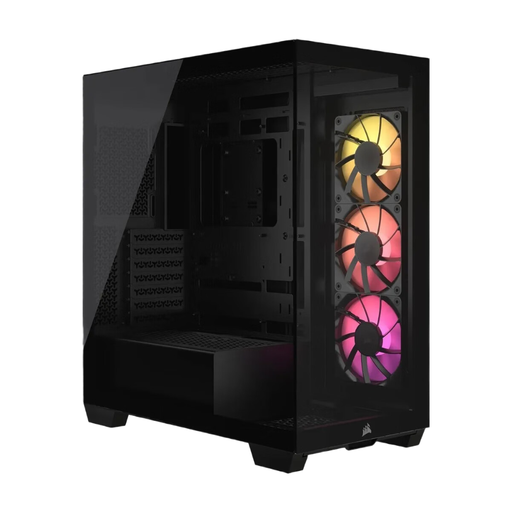
Why this product suits this profile: This case combines panoramic glass with broad compatibility from Mini-ITX to E-ATX and comes with three pre-installed 120 mm RS120 ARGB PWM fans.
The fans are clearly specified, ARGB control is handled via a 5-volt ARGB connector, and the maximum supported graphics card length is 400 mm.
Support for up to ten 120 mm fans, seven expansion slots and tool-free removable panels.
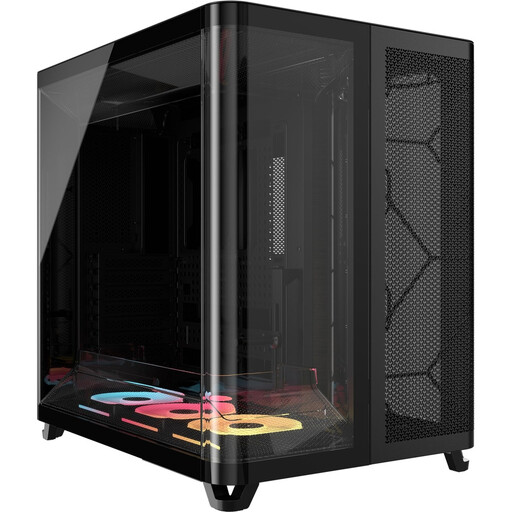
Why this product suits this profile: The dual-chamber design separates the components from the power supply, cables and drives. Three pre-installed LX RGB fans use the iCUE LINK system with daisy-chain connections.
The integrated connection system reduces the number of visible fan cables. The specified limits of 400 mm for graphics cards and 180 mm for CPU coolers make compatibility checks easier.
ATX, Micro-ATX and Mini-ITX support, a 225 mm power supply length and two panoramic glass panels without a central support.
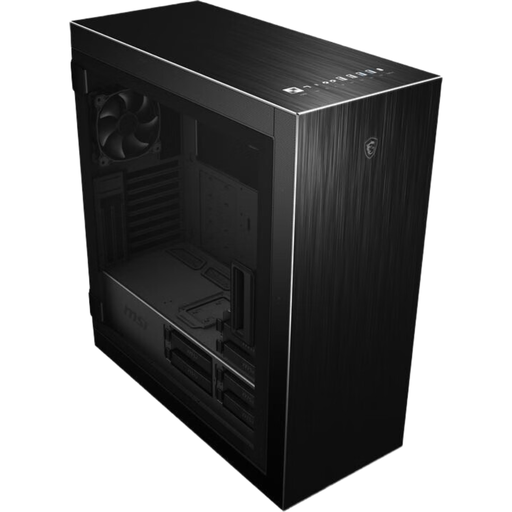
Why this product suits this profile: This mid-tower case is designed for users with extensive storage requirements and different cooling configurations. It supports ATX, E-ATX, Micro-ATX and Mini-ITX.
Drive capacity is clearly specified: up to six 3.5-inch drives, three 2.5-inch drives and six combination bays. A power supply is not included and must be planned separately.
Support for up to seven fans, three radiator positions, 400 mm graphics card length and a modular hard drive cage.
We have put together a complete, regularly updated list of products that fully meet these strict selection criteria and the safety regulations applicable in the EU.
Before ordering a gaming PC case, we recommend carrying out this quick check:
Several models in this selection support graphics cards up to 400 mm. However, the key question is whether front fans or a radiator reduce the available space. You should therefore check the manufacturer’s specification for the specific cooling configuration.
That depends on the processor, graphics card and power consumption. A common basic configuration consists of intake fans at the front or bottom and exhaust fans at the rear or top. The maximum number of fan mounts is less important than consistent airflow and suitable connectors.
Its lifespan depends on the materials, exposure to dust, mechanical stress and future upgrades. A case with sufficient internal space, replaceable dust filters and easily accessible components can remain useful for longer, as new graphics cards or coolers can be integrated more easily.