
Lieferung heute & morgen

Qualitätsgarantie

Willkommens-Angebote freischalten: KOSTENLOSE Lieferung | Bis zu 80 % RABATT | Kostenlose 30-Tage-JoyPlus-Testphase
App herunterladen
A gaming PC case doesn’t just determine how your finished system looks. It also affects which graphics card, CPU cooler and liquid cooling setup you can install. If you let ARGB lighting or a glass front panel be your only guide, you can easily overlook important technical details.
A PC case with ARGB fans can look impressive straight after assembly. However, the lighting says very little about the actual airflow. What really matters are the number, position and size of the fans, as well as the design of the front panel. A solid glass front, for example, can restrict air intake far more than a perforated mesh panel.
Manufacturer specifications like “graphics card up to 400 mm” refer to specific installation scenarios. If you also fit a front radiator, the available space can be reduced. Cables, the PSU shroud and drive cages can also affect installation. Before you buy, you should check graphics card length, CPU cooler height and radiator position together.
A modern front panel with USB-C is only fully usable if your motherboard has the right internal header. Likewise, the case must match your motherboard format. An ATX case usually offers more room for expansion, while a Micro-ATX case can be more compact. For particularly large systems, models with E-ATX support are worth considering.
First, check whether the case supports your motherboard:
A mid-tower case can, depending on the model, accommodate ATX, Micro-ATX and Mini-ITX. However, the name alone isn’t enough to guarantee compatibility. The technical specifications of each product are what really count.
An airflow PC case often has a perforated front or mesh elements. For balanced ventilation, cool air should enter from the front or bottom, and warm air should exit from the rear or top. A typical basic layout consists of:
If you plan to use an AiO liquid cooler, check the radiator size and mounting position. A gaming case with liquid cooling support can, depending on the model, accommodate radiators up to 240, 360 or even 420 mm. The radiator, fans and RAM all need to fit at the same time.
High-performance graphics cards are often longer and thicker than standard models. So compare the maximum GPU length with the actual length including power connectors. For air coolers, the maximum CPU cooler height is what matters. With large power supplies, you should also consider the maximum PSU length.
Removable dust filters, tool-free side panels and enough space behind the motherboard tray are all very handy. They make maintenance and cable management easier, but they don’t replace regular cleaning.
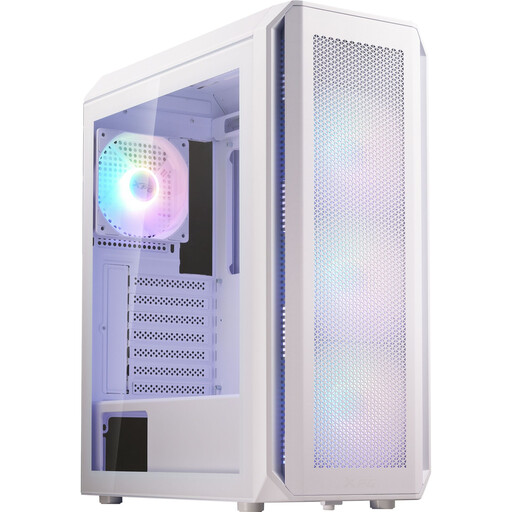
Why this product fits the profile: This ATX mid-tower case supports ATX, Micro-ATX and Mini-ITX and comes with four pre-installed 120 mm ARGB fans.
The technical specs give clear limits: 340 mm GPU length, 160 mm CPU cooler height and front radiators up to 360 mm.
Four pre-installed fans, tempered glass side panel and support for up to six fans.
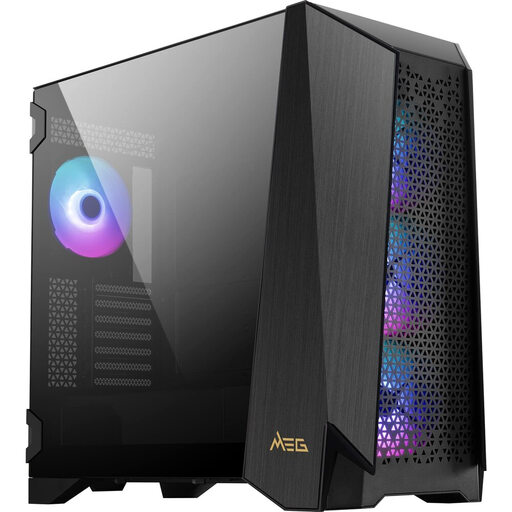
Why this product fits the profile: This model is designed for large builds with E-ATX support, big graphics cards and multiple cooling options.
Cooling isn’t just about lighting: up to ten fans, multiple 360 mm radiator positions and four magnetic dust filters are specified.
4.3-inch IPS touchscreen, 400 mm GPU clearance and support for CPU coolers up to 185 mm.
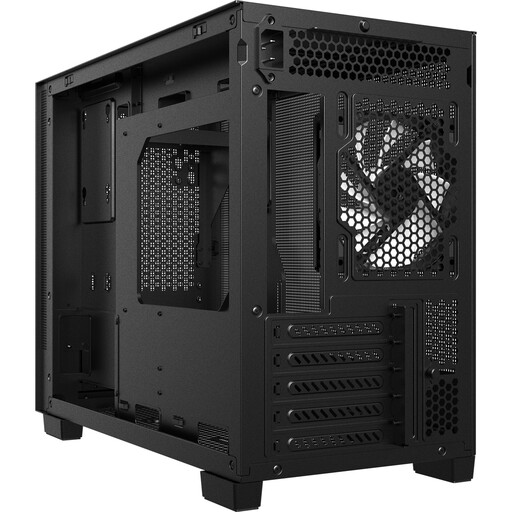
Why this product fits the profile: This compact Micro-ATX case is ideal for users planning a smaller rig with modern cooling and fast front-panel connections.
The mesh front with dust filters supports air intake. At the same time, GPU lengths up to 370 mm and CPU coolers up to 170 mm are possible.
USB-C 3.2 Gen 2, two USB-A ports, space for a 360 mm radiator on top and five PCIe slots.
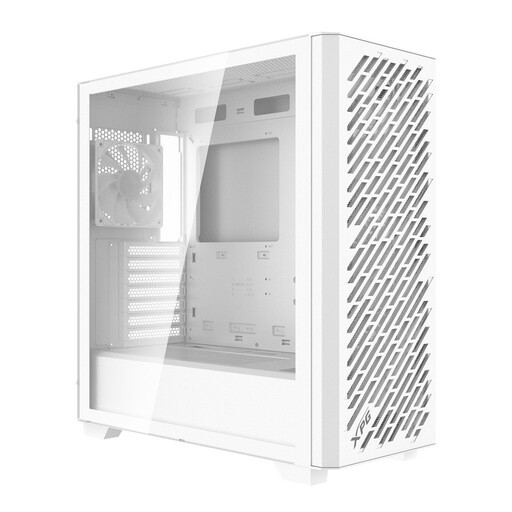
Why this product fits the profile: For powerful systems, this mid-tower case offers support for E-ATX, ATX, Micro-ATX and Mini-ITX.
The specs cover the key bottlenecks: up to 400 mm GPU length, 167 mm CPU cooler height and 360 mm radiators at the front or top.
Four pre-installed 120 mm ARGB fans, USB-C, magnetic dust filters and support for up to nine fans.
We’ve put together a full, regularly updated list of products that fully meet these strict selection criteria and the safety regulations in force in the EU.
The key factor is the stated maximum GPU length. For larger models, cases with at least 400 mm of clearance are a good choice. If you fit a radiator at the front, you need to subtract its thickness from the available space. You should also consider the distance to cables and the PSU shroud.
That depends on your processor, graphics card and case size. A practical basic setup consists of two or three front fans and one rear exhaust fan. Additional fans can be useful with high-performance components or a liquid cooling system. What matters is a clear airflow path, not simply the highest possible number of fans.
USB-C on the front panel is handy for modern external SSDs, smartphones and other peripherals. Before you buy, check whether your motherboard has an internal USB-C header and what transfer speed it supports. Without a compatible header, the port may not work at all, or only with limited functionality.