
Lieferung heute & morgen

Qualitätsgarantie

Willkommens-Angebote freischalten: KOSTENLOSE Lieferung | Bis zu 80 % RABATT | Kostenlose 30-Tage-JoyPlus-Testphase
App herunterladen
A gaming PC case influences more than just the look of your build. Dimensions, airflow, fan configuration, and space for your graphics card or radiator all determine whether assembly goes smoothly. If you choose based only on RGB lighting or a low price, you can easily overlook technical limitations.
The number of fans is only one part of the cooling equation. A solid front panel can restrict fresh air intake, whereas a mesh front panel helps with airflow. What's more, fan direction, clearance from walls, and available mounting positions all need to work together.
So pay attention to:
A PC case with a glass window can show off your components, but it doesn't replace proper airflow management.
The stated maximum GPU length often applies to a specific internal configuration. A front-mounted radiator or an extra fan can reduce the available space. Always check the graphics card length with your cooling installed and compare it against the case clearance.
ARGB at 5 volts with three pins is technically different from standard 12-volt RGB with four pins. Connecting them incorrectly can damage your lighting components. Before buying, check whether your motherboard has a compatible 5V ARGB header, or whether a controller or hub is included.
A mid-tower case is often a practical compromise for many gaming PCs, balancing space requirements with expandability. When choosing, the supported form factors are key:
An ATX motherboard won't fit in every compact Micro-ATX model. The position of cable routing grommets and the width of the motherboard can also matter for E-ATX systems.
Compare at least these three values:
For example, the XPG INVADER X supports graphics cards up to 400mm, CPU coolers up to 175mm and power supplies up to 240mm. The XPG VALOR AIR PLUS is more compactly designed, with up to 340mm GPU length, 160mm cooler height and a power supply length of 160 to 180mm.
An airflow PC case should offer not just plenty of fan mounts, but also sensible installation positions. The following basic layout often works well:
If you're looking for a case for water cooling, check the radiator size and mounting position. The NZXT H7 Flow supports up to 420mm at the front and 360mm at the top, according to product specifications. With the XPG INVADER X, up to 360mm radiators are supported at the top and bottom. These figures refer to the specific installation configuration and should be cross-checked with your planned pump, fans and motherboard.
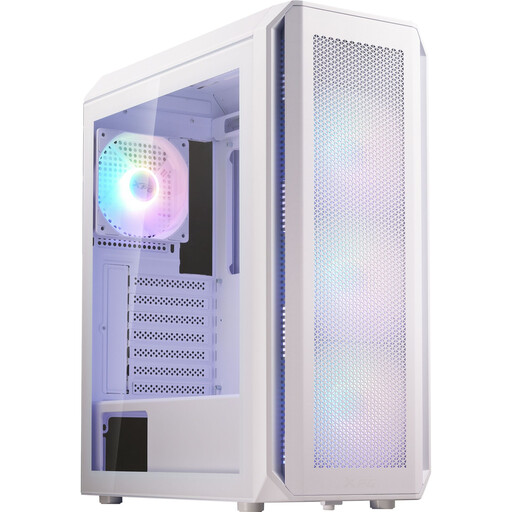
Why this product fits the profile: This mid-tower case supports ATX, Micro-ATX and Mini-ITX and comes with four 120mm ARGB fans.
The front accommodates three 120mm fans and supports radiators up to 360mm. The GPU limit of 340mm should be checked against your own graphics card before buying.
Four pre-installed 120mm ARGB fans, glass side panel and front I/O with USB-A and LED control.
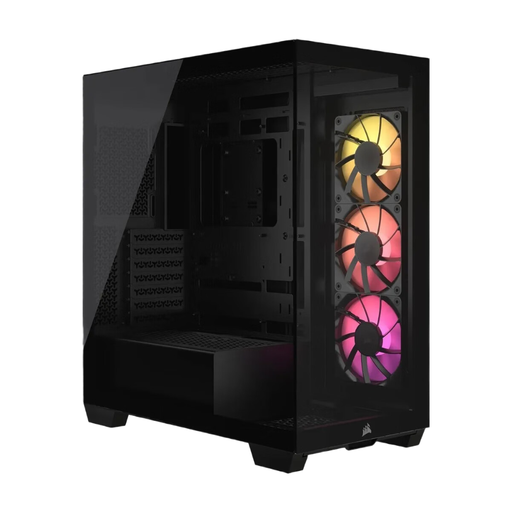
Why this product fits the profile: This PC case combines panoramic glass with support for Mini-ITX up to E-ATX, and is aimed at users who value both build quality and presentation.
Compatibility with selected reverse-connection motherboards is explicitly stated. Additionally, the glass panels are designed for tool-free access.
Three pre-installed CORSAIR RS120 ARGB PWM fans, support for up to ten 120mm fans and a maximum GPU length of 400mm.
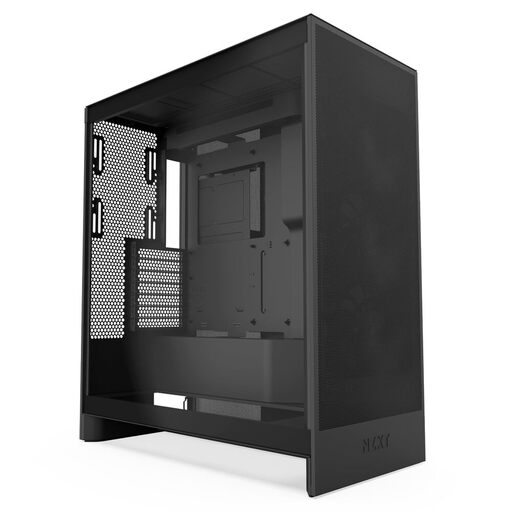
Why this product fits the profile: For long gaming sessions or high-performance components, this ATX case offers several defined cooling options.
The mesh design and included bottom fans address the common limitation of solid front panels. The GPU air intake must still remain unobstructed.
Three pre-installed front fans, support for three bottom fans, plus radiators up to 420mm at the front and 360mm at the top.
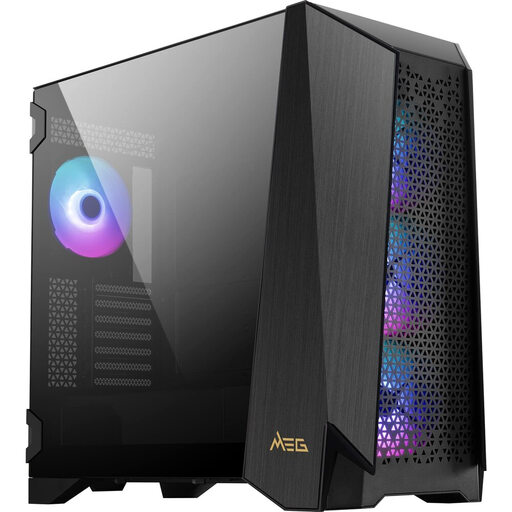
Why this product fits the profile: This model is designed for large builds with an E-ATX motherboard, extensive cooling and additional controls on the case itself.
The manufacturer's specifications list E-ATX support, 400mm GPU length and a CPU cooler up to 185mm. This allows you to cross-check the key compatibility values in advance.
4.3-inch IPS touchscreen, four pre-installed 140mm ARGB fans and support for up to ten fans.
We've put together a complete, regularly updated list of products that fully meet these strict selection criteria and the safety regulations in force in the EU.
Check the maximum GPU length and take front fans and the radiator into account. Models like the GAMDIAS ATLAS P2 state up to 430mm, while many ATX mid-tower cases sit at 390 to 400mm. You should also consider your specific graphics card's power connectors and the cable's bend radius.
The case itself doesn't have a typical fixed lifespan. What matters are sturdy materials, working fans, clean dust filters and careful handling of glass panels. Before rebuilding, make sure the power supply and all components are completely disconnected. Warranty terms should be checked with the manufacturer and retailer respectively.
ARGB fans and lighting do require additional power, but consumption depends on the number, brightness and operating time. With several fans, a hub can simplify the wiring. For lower power consumption, you can adjust the lighting and fan profiles via the controller or motherboard.