
Lieferung heute & morgen

Qualitätsgarantie

Willkommens-Angebote freischalten: KOSTENLOSE Lieferung | Bis zu 80 % RABATT | Kostenlose 30-Tage-JoyPlus-Testphase
App herunterladen
By Joybuy Product Recommendation Officer, August 30, 2026
Choosing a new gaming PC case can quickly become overwhelming. The market is filled with models that promise impressive aesthetics and supposedly high performance. But behind shiny glass panels and glowing fans, there are often costly compromises that only become apparent after the purchase. An unsuitable case can not only make assembly difficult but also throttle the performance of expensive components due to heat buildup.
This guide will help you identify common pitfalls and make an informed decision. We focus on the technical parameters that truly matter, ensuring your next PC not only looks good but also runs reliably and cool.
Before we dive into the important specifications, let's highlight three common issues that frequently lead to disappointment during the selection process:
To avoid the problems mentioned above, you should focus on three core technical areas. These form the foundation for a functional and future-proof system.
The form factor indicates the basic size and compatibility with the motherboard. The most common formats are:
However, more important than the form factor alone are the maximum dimensions for your components. Before buying, be sure to check these three values in the case's technical specifications:
A well-designed cooling concept is the foundation of a stable gaming system. There are two main approaches here:
Design is more than just aesthetics. Modern layouts offer tangible benefits:
Instead of making a one-size-fits-all recommendation, we have selected models that address specific needs and user profiles, cleverly avoiding the pitfalls mentioned earlier.
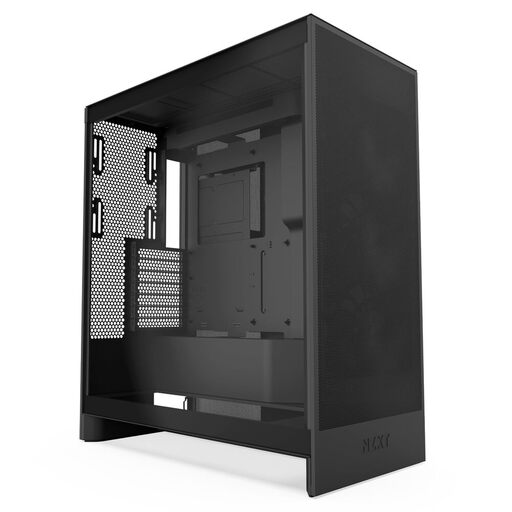
Why This Fits Their Persona: Ideal for users who prioritise maximum cooling and stable performance above all else. The focus is clearly on function without compromising on build quality.
The fully perforated front and top panels completely bypass the "airflow trap," ensuring unrestricted airflow to core components.
Supports large radiators (up to 420mm) and offers dedicated bottom fan mounts for direct GPU cooling.
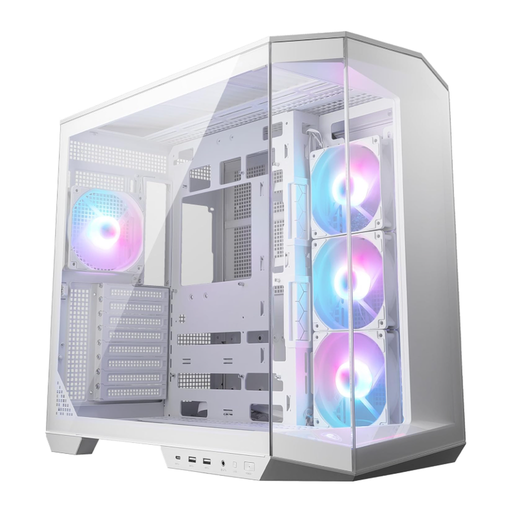
Why This Fits Their Persona: Perfect for users who want to build a flawless "showcase PC" with minimal visible cables. The white design and panoramic view are the main attractions.
The dual-chamber design and support for back-connect motherboards solve the problem of messy cable management that is often hidden behind a side panel.
Enables an extremely clean interior via rear connectors and provides good out-of-the-box cooling with four pre-installed ARGB fans.
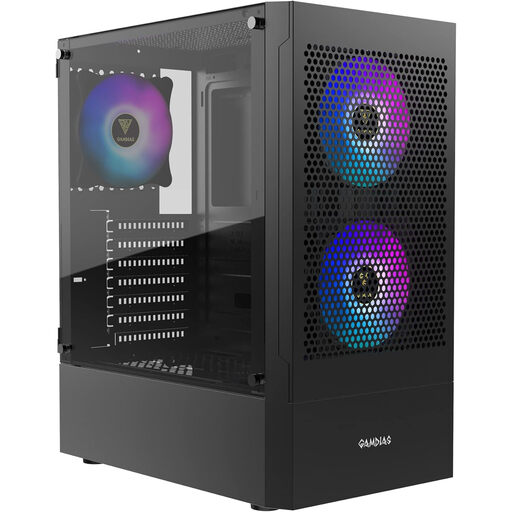
Why This Fits Their Persona: A solid choice for first-time builders or users on a limited budget who still want good cooling performance and a modern look with glass and RGB.
The 5.0mm perforated mesh front guarantees genuine airflow, avoiding the typical mistake of budget cases with restrictive front panels.
Offers a great overall package in its price class with three pre-installed ARGB fans and a mesh front. The fans can be synchronised via a standard 5V header.
We have compiled a complete, up-to-date list of products that fully meet these strict selection criteria and UK safety regulations.
1. How many case fans are really necessary? For a typical gaming system, a configuration with at least two intake fans at the front and one exhaust fan at the rear is a solid baseline. This creates directional airflow that pulls cool air over the components and expels warm air. High-end systems benefit from additional fans at the top or bottom.
2. Will any graphics card fit in any ATX case? No. Although the motherboard will fit, the length of the graphics card is the limiting factor. The top models from the NVIDIA 40-series and AMD 7000-series, in particular, are very long. Always compare the "maximum GPU length" specification of the case with the length of your graphics card. Plan for a few millimetres of buffer space.
3. What is the advantage of a dual-chamber case? A Dual Chamber Case divides the interior into two separate areas. The main chamber houses the heat-generating components like the motherboard, CPU, and GPU. The second chamber, usually behind the motherboard tray, accommodates the power supply, hard drives, and most of the cables. This results in a tidy appearance and can improve airflow in the main chamber as it is not obstructed by cable clusters.