Single-PC streamers
You play and stream on the same computer. OBS Studio points out that having a compatible system alone doesn’t guarantee that streaming or recording will work well.


Choose a gaming PC based on the game you’ll play, your planned streaming output and your overall setup – not just the graphics card. A supported hardware encoder can take some of the load off the CPU, but OBS still needs graphics resources and a suitable upload connection. In a small room, you’ll also need to consider the space available, ventilation and how noisy the specific model gets under load.
You play and stream on the same computer. OBS Studio points out that having a compatible system alone doesn’t guarantee that streaming or recording will work well.
You want to factor in a monitor, peripherals and any streaming accessories you need before buying, rather than budgeting for the computer alone.
You’ll need to balance the space available with the clearance needed for ventilation, and consider whether the specific PC is acceptably quiet for you while gaming.
For gaming and streaming at the same time, it’s not enough to look at the CPU or graphics card in isolation. OBS Studio also needs resources to compose and render your scenes.
| What matters | What to check when buying | Who it matters most to |
|---|---|---|
| Gaming and streaming at the same time | Assess the game you’ll play, your intended output and the configuration’s encoder support together. Test the game and OBS in advance using comparable scenes. | If I’m gaming and streaming on one PC, I want to know whether the game and OBS will run together, rather than relying on a single component. Around 31% of consumers put this type of simultaneous use at the top of their list. |
| Total budget | Check the contents of the box, operating system, ports you’ll need and any accessories you already own against the configuration you’re ordering. | If I still need a monitor, peripherals or streaming accessories, I need to include them in my budget. Around 25% of consumers prioritise the total cost, including any extras they need. |
| Space and noise | Check the case dimensions and ventilation clearance against the space you have available. If noise is a particular concern, look for measurements of the exact model under load. | If my PC is going in a small room, I want to be able to judge how much space it takes up and how noisy it is while gaming. Around 25% of consumers put this at the top of their list. |
| Reliable streaming | Test your upload speed at the connection you plan to use, then choose settings that suit your platform, resolution, frame rate, codec and bitrate. Run a test with movement and audio. | If I’m streaming over the connection in my room, I want to test the broadcast before going live. Around 19% of consumers prioritise a reliable upload connection. |
A hardware encoder can take some of the encoding workload off the CPU. However, OBS Studio still needs GPU resources to compose and render scenes.
Test the game and OBS together. If you run into bottlenecks, adjust the frame rate or graphics settings.
Components can vary within a model range. For the AN290, ONE specifically notes that the photo shows a sample configuration and that the technical description applies to the order.
Check the full model or product code against the technical description for the specific item you’re ordering.
A tower on its own isn’t a complete streaming setup. Depending on what you already own, you may also need a monitor, peripherals or streaming accessories.
Before ordering, check the space available, connections and what’s included against your existing setup.
Whether an organisation is allowed to issue donation receipts is a separate matter. An organisation’s absence from the Register of Recipients of Donations does not, on its own, prove that it isn’t eligible.
Be transparent about who will receive the money and how payments will be made, and check the organisation’s official information.
Legion towers are worth considering if you want a desktop PC with potential for upgrades.
You can assess the OMEN 35L GT16-0778ng based on its stated configuration.
Compare ERAZER models by their full names and individual specifications.
Configurable gaming PCs are an option if you want to match the specification carefully to your needs and the accessories you already own.
Configuration options are useful if you want to match the components to your games, streams and existing accessories.
This selection includes gaming desktops and laptops with specified components. Compare the exact specification with the games you play, your planned OBS scenes and the space available for your streaming setup.
 No image available
The listed components give you specific points of comparison if you want to use one computer for gaming and OBS.
Core Ultra 5 225F, RTX 5060, 16 GB RAM and 512 GB SSD; Windows 11 Home. Dimensions: 378 × 190 × 438 mm. The user instructions specify at least 10 cm of clearance on all sides for ventilation.
 No image available
Compare this configuration with your gaming and OBS requirements by looking at the listed CPU, graphics card and RAM.
Core Ultra 9 285K, RTX 5080, 32 GB RAM, 2 TB SSD and a 240 mm liquid cooler. The user instructions call for adequate ventilation and unobstructed air vents.
 No image available
The processor, graphics card and RAM specifications help you check whether this setup is suitable for gaming and streaming at the same time.
Ryzen 7 7800X3D, RTX 5070 Ti, 64 GB RAM and 2 TB SSD; Windows 11. Dimensions: 44 × 28 × 44 cm. The user instructions specify 10–15 cm of clearance from the wall and unobstructed ventilation areas.
 No image available
This gaming laptop has a built-in display. Check that it suits your space and planned streaming setup.
Ryzen 9 7940HX, RTX 4060, 16 GB RAM and 1 TB SSD; 17.3-inch FHD display with 144 Hz refresh rate. The stated weight is around 2.8 kg. The user instructions specify a flat surface and unobstructed air vents.
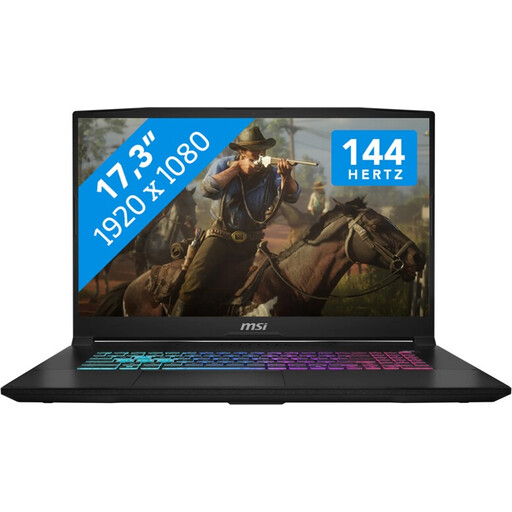 No image available
The built-in display and listed components give you points of comparison if you’re considering a laptop instead of a tower setup.
Core i7-14650HX, RTX 5060 with 8 GB GDDR6, 16 GB RAM and 1 TB SSD; 17.3-inch FHD display with 144 Hz refresh rate. The user instructions specify a hard, flat surface and unobstructed air vents.
No. OBS Studio explains that compatibility alone doesn’t guarantee that streaming or recording will work well. Test your game, scenes and planned output on the specific configuration.
It depends on the platform, codec, resolution and frame rate. YouTube recommends testing your upload speed and publishes its own bitrate recommendations; these aren’t universal requirements for other platforms or every connection.
Check the space available and ventilation, connect the devices you need, then test your game, OBS, microphone audio and a scene with plenty of movement. If OBS struggles under load, OBS Studio suggests options such as limiting the game’s frame rate, lowering graphics settings and simplifying scenes.
No. Your Europe explains that the CE mark is the manufacturer’s declaration that a product complies with relevant EU product rules. It says nothing about frame rate, encoder quality or noise levels. When carrying out market surveillance, Germany’s Federal Network Agency checks, among other things, product markings, product identification and manufacturer information.
Name the organisation receiving the money and make the payment route clear. You can check the Federal Central Tax Office’s Register of Recipients of Donations to see whether an organisation is allowed to issue donation receipts; absence from the register alone doesn’t prove that it isn’t eligible. Calling something a ‘charity stream’ doesn’t automatically mean viewers can claim tax relief, nor does it determine how payments to the streamer are treated.