
Lieferung heute & morgen

Qualitätsgarantie

Willkommens-Angebote freischalten: KOSTENLOSE Lieferung | Bis zu 80 % RABATT | Kostenlose 30-Tage-JoyPlus-Testphase
App herunterladen
A new gaming PC or upgrade does not always fail because of insufficient processing power. Problems more often arise from incompatible connections, limited space inside the case or an unsuitable combination of processor, motherboard and memory. When buying gaming PC components, you should therefore look beyond lighting, display features and high clock speeds.
An AIO liquid cooler 360 mm and an Intel motherboard require particular attention to several technical details. The following selection criteria will help you assess marketing claims and avoid unsuitable purchases.
A CPU liquid cooler may support several sockets, but that does not mean that every motherboard is compatible with every CPU. An Intel LGA 1700 motherboard is designed for compatible Intel processors. An Intel LGA 1851 motherboard, on the other hand, belongs to a different platform. Some coolers support both sockets, but processors and motherboards cannot be combined arbitrarily.
Before buying, you should compare these three details:
A 360 mm AIO needs space for a radiator and three 120 mm fans. Depending on the case, it may be possible to install it at the top or front. The specification “360 mm” alone does not indicate whether there is enough room for the radiator thickness, fans, memory and graphics card.
Check the following before placing your order:
An ARGB CPU cooler or a cooler with a pump display may suit the look of your build. For the actual selection, however, the pump design, fan control, radiator size, mounting compatibility and connection type are more important. A display also requires additional cables and, where applicable, software. You should therefore check whether the desired display works with your operating system and the internal USB cabling available.
The socket is the first compatibility check. With an LGA 1700 system, the CPU, chipset and BIOS version must work together. Some combinations require a BIOS update before use. You should also check the processor support specified by the manufacturer and the board’s power delivery.
A gaming motherboard with stronger power delivery, additional heatsinks and several fan headers can be useful for powerful processors or extended periods of heavy load. A basic H610 board, on the other hand, is more geared towards essential features and compact systems.
A DDR4 motherboard and a DDR5 motherboard use different memory standards. DDR4 modules do not fit into DDR5 slots, and vice versa. This decision should be made before buying, as switching later will usually also require a new motherboard.
Pay attention to:
An ATX motherboard generally offers more slots and a larger selection of connections. A Micro-ATX motherboard is suitable for more compact cases, but often has fewer expansion slots. A PCIe 5.0 motherboard may be worth considering for fast SSDs; however, what matters is whether the graphics card or SSD you use actually supports this standard.
A motherboard with Wi-Fi reduces the need for additional adapters and may already include Bluetooth. Nevertheless, check that it also has a wired 2.5-gigabit LAN connection, enough USB ports and the desired number of M.2 slots.
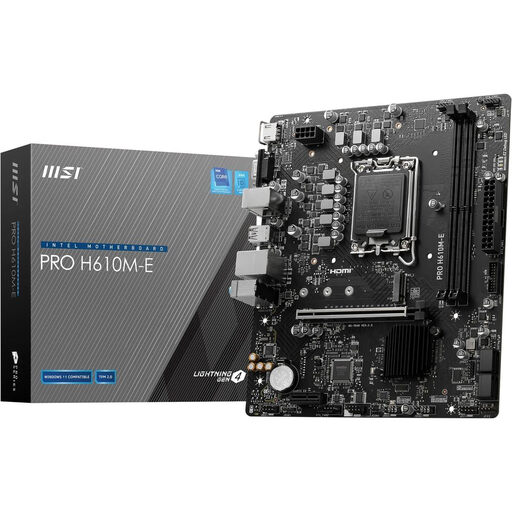
Why this product suits the profile: This compact LGA 1700 board supports DDR5, has a PCIe 4.0 x16 slot and an M.2 slot for NVMe storage. It is suitable for a straightforward build with limited expansion requirements.
DDR5 support is clearly stated, helping you avoid confusing it with DDR4 memory. The Micro-ATX design makes it easier to integrate into compact cases.
Two DDR5 DIMM slots, one PCIe 4.0 x16 slot and one M.2 slot.
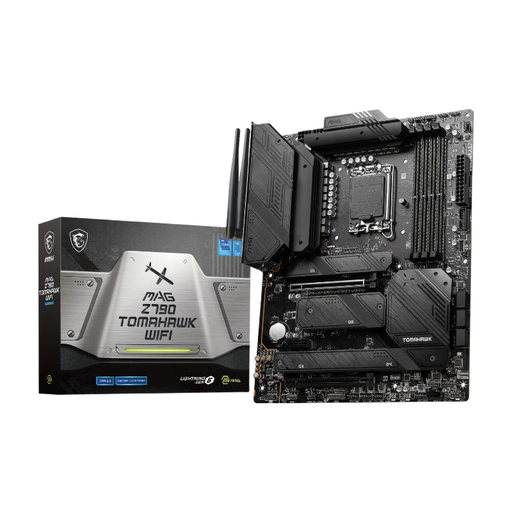
Why this product suits the profile: This ATX motherboard combines four DDR5 slots, four M.2 interfaces, PCIe 5.0, Wi-Fi 6E and 2.5-gigabit LAN. It is well suited to comprehensive gaming and content creator systems.
The key standards and connections are clearly specified. This allows buyers to check whether their case, memory, graphics card and SSDs match the available features.
16+1+1-phase power delivery, four M.2 slots, PCIe 5.0 x16 and integrated Wi-Fi 6E.
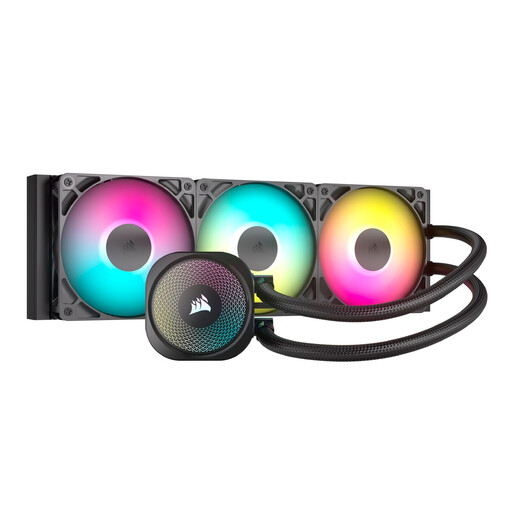
Why this product suits the profile: This 360 mm AIO features three RS120 ARGB fans, PWM control and direct connections to the motherboard. It supports Intel LGA 1851, LGA 1700, as well as AMD AM5 and AM4.
The required PWM and 5V 3-pin ARGB connections can be checked before installation. This prevents 5V ARGB and 12V RGB connectors from being confused.
360 mm radiator, three PWM fans, ARGB control via the motherboard and broad socket support.
With a sealed AIO, the cooling circuit should not be opened. If you notice visible fluid, unusual noises or a system failure, switch off the PC and disconnect it from the mains.
We have compiled a complete, regularly updated list of products that fully meet these strict selection criteria and the safety regulations applicable in the EU.
The key question is whether the package includes a suitable LGA 1700 mounting bracket or whether the manufacturer explicitly lists this socket as supported. You must also check the radiator size, case and connections. Several 360 mm models in this selection list LGA 1700 and LGA 1851 as supported Intel sockets.
Its service life depends on factors including pump operating time, dust levels, case ventilation and installation. An AIO should be checked regularly for unusual noises, rising temperatures and visible damage. The sealed cooling circuit must not be opened independently.
Not necessarily. The key considerations are the CPU, graphics card, memory, number of M.2 slots, networking and expansion requirements. An H610 or B760 Micro-ATX board may be sufficient for compact systems, while a Z790 ATX model may offer additional connections, DDR5 support, PCIe 5.0 or better expandability. What matters is that the features match the PC you plan to build.