What should you look for when buying?
Gaming and recording on the same PC
A good fit if: The game runs on your new PC and you want to record gameplay with OBS.
The trade-off: A hardware encoder can take some of the load off the CPU, but the game and OBS may both use GPU resources at the same time. A parts list can’t predict a specific recording frame rate.
Console gaming with recording on a PC
A good fit if: You play on a console and want to show its picture in OBS.
The trade-off: Your PC’s graphics card won’t automatically bring in the console signal. A capture device or supported Remote Play option needs to work with your console, PC and preferred recording format.
OBS Project points out that system requirements alone don’t guarantee a particular level of recording performance. Plan your devices and intended recording setup together, then check everything with a test recording.
| What you need |
What to check before buying |
Who this matters most to |
| Running the game and OBS at the same time |
Consider the game’s requirements, a supported hardware encoder and your planned OBS scene; test the game and recording together. |
If I’m gaming and recording on the same PC, I want to know whether it can handle the specific scene and game I’ll be using. Around 31% of consumers choosing a PC for this purpose prioritise gaming and recording at the same time. |
| Bringing in the console picture |
Check the capture device or supported Remote Play option, connections and compatibility with your console and PC. |
If the game runs on a console, I need a reliable way to get its picture to the recording PC before setting up OBS. That’s why around 25% of consumers focus on bringing the console picture into their setup. |
| Camera and clear voice audio |
Check the connections and that OBS recognises the camera and audio devices you plan to use; set up audio sources separately. |
If I want to show how to hold a controller and record my explanation, the picture and sound need to work together in the same scene. Around 19% of consumers prioritise a camera and clear voice audio. |
| Storage and editing |
Check the SSD capacity and upgrade options for the exact model, along with whether your editing software supports the recording format and codec. |
If I’m recording several takes and editing them afterwards, I want to choose storage and file formats to suit my workflow. Around 13% of consumers prioritise storage and post-production. |
| Space and noise |
Check the case dimensions and assess fan noise under your own gaming and recording workloads, especially if your microphone will be close to the PC. |
If the tower needs to sit near the microphone, I want to know in advance whether it will fit and whether it could affect the recording. Around 12% of consumers focus on finding a suitable, as-quiet-as-possible studio spot. |
Joybuy products for PC gaming and recording
This selection includes gaming PCs and laptops for gaming and recording on the same device. For each model, check that the exact specification suits your game, OBS scene and connected studio equipment.
 No image available
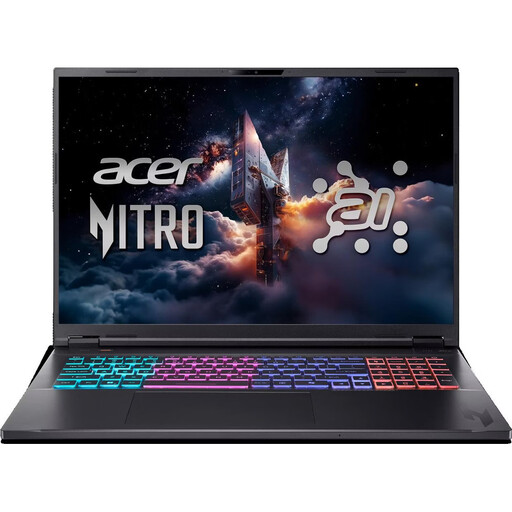
Acer Nitro 18 AI AN18-61-R40J
For gaming and OBS on the same device; test your planned recording with your game and chosen sources.
18-inch 165 Hz display; Ryzen AI 7 350; RTX 5070; 16 GB RAM; 1-TB SSD; RAM upgradeable to 32 GB.
Listed connections include USB-A, USB-C, HDMI and RJ-45.
View at Joybuy
 No image available
Acer Predator Orion 3000 Desktop i5 Ultra
For gaming and recording on the same PC; test your game and OBS scene together before you start using it.
Core Ultra 5 225F; RTX 5060; 16 GB DDR5 RAM; 512-GB SSD; RAM upgradeable to 32 GB.
Listed connections include USB-A, USB-C, HDMI and RJ-45.
View at Joybuy
 No image available
Acer Nitro 20 N20-100 Desktop i5
For gaming and recording on the same device; consider the OBS scene and planned equipment as well as the game.
RTX 5060; 32 GB DDR4 RAM; 1-TB SSD and 1-TB HDD; 8-core processor.
USB ports, DisplayPort, HDMI and two RJ-45 ports are listed.
View at Joybuy
 No image available
HP OMEN 16-ap1099ng
If you’re considering this model for PC gaming and OBS, check the exact variant and its specifications against your recording workflow before buying.
View at Joybuy
 No image available
HP OMEN 16-ap1071ng
For gaming and OBS on the same device; check that the connections and exact specifications suit your recording sources.
16-inch QHD 165 Hz display; Ryzen 7 8745HX; RTX 5060; 16 GB RAM; 1-TB SSD.
Listed features include an integrated webcam, microphone input, HDMI 2.1 and several USB ports.
View at Joybuy
Frequently asked questions
Do I need a capture card to make a controller tutorial using a console?
For a direct feed of the console picture into OBS, OBS Project lists a game capture device. It also describes Remote Play and the Xbox app as alternatives; check that your console supports them and that your network connection is suitable. A camera showing your hands is a separate video source.
How do I set up picture and sound without recording the game audio or microphone twice?
Add separate sources in OBS for the game or capture device, camera and microphone, then check the audio tracks with a short test recording. OBS Project warns that you may get an echo if the same audio device is added both globally and as a separate scene source.
Which recording format is best for editing later?
OBS Project describes MKV as a more resilient recording format, although some editing software may require you to remux it first. Check which containers and codecs your editing software supports; OBS also lists fragmented MP4 and MOV variants as possible alternatives.
What should I do if a new PC bought from a retailer in Germany is faulty?
Your statutory rights and a voluntary manufacturer’s guarantee are separate. According to the Verbraucherzentrale, the retailer is generally responsible for statutory rights when goods are faulty; new goods usually have a two-year period. For sales contracts from 31 July 2026, the Verbraucherzentrale says that choosing a repair extends this period once by 12 months.
Can I clearly show someone else in a tutorial I publish?
If other people can be identified in a published tutorial, the German legal position explained here is that you generally need their consent or another applicable legal basis. Any exceptions, as well as the specific purpose of recording and publishing, should be considered separately.


