Which type of PC is right for you?

Orbital gamers with a cramped cockpit

If space is limited, check the case dimensions, cable routing and airflow together. ASUS and ZOTAC document different compact PC designs; what matters is how the exact configuration will fit in your intended space.

Gamers with a specific simulation in mind

If you already know which game you want to play, compare its version and your preferred settings with the specifications of the PC you’re considering. Steam lists requirements for Kerbal Space Program; the developers’ specifications for Kerbal Space Program 2 relate to a different game and its own settings.

Cockpit users with multiple peripherals

If you want to connect a screen and controls at the same time, check the ports on the exact PC variant against your devices. ASUS and ZOTAC’s specifications refer to specific configurations, not necessarily every version in a product range.

What should you look for when buying a PC for a cramped cockpit?

Gaming mini PC

A good fit if: space is particularly limited and the exact configuration suits your game, screen and controls.

Consider: Upgrade options may be limited on compact devices. Also check for independent noise measurements of the specific model.

Compact gaming desktop

A good fit if: you have room for a larger case alongside your cockpit and a pre-configured alternative could work for you.

Consider: Case dimensions and specifications vary by model and variant. Manufacturer details for one configuration won’t necessarily apply to a different listing.

Larger gaming tower

A good fit if: you have enough space outside the immediate cockpit area and documented upgrade options are important to you.

Consider: A tower takes up more room; the fact that you play space games doesn’t automatically mean you need extra graphics performance.

What matters What to check before buying Who will find this especially important?
Performance for your specific game Compare the game version and preferred resolution with the CPU, graphics chip, RAM and storage in the exact PC variant. If I want to play a particular orbital game, I want to match the specification to its version and settings. That’s why around 25% of consumers put suitable gaming performance first.
Space in the cockpit Measure the width, depth and height, as well as the intended orientation, cable exits and clearance for ventilation, at the exact location. With limited cockpit space, I want to fit the PC and its cables while keeping airflow clear. Around 25% of consumers give having a suitable space the highest priority.
Ports for your screen and controls Compare the types and number of USB ports you need, as well as the video outputs, with the ports on your devices. If I want to connect my screen and controls at the same time, I want to avoid having to keep swapping connections. Around 20% of consumers prioritise having the right ports.
Cooling and noise Keep ventilation openings clear where you place the PC and, where available, check independent noise measurements for the exact model under load. If the PC is close to where I sit, I want to take noise and heat dissipation into account when choosing. Around 15% of consumers put this first.
What’s included and future changes Check the RAM, SSD, operating system and documented upgrade options for the exact variant. If I want a system I can use straight away or plan to make changes later, I want to know exactly what’s included and what can be upgraded. Around 15% of consumers prioritise what’s included and upgradeability.

These buying misconceptions can lead to the wrong choice

  • “Gaming mini PC” means it’ll run every orbital game well

    Published requirements vary between games, and mini PCs use different graphics solutions. So a general gaming label doesn’t tell you whether a specific model is suitable for the game version and settings you want.

    Start by deciding which game you’ll play and what screen settings you want, then compare the requirements with the PC’s full configuration.

  • You can compare a barebone directly with a complete PC

    A barebone may be missing components or an operating system licence. MINISFORUM specifically states that the AtomMan G7 Pt barebone variant doesn’t include an operating system licence.

    Check what’s included with the specific configuration before comparing offers.

    Depending on the barebone configuration, you may also need to buy RAM and an SSD; for the AtomMan G7 Pt mentioned above, you’ll also need an operating system licence.

  • A compact case won’t need any extra space in your cockpit

    Case dimensions alone don’t account for cable routing or the clearance needed around ventilation openings. A tight fit can also make ports harder to access.

    Measure the exact space where you plan to put the PC, and check that the ports will remain accessible and the ventilation areas unobstructed.

Key brands and product ranges to consider

ASUS ROG

ROG NUC mini PCs are aimed at buyers short on space who want a specific gaming configuration.

  • ASUS lists different laptop graphics chips and RAM configurations for the ROG NUC (2025).
  • These are manufacturer specifications, not independent performance or noise measurements. A laptop GPU shouldn’t be assumed to match a desktop GPU with the same RTX name.

MINISFORUM

The AtomMan range includes mini PC variants with different processor and graphics platforms.

  • MINISFORUM offers barebone and fully equipped variants, depending on the model.
  • For the AtomMan G7 Pt barebone, MINISFORUM specifically states that an operating system licence isn’t included. Manufacturer performance claims aren’t a substitute for testing the simulation you’ve chosen.

ZOTAC

The MAGNUS ONE EU275070C is a compact desktop alternative if you’re considering a model with a documented desktop graphics card.

  • For the Windows version, ZOTAC lists an 8.48-litre case, an RTX 5070, 16 GB RAM and a 1 TB SSD.
  • These specifications apply to the Windows version listed and shouldn’t be assumed to apply to other variants or retailer offers without checking.

HP OMEN

The OMEN 16L offers a compact desktop design rather than an ultra-small mini PC.

  • HP lists Windows 11 Home, 16 GB RAM, a 512 GB SSD and an 8 GB RTX 5060 for the TG03-1770ng.
  • Cooling information on the product page is provided by the manufacturer and isn’t an independent measurement for orbital games.

Lenovo Legion

The Legion Tower 5i is worth considering if you have room for a tower outside the cockpit and want upgrade options.

  • Lenovo documents upgradeable memory and storage for this range.
  • Available configurations vary, and the range isn’t automatically suitable for a cramped space.

Joybuy PCs for compact cockpit setups

The Joybuy options below are mini PCs for compact cockpit setups. Compare the specifications of each model with your game’s requirements, as well as the available space and ports where you’ll use it.

FIREBAT F1 mini gaming PC with AMD Ryzen 5 7640HS, 12 GB DDR5 RAM and 512 GB SSD

FIREBAT F1 mini PC, Ryzen 5 7640HS, 12 GB DDR5, 512 GB SSD

A mini PC can be useful when cockpit space is limited; whether it has enough performance depends on the simulation you choose.

Specifications listed: AMD Ryzen 5 7640HS, 12 GB DDR5 RAM, 512 GB SSD, Windows 11 Pro, Wi-Fi 6 and USB4.0.

View at Joybuy
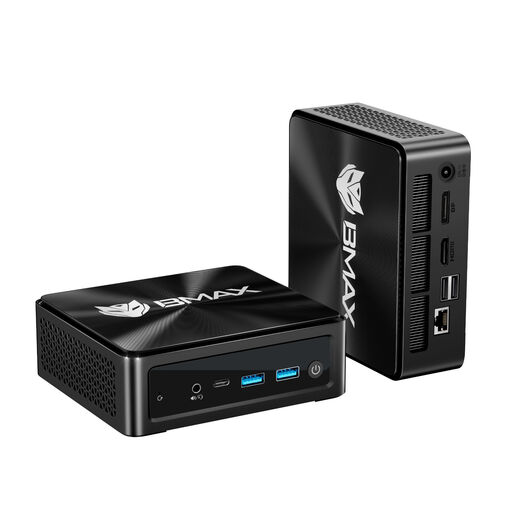
BMAX B8A Pro mini PC with AMD Ryzen 7 8745HS, 16 GB DDR5 RAM and 512 GB SSD

BMAX B8A Pro mini PC, Ryzen 7 8745HS, 16 GB DDR5, 512 GB SSD

The mini PC design may suit a compact setup; check whether it meets the requirements of the specific simulation you play.

Specifications listed: AMD Ryzen 7 8745HS, 16 GB DDR5 RAM, 512 GB SSD and Radeon 780M.

The product details list HDMI 2.1, DisplayPort 2.1 and USB-C, as well as support for three 4K screens; check that the ports match your devices.

View at Joybuy

FIREBAT AM02L mini PC with AMD Ryzen 5 6600H, 16 GB LPDDR5 RAM and 512 GB SSD

FIREBAT AM02L mini PC, Ryzen 5 6600H, 16 GB LPDDR5, 512 GB SSD

The product title describes this as a light gaming PC, so check how it matches the requirements for your specific orbital game version.

Specifications listed: AMD Ryzen 5 6600H, 16 GB LPDDR5 RAM and 512 GB M.2 NVMe SSD.

The title lists HDMI 2.1, DisplayPort 1.4, Wi-Fi 6, Bluetooth 5.2 and 2.5G Ethernet.

View at Joybuy

FIREBAT mini PC with AMD Ryzen 7 7735HS, Radeon 680M, 16 GB RAM and 512 GB SSD

FIREBAT mini PC, Ryzen 7 7735HS, Radeon 680M, 16 GB RAM

The compact design may suit a cramped cockpit; assess the specifications against the requirements of the game you actually play.

Specifications listed: AMD Ryzen 7 7735HS, Radeon 680M, 16 GB RAM and a 512 GB SSD.

The product details list two M.2 slots and support for three displays; check the connection types you need for your screen and controls.

View at Joybuy

FIREBAT F1 mini PC with AMD Ryzen 5 7640HS, Radeon 760M and 24 GB LPDDR5 RAM

FIREBAT F1 mini PC, Ryzen 5 7640HS, Radeon 760M, 24 GB LPDDR5

A mini PC can be a good choice when cockpit space is limited; compare the exact specifications with your game’s requirements.

Specifications listed: AMD Ryzen 5 7640HS, Radeon 760M, 24 GB LPDDR5 RAM and a 512 GB PCIe 4.0 SSD.

The title lists USB 4.0, HDMI 2.1 and support for output to three screens.

View at Joybuy

Frequently asked questions about gaming PCs for orbital cockpits

Are Kerbal Space Program’s system requirements also suitable for Kerbal Space Program 2?

No, the specifications aren’t interchangeable. For Kerbal Space Program on Windows, Steam recommends at least 8 GB RAM, among other requirements. The developers’ specifications dated 17 February 2023 list separate requirements for Kerbal Space Program 2 at 1080p on low settings and 1440p on high settings, and relate to the Early Access version. Check the requirements for the version you actually want to play.

What should I consider when placing and connecting a PC in my cockpit?

Measure the intended space, including room for cables, and keep the ventilation openings clear. Then compare the video and USB ports on the exact PC variant with the screen and controls you want to use at the same time.

Is a barebone ready to use straight away?

Not necessarily. MINISFORUM offers an AtomMan G7 Pt barebone without an operating system licence, as well as a variant with 32 GB RAM and a 1 TB SSD. Before comparing, check which components and licence are included in the specific offer.

What are your rights if a PC bought online in Germany is faulty?

If a PC is faulty, your statutory rights against the seller may apply; these are separate from any voluntary guarantee. In its article dated 28 September 2026, the Verbraucherzentrale explains that online purchases generally come with a right to cancel, usually within 14 days. The statutory requirements and exceptions will depend on the specific contract.

What conformity information matters when buying a PC for Germany?

For products covered by the relevant EU rules, you should check for the required CE marking and accompanying information. The Bundesnetzagentur lists checks including correct CE marking, product and manufacturer details, required German-language information and a declaration of conformity. Check these details for the specific offer; a brand or product range name alone doesn’t prove compliance.