What to consider when buying
First, choose your simulator and monitor resolution. Then check the full PC specification and plan how you’ll use charts, the cockpit view and controls on one screen.
| Buying consideration |
What to check before buying |
Who it matters most to |
| Simulator and PC requirements |
Microsoft recommends 32 GB of RAM and 8 GB of VRAM for Microsoft Flight Simulator 2024. For X-Plane 12, Laminar Research recommends 16–24 GB of RAM or more and at least 8 GB of VRAM; check the CPU and operating system too. |
If I want to use a particular simulator, I need to compare the complete specification rather than focus only on the graphics card model. Around 29% of consumers put compatibility with their simulator first. |
| Charts and cockpit on one screen |
Microsoft describes airport charts in the Electronic Flight Bag for Microsoft Flight Simulator 2024. Check that the monitor resolution and connection match the specific PC model. |
If I want to use charts and the cockpit view on my only monitor, the layout needs to work for my practice sessions. Around 24% of consumers prioritise using an airport chart on one screen. |
| Controls |
Check that the ports support your existing input devices and that you can set up the controls you want. Microsoft Flight Simulator Support describes control profiles for specific devices and aircraft. |
If I want to use my existing controls for taxiing, I need to be able to connect and configure them properly. Around 18% of consumers pay particular attention to integrating their control devices. |
| Space and case |
Compare the dimensions of the specific model with the space available, and check the documented connectivity and expansion options. |
If there’s little room next to my monitor, the case needs to fit in the space I have. Around 17% of consumers focus on the space available. |
| Connectivity and setup |
Microsoft recommends a bandwidth of 50 Mbit/s for Microsoft Flight Simulator 2024. Also check whether the simulator licence and the input devices you want are part of your planned setup. |
If I’m planning my whole setup, I need to consider connectivity, software and the equipment I’ll need as well as the PC. Around 12% of consumers focus mainly on these requirements and the overall setup. |
Joybuy products
The Joybuy models below cover a range of single-monitor setups, from towers and mini PCs to laptops. Check each model against the requirements of your chosen simulator.
 No image available
HP Z2 Tower G1i A40MMET, Core Ultra 7 265
The listed DisplayPort outputs are relevant for connecting one monitor; check that they match your screen.
Core Ultra 7 265, 32 GB DDR5-5600, Intel Graphics and Windows 11 Pro. The product details list both a 1 TB and a 2 TB SSD; check the storage capacity of your chosen model before buying.
View at Joybuy
 No image available
Dell Alienware Aurora ACT1250 1J3N5, Core Ultra 9 285K
Check that the listed HDMI and DisplayPort outputs match your single monitor; that alone doesn’t mean the PC is suitable for every simulator.
32 GB of RAM, a 2 TB SSD, a GeForce RTX 5080 with 16 GB of graphics memory and Windows 11 Home. Check the full requirements to see whether this configuration is right for your resolution and simulator.
View at Joybuy
 No image available
MSI Stealth A16 AI+ Mercedes-AMG Motorsport A3XWGG-052
The integrated 16-inch QHD+ display can serve as your only screen; check that it works well for viewing charts and the cockpit.
Ryzen AI 9 370, 32 GB of RAM, a 2 TB SSD and a GeForce RTX 5070 with 8 GB of graphics memory. HDMI is also listed.
View at Joybuy
 No image available
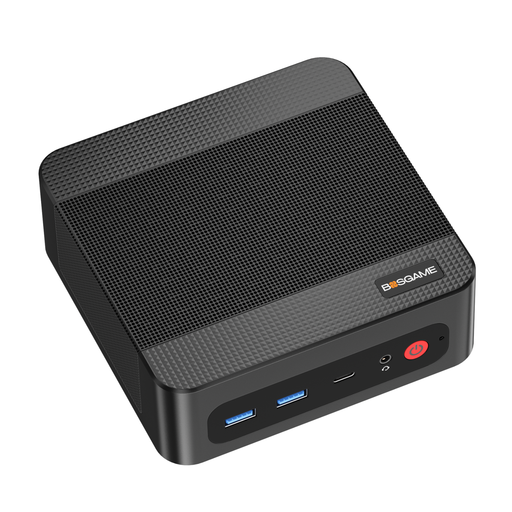
BOSGAME P4 Ultra mini PC, Ryzen 7 7730U
This mini PC could suit a compact workspace; check that its connections work with your existing display.
16 GB of DDR4 and a 512 GB PCIe SSD. Laminar Research recommends 16–24 GB of RAM or more for X-Plane 12; Microsoft recommends 32 GB for Microsoft Flight Simulator 2024. So, compare the full configuration with the requirements of your simulator.
View at Joybuy
 No image available
FIREBAT mini PC, Ryzen 7 7735HS
The compact design could be useful if space is limited; check that the HDMI and USB4 outputs work with your monitor.
Radeon 680M, 16 GB of RAM and a 512 GB SSD. Microsoft recommends 32 GB of RAM for Microsoft Flight Simulator 2024; Laminar Research recommends 16–24 GB or more for X-Plane 12. These specifications alone don’t confirm that the whole system is suitable.
View at Joybuy
Frequently asked questions
Which requirements should I check first for Microsoft Flight Simulator 2024?
Compare the complete recommended PC specification with the configuration you’re considering. Microsoft lists, among other things, 32 GB of RAM, 8 GB of VRAM, 50 GB of storage and 50 Mbit/s bandwidth; these specifications don’t guarantee a particular frame rate at your airport.
How can I use an airport chart on my only monitor?
Microsoft describes airport charts in the Electronic Flight Bag for Microsoft Flight Simulator 2024. You can open it from the world map or in the cockpit using Tab; try switching between the chart and the view you need for taxiing.
What can I do if my control device isn’t responding as expected?
Open the control settings, select the recognised device and check its assignments and any potential conflicts. Microsoft Flight Simulator Support describes general profiles as well as profiles for specific aircraft and devices.
Can I try the X-Plane 12 demo first on a PC that’s close to the minimum requirements?
Yes. Laminar Research recommends trying the demo first if your system is close to the minimum requirements, and says the full version performs the same on that system. Check any additional aircraft and scenery separately.
Does practising taxiing on a home gaming PC count as flight training?
You can’t assume that it does just because you own a gaming PC or flight simulator. The European Union Aviation Safety Agency sets out a separate framework for the qualification and use of Flight Simulation Training Devices; check with your training organisation whether your practice can count towards your training.


