
Lieferung heute & morgen

Qualitätsgarantie

Willkommens-Angebote freischalten: KOSTENLOSE Lieferung | Bis zu 80 % RABATT | Kostenlose 30-Tage-JoyPlus-Testphase
App herunterladen
When you're buying gaming PC hardware, you'll often compare processors, graphics cards or RGB lighting first. However, for a system to work properly, compatibility, cooling, memory standards and upgrade options are equally crucial. A flashy product description is no substitute for checking the technical specifications.
This buying guide shows what gaming enthusiasts, PC builders, upgraders and content creators should look out for – and categorises selected gaming PC components, gaming laptops and mini PCs according to different user profiles.
A high figure like 6000 MT/s describes the theoretical data transfer rate of memory. It doesn't automatically guarantee a certain frame rate or shorter loading times in every game. For that, the motherboard, processor, BIOS settings and memory profile all need to work together.
It's also important to distinguish between standard speed and profile speed. With the Kingston FURY Beast RGB DDR5 32GB Kit, for example, the standard SPD speed is 4800 MT/s, while 6000 MT/s is activated via a compatible AMD EXPO or Intel XMP 3.0 profile.
A gaming laptop RTX 5060 or gaming laptop RTX 4060 shouldn't be judged solely by the GPU name. What matters includes the specific power draw of the notebook graphics, the cooling system, the display resolution and the refresh rate.
A QHD+ display with 240 Hz places different demands on the system than a Full HD display with 144 Hz. The capacity of the RAM and SSD also affects how well a notebook is suited to gaming, streaming or video editing.
RGB DDR5 memory requires not only a compatible DDR5 slot but often also software or motherboard control. Not every lighting control system works the same way with every motherboard. So before you buy, you should check which systems are supported, such as ASUS Aura Sync, MSI Mystic Light, Gigabyte RGB Fusion or ASRock Polychrome.
For many current games and multitasking scenarios, a DDR5 RAM 32GB 6000MHz kit with two 16 GB modules is a practical starting point. Two modules enable dual-channel operation, provided they are installed in the slots recommended by the motherboard.
When comparing, these specifications are relevant:
An AMD AM5 motherboard must be compatible with the processor and DDR5 memory. The ASUS PRIME A620M-K features an AM5 socket, two DDR5 DIMM slots, one PCIe 4.0 x16 slot, one M.2 slot with PCIe 4.0 x4, and four SATA 6 Gbit/s ports.
Before buying, you should particularly check the following points:
DDR4 and DDR5 memory are not interchangeable. A DDR5 module belongs exclusively in a compatible DDR5 slot.
A gaming laptop combines the display, keyboard, battery and hardware in a single device. This is practical for users who move between home, office, university or LAN parties. A mini PC with Ryzen AI, on the other hand, usually requires a separate display, input devices and possibly an external graphics card, but offers a compact chassis and flexible connectivity options.
With both device categories, you should consider cooling, power supply, storage, RAM upgradeability and port selection. A mini PC with integrated Radeon graphics is not automatically comparable to a desktop PC with a dedicated graphics card. The specific games you play and the resolution you want remain decisive factors.

Why this product fits the profile: This Micro-ATX motherboard is aimed at compact AM5 systems with modest feature requirements and DDR5 memory.
The product data clearly states the socket, chipset, RAM type, form factor and ports. This allows you to check compatibility before buying.
AMD AM5 socket, two DDR5 DIMM slots, M.2 PCIe 4.0 port and Micro-ATX form factor.
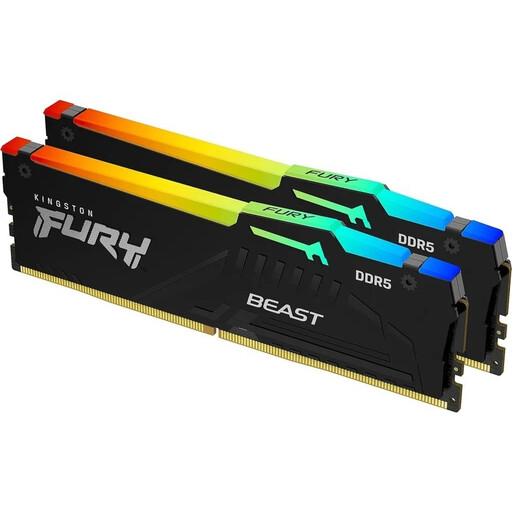
Why this product fits the profile: This kit combines 32 GB capacity with 6000 MT/s, CL30 and support for both AMD EXPO and Intel XMP 3.0.
Standard and profile speeds are listed separately. This makes it clear that the advertised transfer rate requires BIOS activation.
Dual-channel kit with 2 × 16 GB, CL30-36-36, On-Die ECC and customisable RGB lighting.
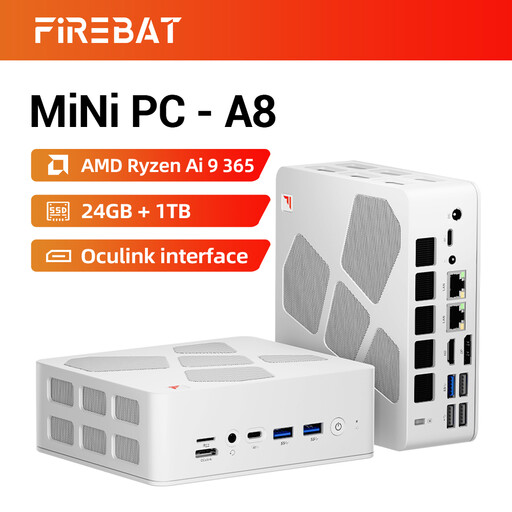
Why this product fits the profile: This compact computer is ideal for users with limited space, multiple displays and a need for modern ports for office work, media and selected games.
The specification explicitly highlights integrated Radeon 880M graphics, a 1 TB SSD, USB4, Oculink and four display outputs. This means the port situation can be assessed in advance.
24 GB DDR5 RAM, 1 TB PCIe 4.0 SSD, Wi-Fi 6E, two 2.5 Gbit Ethernet ports and support for up to four displays.
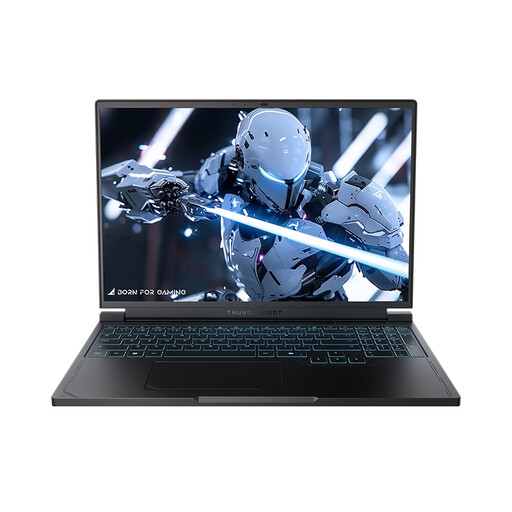
Why this product fits the profile: This notebook combines a 16-inch QHD+ screen with 240 Hz, 16 GB DDR5 RAM, a 1 TB SSD and an NVIDIA GeForce RTX 5060 Laptop GPU.
Display resolution, refresh rate, CPU, GPU, storage and ports are all listed together. This allows you to assess the overall device configuration rather than just the GPU name.
QHD+ panel with 2560 × 1600 pixels and 240 Hz, Ryzen 7 7745HX, 1 TB NVMe SSD and Wi-Fi 6.
We've put together a complete, regularly updated list of products that fully meet these strict selection criteria and the safety regulations in force in the EU.
32 GB as a 2×16 GB kit is a practical configuration for many gaming and streaming scenarios. If you also work with extensive video projects, virtual machines or memory-intensive applications, you might consider a 64 GB kit such as the G.Skill Trident Z5 RGB. The motherboard, processor and supported memory capacity remain the deciding factors.
No. The actual performance depends on factors including the notebook's GPU power draw, the cooling system, the processor, the RAM and the resolution used. So when comparing, you should look at the full technical specifications rather than just the model name.
It's not possible to give a reliable fixed lifespan. It depends on operating hours, temperatures, dust exposure, power supply quality and usage profile. Good ventilation, up-to-date firmware and operation within the intended voltage and temperature ranges can help support operational reliability. Manufacturer specifications and warranty conditions remain the key reference.