Squad players with a permanent desk setup
If you want to play a particular game on your monitor, match the processor, graphics card and target frame rate to that goal. PUBG Support and Epic Games Support each set out requirements for their games.


Choose a gaming PC based on the game you play, your monitor and the frame rate you’re aiming for, rather than treating the minimum requirements as your shopping target. PUBG Support and Epic Games Support distinguish between recommended requirements and higher performance targets. Then compare complete configurations, taking into account desk space, storage, connections and accessories.
If you want to play a particular game on your monitor, match the processor, graphics card and target frame rate to that goal. PUBG Support and Epic Games Support each set out requirements for their games.
If you don’t want to pay for performance headroom you won’t use, compare suitable complete configurations and factor in your existing monitor and any accessories you need. Bitkom e. V. has highlighted price concerns among a wider group of gamers; this does not show how buyers prioritise the PCs in this selection.
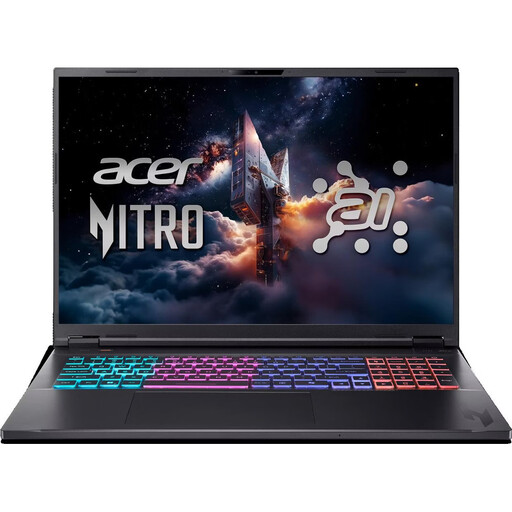
If your PC will sit on your work and gaming desk, check its dimensions, footprint and cable routing. Acer describes the Nitro 20 Intel series as a 17.3-litre desktop; the exact specifications depend on the variant.
Start by deciding on your game, monitor and target frame rate. Then consider which requirements for overall cost, space, storage and connectivity matter most for your workspace.
| What to consider | What to look for | Who should pay particular attention? |
|---|---|---|
| Game and frame rate | Check the requirements for the specific game you play, your resolution and your preferred settings. PUBG Support lists 16 GB RAM for its recommended requirements and 32 GB for competitive requirements; Epic Games Support lists 16 GB RAM for the recommended Fortnite configuration. | If you’re aiming for a particular frame rate in matches on your monitor, choose based on the game and settings rather than just the minimum requirements. Around 29% of consumers put suitable gaming performance first. |
| Total cost | Include any missing peripherals and the PC’s actual power consumption in your comparison. The power supply’s rated wattage is not a measure of its power consumption during use. | If you’re planning a complete setup for gaming and work, factor in your existing monitor and any accessories you need. Around 23% of consumers put total cost first. |
| Desk space and noise | Compare the dimensions of the exact model with the space available and your cable routes. You can’t work out how noisy a PC will be under load from the case size alone. | If the PC will sit next to your desk in your home office, you’ll need to make sure the case and cables will fit. How noisy it is during use also matters. Around 18% of consumers prioritise space and a quiet workspace. |
| Storage and upgrades | Check the SSD capacity and the upgrade options available on the exact variant. Lenovo lists a 512 GB SSD for the Legion Tower 5 Gen 10, while HP lists a 1 TB SSD for the OMEN 35L GT16-0778ng. | If you’re planning to add more games or work files, check the storage space and which upgrade options are still available. Around 18% of consumers put storage and future customisation first. |
| Internet connection | Check whether you can run an Ethernet cable to your router and how you’ll route it around your workspace. PUBG Support notes that Wi-Fi can be more susceptible to interference. | If a stable connection matters for your online matches, check whether your workspace allows for a wired connection. Around 12% of consumers put connection stability first. |
A shared series name doesn’t tell you exactly which CPU, memory or other specifications a particular variant includes. Published specifications differ between Nitro 20 offers with similar names.
Before buying, compare the full model number and the specifications of the key components. Don’t assume differences in the listed details are just down to packaging.
A power supply’s rated wattage doesn’t tell you how much electricity the specific configuration will actually use. Costs also depend on how long you use it and your price per kWh.
For a reliable cost estimate, use verifiable measurements or documented power consumption figures for the exact configuration, along with your own tariff.
According to Lenovo, the Lenovo Legion Tower 5 Gen 10 with model number 90YJCTO1WWDE1 does not include a keyboard or mouse.
Check what’s included with the exact variant and see how it compares with the monitor and peripherals you already own.
The Legion Tower 5 Gen 10 is a tower PC whose exact specifications can be compared using its model number.
The OMEN 35L GT16-0778ng is a more fully specified tower PC. It’s best suited to buyers whose gaming and monitor requirements call for that extra performance headroom.
According to Acer, the Nitro 20 Intel series is designed for a compact desktop setup.
The MAG Infinite Z 8B is a tower series for comparing specific PC configurations.
This selection includes gaming desktops for a permanent desk setup, as well as laptops with built-in displays for combining gaming and working from home in one place.
 No image available
A laptop with a built-in display could suit you if you want to use your PC and screen in the same workspace.
18-inch WQXGA display with 165 Hz; Ryzen AI 7; 16 GB RAM; 1 TB SSD; RTX 5070; Windows 11 Home.
The keyboard has an international English layout. Before buying, check that it suits the way you prefer to type.
 No image available
A desktop for a permanent desk setup, if you’re looking for a tower PC rather than a laptop.
Intel Core Ultra 5 225F; 16 GB DDR5; 512 GB SSD; RTX 5060; Wi-Fi 7; Windows 11 Home.
 No image available
A desktop for a permanent gaming and home-working setup, if you want to compare the listed specifications with your requirements.
i5; 32 GB DDR4 (2 × 16 GB, 3200 MHz); 1 TB SSD and 1 TB HDD; RTX 5060; Windows 11 Home.
Compare the full model number and memory specifications: published details differ between Nitro 20 configurations with similar names.
 No image available
A laptop with a built-in display could suit you if you want to combine gaming and working from home in one place.
16-inch QHD display; AMD Ryzen 9 8940HX; 24 GB RAM; 1 TB SSD; GeForce RTX 5070; Windows 11 Home.
 No image available
A laptop with a built-in display could suit you if you want one place for gaming and work.
15.6-inch Full HD display with 144 Hz; Intel Core i5-13420H; 16 GB RAM; 512 GB SSD; NVIDIA RTX 3050.
This variant is listed with a German QWERTZ keyboard layout.
Not if you’re expecting a particular frame rate or higher graphics settings. PUBG Support distinguishes between minimum, recommended and competitive requirements. Epic Games Support separates Fortnite’s minimum requirements, recommended specifications and Epic graphics settings. Decide on your game and target first: a list of requirements doesn’t tell you how well any given pre-built PC will perform.
Check that you can connect the monitor to the graphics card, that there’s enough space for the PC and its cables, and that you can run an Ethernet cable to your router. PUBG Support notes that Wi-Fi can be more susceptible to interference, but a wired connection doesn’t guarantee that all network problems will disappear.
Electricity costs depend on actual power consumption, how long you use the PC for and your price per kWh. Without these figures, it isn’t possible to give a reliable estimate for the PC. When you buy from a trader, you’re generally entitled to a minimum two-year legal guarantee from the date you receive the goods. This is separate from any voluntary manufacturer’s warranty.
For goods bought online, you generally have 14 days from delivery to cancel; a legal exception may apply to goods made to the customer’s specifications. The Bundesnetzagentur lists correct CE marking, manufacturer details and a declaration of conformity among the checks for devices covered by its market surveillance. This doesn’t confirm whether a particular product listing meets these requirements.