First decide whether you want to use multiple monitors as separate workspaces or as one combined gaming display. For separate windows, check that the PC has suitable graphics outputs that can all be used at the same time. For a wide gaming view, the graphics card, software and specific game must also support the display you want. Compare the PC with your game’s requirements, and if you’re buying a complete system, check the memory, power supply and upgrade options too.
Who is a multi-monitor PC for?
Multi-monitor bridge builder
If you want to display a wide ship’s bridge, check the graphics outputs, combined resolution and support from the specific game together. AMD and NVIDIA explain how to set up multiple displays as one combined screen, but that doesn’t automatically mean a particular game will support this display setup.
Simulator player with extra screens
If the game runs on one monitor and you want separate windows on additional screens, independent graphics outputs and your Windows display layout are key. Microsoft Support explains how to extend and position displays in Windows.
Budget-conscious pre-built PC buyer
If you’re choosing a complete PC rather than just a graphics card, compare the memory, SSD, power supply and possible upgrades too. Specifications and what’s included can vary even within the same product range.
What should you look for when buying?
Separate screens
Ideal if: you want the game to run on one monitor and separate windows to appear on additional screens.
Bear in mind: Connecting several monitors doesn’t mean the game itself will offer one continuous multi-monitor view.
Combined gaming view
Ideal if: you want the virtual bridge to span several monitors and the specific game supports the display you want.
Bear in mind: The combined resolution increases with the number and resolution of the displays. Suitable hardware alone doesn’t guarantee game support or a particular frame rate.
| Buying priority |
What to check before buying |
Who it matters most to |
| Wide gaming view |
Check the graphics card’s outputs and the number of displays it supports at the same time, the total resolution and the game’s display options. |
If I want to show a wide ship’s bridge across several monitors, the complete PC and game setup needs to be compatible. This is likely to be the top priority for around 50% of consumers with this requirement. |
| Separate additional windows |
Check that there are suitable connections for all screens and how many displays can be supported at the same time. In Windows, choose ‘Extend’ rather than ‘Duplicate’ for independent windows. |
If I want to play on one screen and use separate windows on the others, I need independent displays. Around 30% of consumers are likely to consider this setup their top buying priority. |
| Overall specification and upgrades |
Check the memory, SSD, power supply, upgrade options and exactly what’s included in the specific offer. |
If I’m choosing a complete PC, I want to consider the storage and scope for future upgrades as well as the graphics card. This is likely to be the top priority for around 20% of consumers focused on the overall specification. |
Steam lists Windows 11 64-bit, an AMD Ryzen 5 2600 or Intel Core i7 10700, 16 GB RAM and 25 GB of free storage as the recommended specifications for ‘Ships At Sea’. These are the game’s requirements and don’t guarantee a particular level of performance or multi-monitor support.
Common buying mistakes
-
Assuming lots of ports mean you can have a wide gaming view
The number of displays supported depends on the specific graphics card. A combined gaming display and support from the game are separate considerations.
Check the exact graphics card variant, monitor connections and the game’s display options separately.
A splitter that isn’t suitable for independent displays could mean an extra accessory purchase.
-
Comparing only the graphics card and starting price of a pre-built PC
The power supply and other components may limit your options for upgrades. Specifications and what’s included vary between models.
Compare the full technical description and what’s included with your gaming and monitor plans.
Gaming PC brands to consider
ONE
- For the High End Gaming PC Next Level (64258), the manufacturer lists, among other specifications, a Ryzen 7 7800X3D, RTX 5070 Ti and 32 GB RAM.
- The operating system and configuration can be selected. The manufacturer’s estimated FPS figures relate to other games listed, not the ship simulation discussed here.
MEDION ERAZER
Gaming desktop ranges such as Recon, Bandit, Engineer, Tank and Hunter are available in various configurations.
- The manufacturer’s range overview lets you compare the CPU, graphics card, RAM and SSD across the ranges.
- Similar range names don’t necessarily mean the same specification: an Engineer X20 is not the same as an Engineer X30.
HP OMEN
Gaming desktops in a range of case sizes and specification tiers, including the OMEN 16L and 35L.
- The manufacturer’s German overview lists specific combinations of CPU, graphics card, RAM and SSD.
- Specifications vary between offers. The range name alone doesn’t tell you the number of connections or how well a game will run.
Memory PC
Configurable gaming PCs with a range of graphics card, processor and RAM combinations.
- The German range includes RTX 5070 variants with 16 GB or 32 GB RAM.
- Before ordering, check the selected graphics card variant, its connections and the full final configuration.
Acer Predator
Gaming desktops in the Predator Orion range, available in various model variants.
- In its gaming PC test list published on 9 June 2026, COMPUTER BILD rated the Orion 3000 PO3-650 as well equipped.
- COMPUTER BILD noted that the PO3-650’s 500-watt power supply limits its upgrade options. This doesn’t apply generally to other Orion 3000 variants.
Gaming PCs at Joybuy
The Joybuy offers below include gaming desktops and one gaming laptop. Before buying, check that the connections, specifications and form factor suit your planned monitor setup.
 No image available
Acer Predator Orion 3000 Desktop i5 Ultra
Described as a gaming desktop. Check that its specific graphics outputs suit your monitor setup.
16 GB RAM, 512 GB SSD, RTX 5060 and Windows 11 Home.
For ventilation, the product description recommends leaving at least 10 cm of clearance on all sides.
Joybuy
 No image available
Acer Nitro 20 N20-100 Desktop
For a separate-screen setup, the product description lists three DisplayPort connections and one HDMI connection. Check that the specific graphics card supports your setup.
RTX 5060, 32 GB RAM, 1 TB SSD, 1 TB HDD and Windows 11 Home.
For ventilation, the product description recommends leaving at least 10 cm of clearance.
Joybuy
 No image available
Captiva Highend Gaming PC R89-503
For connecting several screens, the product description lists three DisplayPort connections and one HDMI connection. Check separately whether the game supports a combined display.
AMD Ryzen 7 7800X3D, RTX 5070 Ti, 32 GB RAM, 2 TB SSD and Windows 11 Home.
Before switching it on, remove any internal transit restraints and keep the ventilation openings clear.
Joybuy
 No image available
Captiva PC Highend Gaming R90-463
For connecting several screens, the product description lists three DisplayPort connections and one HDMI connection. Also check that the specific game supports the display you want.
AMD Ryzen 7 7800X3D, RTX 5070 Ti, 64 GB RAM, 2 TB SSD and Windows 11.
The product description recommends leaving space between the PC and the wall and removing dust regularly.
Joybuy
 No image available
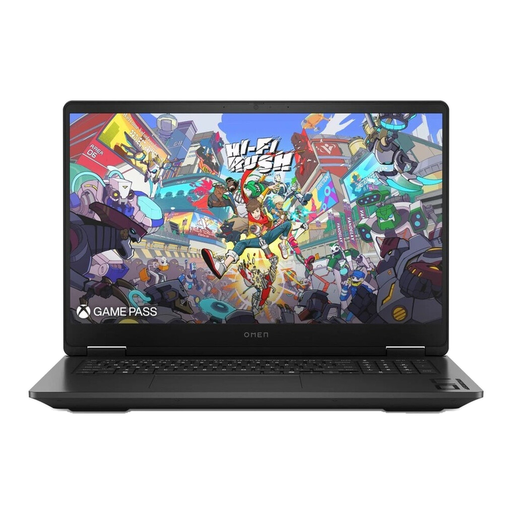
HP OMEN 17-db1077ng
This is a gaming laptop, not a gaming desktop. The description lists an HDMI connection for an additional monitor. Check for any other connections you need before buying.
17.3-inch QHD, AMD Ryzen AI 7 350, GeForce RTX 5070, 24 GB RAM, 1 TB SSD and Windows 11 Home.
Keep the ventilation openings clear while gaming and use the supplied power adapter.
Joybuy
Frequently asked questions
Are three connected monitors enough for a game to span all three?
No. The connections and simultaneous display support are only part of what you need to check. The graphics card, display software and specific game must also support the resolution and display setup you want.
How do I set up separate additional screens in Windows?
Connect the monitors to suitable outputs and choose ‘Extend’ in Windows if you want them to show independent workspaces. Microsoft Support also explains how to identify displays in Windows settings and arrange them to match their positions. A basic HDMI splitter duplicates the signal rather than creating independent displays.
What does a PC need to run ‘Ships At Sea’?
If ‘Ships At Sea’ is your game, Steam lists Windows 11 64-bit, an AMD Ryzen 5 2600 or Intel Core i7 10700, 16 GB RAM and 25 GB of free storage as the recommended specifications. These don’t guarantee a particular level of performance or a multi-monitor view.
What are your rights if you buy a faulty PC in Germany?
According to official EU consumer information, consumer purchases from a trader in the EU come with a minimum two-year legal guarantee from the date you receive the goods. If there’s a fault, contact the seller about your statutory rights; an additional manufacturer’s warranty doesn’t replace them.


