Drivers short on space
If your PC needs to fit in a tight cockpit, remember to allow space for cables and ventilation too. Check the actual dimensions rather than relying on the word ‘mini’ alone.


Start by choosing a PC that fits your available space and planned screen set-up. A suitably specified mini PC may work for a single monitor, while triple-screen gaming or VR calls for the right graphics outputs and configuration. A larger tower is an option if there’s room beside your cockpit and documented upgrade options matter to you. Manufacturer specifications don’t guarantee a particular frame rate for your racing set-up.
If your PC needs to fit in a tight cockpit, remember to allow space for cables and ventilation too. Check the actual dimensions rather than relying on the word ‘mini’ alone.
If you want to practise oval racing on one screen, compare the requirements of the game you’ll actually play with the specific PC configuration and your monitor resolution. iRacing sets out both minimum and recommended requirements.
If you want to use a headset or three monitors, check the GPU outputs, connections and requirements of the specific headset. iRacing advises connecting three monitors to the dedicated graphics card.
Best for: When space around your cockpit is particularly limited and the specifications suit your game and screen.
Consider: The MINISFORUM AtomMan G7 Ti is available as a barebone or, depending on the version, with RAM and an SSD; its RTX 4070 is a laptop GPU.
Best for: When there’s room for a small desktop on or under your cockpit and you’d prefer a fully configured PC.
Consider: HP lists replaceable RAM and an SSD for the OMEN 16L TG03-1770ng; this doesn’t mean the graphics card can be upgraded without restriction.
Best for: When there’s space beside your cockpit for a larger case, cables and room for ventilation.
Consider: Lenovo documents upgrade options for the Legion Tower 5i 90YA000CGF; the case measures 211 × 490,4 × 414 mm.
The right choice depends on which need you want to address first in your oval racing set-up.
| Your priority | What to check before buying | Who should pay particular attention? |
|---|---|---|
| Gaming on a single monitor | Compare the requirements of the specific game with your monitor resolution and dedicated graphics memory. iRacing lists 6 GB of dedicated graphics memory as the minimum and 8 GB as recommended; this doesn’t guarantee a particular frame rate. | If you mainly train on one monitor, you’ll want to choose a configuration that suits the game you actually play. Around 36 % of consumers put suitability for single-monitor gaming first. |
| Space and ventilation | Check the dimensions of the specific case, as well as space for cables and unobstructed air vents where you plan to put it. | In a tight cockpit, your PC needs to fit without getting in the way of controls or airflow. Around 29 % of consumers prioritise space. |
| Three monitors or VR | Check the required GPU outputs, monitor connections and requirements of the specific headset. iRacing recommends connecting three monitors to the dedicated graphics card. | If you’re planning to use a headset or three screens, you’ll need a configuration that suits your display set-up. Around 21 % of consumers put this requirement first. |
| Connections and upgrades | Check that USB ports are accessible for your existing accessories, and confirm the documented RAM and SSD slots for the exact version. | If your choice depends on a steering wheel, pedals or future upgrades, connections and available upgrade options matter. Around 14 % of consumers prioritise this need. |
The name alone won’t tell you whether a PC is right for your game or what frame rate to expect with your planned display set-up. MINISFORUM specifies that the AtomMan G7 Ti has an RTX 4070 laptop GPU.
Compare the exact PC version with the requirements of the game you’ll use and your single-monitor, triple-screen or VR set-up. Don’t assume laptop and desktop graphics cards are equivalent just because their model names are similar.
MINISFORUM sells the AtomMan G7 Ti both as a barebone and with 32 GB RAM and a 1 TB SSD, so the versions don’t have the same specifications.
Before you buy, check the version you’ve selected, the included memory and storage, and the operating system.
The PC’s dimensions don’t automatically account for connected cables or the space needed to keep air vents clear.
Plan where you’ll put it with the cables connected, and keep the vents unobstructed.
Statutory consumer rights apply against the seller; an additional guarantee is voluntary and may have its own terms. Germany’s consumer advice centre distinguishes between the two.
Keep a record of the seller, the model you bought and any guarantee that may have been offered.
The AtomMan G7 Ti is a mini PC option for particularly tight spaces.
The OMEN 16L is a compact desktop, with specifications that vary by model number.
The Legion Tower 5i 90YA000CGF is a tower designed to sit beside your cockpit.
The MPG Trident AS 14th range offers a slim desktop design between a mini PC and a larger tower.
Acer describes the Nitro 20 Intel range as a compact desktop series.
The Joybuy products below are mini PCs. Compare their specific components and connections with your game and planned screen set-up; product specifications don’t guarantee a particular level of racing performance.
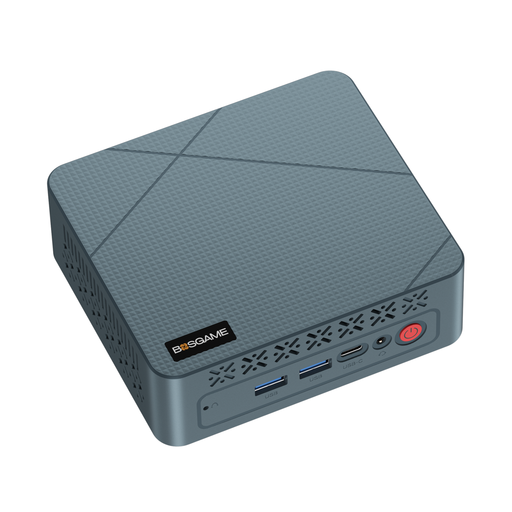 No image available
The mini PC form factor may suit a tight space; compare its graphics capabilities with the requirements of your racing game.
AMD Ryzen 5 3500U, 16 GB RAM, 256 GB SSD and integrated Radeon Vega 8. The product description lists HDMI, DisplayPort, USB 3.0, Gigabit Ethernet and dual-display support.
 No image available
If space is limited, check above all that the specific graphics and connections suit your racing game and display.
16 GB LPDDR5 RAM, 512-GB SSD and Radeon 760M. The title lists Windows 11 Home, HDMI 2.1, DisplayPort 1.4, Wi-Fi 6 and 2.5G Ethernet, as well as support for 4K displays.
 No image available
Support for three screens may be useful for a matching set-up; also check that the graphics configuration suits your game.
16 GB RAM, 512-GB SSD and integrated Radeon 680M. The title lists dual M.2 slots, triple-display support and Wi-Fi 6.
 No image available
If you’re planning to use several screens, compare the listed outputs with your set-up’s connections and your game’s requirements.
24 GB DDR5 RAM, 1-TB-PCIe-4.0 SSD and Radeon 880M. The title lists USB4, HDMI 2.1, Oculink and support for 4K quad-display.
No, you don’t need a specific game for oval racing. If you want to play iRacing, compare its requirements with the exact PC configuration. iRacing lists 64-bit Windows 11 as a supported operating system and notes that the minimum requirements only allow for basic graphics in test mode.
For iRacing, the monitors should be connected to the dedicated graphics card, not the integrated graphics output on the motherboard. Before buying, check that the specific graphics card has the connections you need for all three screens.
For iRacing, both your PC and headset must meet their respective system requirements. iRacing recommends a wired connection; depending on the headset, you may need a specialist cable, which isn’t always included.
As a general rule, consumer contracts concluded at a distance come with a right of withdrawal under § 312g BGB; the withdrawal period under § 355 BGB is generally 14 days. Exceptions may apply, for example to goods made to clearly individual specifications. Check the terms of the specific contract.