Choose a gaming PC to suit the requirements of the exploration games you actually play and the monitor you already have. Then check how noisy that specific configuration is under gaming load. In a shared bedroom, you’ll also need to make sure the case fits and has clear airflow. A compact or sound-insulated tower isn’t automatically quiet, and meeting the minimum requirements doesn’t guarantee a high frame rate.
Who this selection is for
Considerate gamers
If you play while someone else in the room needs peace and quiet, look for noise measurements under gaming load and consider where you’ll position the PC, rather than relying on a “silent” claim alone. COMPUTER BILD described the Acer Predator Orion 3000 PO3-650 it tested as quiet; this applies to the unit tested. HP Support points out that blocked airflow can make fans work harder.
Graphics-focused explorers
If you want to play more demanding exploration games on your existing monitor, compare the requirements of the specific games you play with the PC’s specifications. Steam points out that meeting the system requirements alone doesn’t guarantee a high frame rate.
Gamers short on space
If you share desk or floor space, measure the area and leave room around the ventilation openings. Acer lists the case dimensions for variant DG.BK4EG.00Q as 175 × 385 × 377 mm (width × height × depth); these dimensions apply to this variant only.
What to consider when buying
First, compare your games’ requirements with your monitor. Then check how noisy the specific configuration is and whether it can get enough airflow in the space where you plan to put it.
| What matters |
What to check before buying |
Who it matters most to |
| Noise while gaming |
Check noise measurements for the configuration on offer under load, as well as its airflow and where you’ll position it. |
If I play while someone in the room needs peace and quiet, I want to know how noisy the exact PC on offer is under gaming load. Around 33% of consumers put noise levels while gaming first. |
| Gaming performance and monitor |
Compare game requirements, monitor resolution, and the CPU, full GPU model, RAM and SSD in the specific variant. |
If I want to play exploration games with specific settings, I compare each game’s requirements with my monitor and the PC’s specifications. Around 27% of consumers prioritise gaming performance that suits their needs. |
| Space and ventilation |
Measure the exact model’s width, height and depth, and keep its air intakes and exhausts clear. |
If I share desk or floor space, the tower needs to fit in the available area without blocking its ventilation openings. Around 20% of consumers put space and ventilation first. |
| What’s included and upgrade options |
Check the peripherals included, SSD capacity, power supply and upgrade options for the specific variant. |
If I still need input devices or might want to upgrade later, I check what’s included and the system’s limitations before making a decision. Around 20% of consumers prioritise the specification and future upgrades. |
Common buying mistakes
-
Assuming a “silent” case makes for a quiet complete PC
Sound insulation and airflow are different things. Noise levels also depend on the components inside and how hard the PC is working.
Look for measurements of the exact configuration on offer under load, and make sure there’s room for airflow.
-
Assuming the specifications from the product range name
Components and what’s included can vary between versions. For example, Lenovo Germany lists neither a keyboard nor a mouse as included with the Legion Tower 5, model number 90YJCTO1WWDE1.
Compare the full model number, the components included and the contents of the specific offer.
-
Choosing a small case without considering cooling and upgrades
Even a compact tower needs clear airflow. COMPUTER BILD found that the 500-watt power supply in the Predator Orion 3000 PO3-650 it tested limited future upgrade options.
Measure the space available, including clearance for ventilation, and check the power supply and upgrade options for the exact variant.
Brands to consider
ONE
Configurable gaming towers; the High End PC Next Level is listed under item number 64258.
- For the unit it tested, COMPUTER BILD rated speed and upgradeability positively, and described noise levels under full load as not excessive.
- The review also noted higher power consumption. Its findings apply to the configuration tested and don’t necessarily apply to every build available to order.
Acer
The Predator Orion range includes desktop PCs in a variety of configurations.
- COMPUTER BILD described the Predator Orion 3000 PO3-650 it tested as quiet.
- According to COMPUTER BILD, the 500-watt power supply in the PO3-650 it tested limited its upgrade options. Acer’s stated dimensions of 175 × 385 × 377 mm apply to variant DG.BK4EG.00Q and don’t prove that it’s identical to the unit tested.
Lenovo
The Legion Tower 5 is available as a complete PC in a range of configurations.
- For variant 90YJCTO1WWDE1, Lenovo lists 16 GB RAM, a 512-GB SSD and an RTX 5060 with 8 GB.
- According to Lenovo, a keyboard and mouse aren’t included with this variant. The component specifications don’t provide independent noise measurements.
HP
The OMEN 35L range includes gaming desktop PCs with separately specified configurations.
- For variant GT16-0778ng, HP lists 32 GB RAM, a 1-TB SSD and an RTX 5070 Ti with 16 GB.
- These manufacturer specifications don’t tell you how noisy the PC is under gaming load in a bedroom.
be quiet!
The Silent Base 802 is a case for a self-built or suitably configured PC, not a complete PC.
- be quiet! describes interchangeable mesh and sound-insulating panels.
- Choosing between airflow and sound insulation doesn’t replace testing the finished system’s noise levels under load.
Joybuy products for compact spaces
The products below are mini PCs for compact spaces. Compare the specifications of each one with the requirements of your exploration games.
 No image available
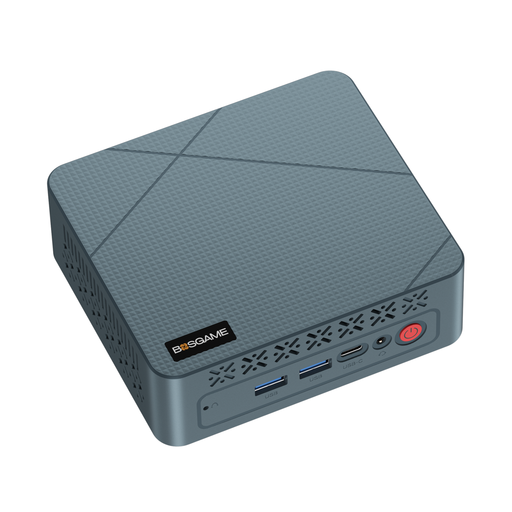
BOSGAME Mini PC E2 neo, AMD Ryzen 5 3500U
The mini PC form factor may suit a tight space. The product description mentions casual gaming, so check the requirements of the specific games you play.
AMD Ryzen 5 3500U, Radeon Vega 8, 16 GB RAM and 256 GB SSD.
View at Joybuy
 No image available
FIREBAT Mini PC AM02L, AMD Ryzen 5 6600H
The description mentions casual gaming. Compare the stated specifications with the requirements of the games you plan to play, rather than assuming a particular level of gaming performance.
16 GB LPDDR5, 512 GB M.2 NVMe and HDMI 2.1/DP 1.4.
View at Joybuy
 No image available
FIREBAT Mini PC, AMD Ryzen 7 7735HS
The compact design may suit a limited amount of space. Check the requirements of your exploration games against the specific components.
Radeon 680M, 16 GB RAM and 512 GB SSD; the product title also mentions dual M.2 slots and triple-display support.
View at Joybuy
 No image available
FIREBAT F1 Mini PC, AMD Ryzen 5 7640HS
The mini PC form factor may suit a shared space. Compare the specifications with the requirements of your games and the settings you want to use.
Radeon 760M, 24 GB LPDDR5 and 512 GB PCIe 4.0 SSD.
View at Joybuy
 No image available
FIREBAT A8 Mini PC, AMD Ryzen AI 9 365
The compact design may be a good fit if space is limited. Choose games based on the requirements of the specific titles you play and the resolution you want to use.
Radeon 880M, 24 GB DDR5 and 1 TB PCIe 4.0 SSD; the product title also mentions Oculink and USB4.
View at Joybuy
Frequently asked questions
Are a game’s minimum requirements enough for a high frame rate?
No. Meeting the minimum requirements doesn’t guarantee high frame rates. Steam recommends comparing the requirements of every game you plan to play with the full PC configuration and the settings you want to use.
Can I put a gaming PC in a tight space?
Only if it fits and the ventilation openings remain clear. HP Support lists blocked airflow and dust as possible causes of heat problems and harder-working fans. You should also follow the positioning instructions for the specific model.
How can I keep fan noise down in a shared bedroom?
Keep the ventilation openings clear and clean, and check noise measurements for the specific configuration under gaming load. If the PC is overheating, HP recommends, among other things, lowering the resolution or graphics settings. Follow the device instructions for cleaning and any adjustments.
What markings should I check on a complete gaming PC?
Check that the complete device carries the required CE marking, and look for the manufacturer’s details and German-language user and safety instructions. The Federal Network Agency lists these as features it checks as part of market surveillance. The CE mark is based on the manufacturer’s declaration of conformity; it isn’t an independent safety or performance certification.
What are my rights if there’s a fault or I buy online in Germany?
Your statutory rights if a product is faulty are separate from any voluntary guarantee. Many online purchases also come with a right to cancel, usually within 14 days of receiving the goods; exceptions and contract details apply. The consumer advice centre explains both rights and when each applies.


