Which form factor is right for you?

For players with limited space

If your PC needs to fit into a compact cockpit, width, depth and height all matter, as does leaving room for cables and airflow. Brands such as MSI, ASUS ROG and ZOTAC offer different case designs and port configurations.

For players with several controllers

If you use input devices as well as a monitor, check that their connections match the specifications of the exact PC variant. Port specifications vary by model.

For players planning future upgrades

If you may want to change the storage or memory later, check the available slots and the exact specifications of the variant you’ve chosen, rather than relying on case size alone.

What should you look for when buying?

Mini gaming PC

A good fit if: Space is limited and the specific variant has the ports you need for your monitor and controllers.

Things to consider: A small case doesn’t remove the need to check cable routing, airflow and the full specification. ZOTAC gives a volume of 2.65 litres for the MAGNUS-EN275060TC-Windows model family, while ASUS describes the ROG NUC (2025) as a 3-litre device. These are case specifications, not gaming performance measurements.

Compact gaming desktop

A good fit if: You have more floor space and documented slots or drive bays are important for future upgrades.

Things to consider: A narrow front doesn’t guarantee it will fit your space: MSI lists dimensions of 396,57 × 137,06 × 410,39 mm for the MPG Trident AS AI 2NVN7-011EU. Check all three dimensions, and allow extra room for cables and airflow.

What to consider What to check Who will find this especially important?
Space and placement Measure the available space. Check the dimensions of the exact variant and allow room for plugs and airflow. If my cockpit has limited space, I want to fit the entire PC, including its cables and airflow routes. Around 33 % of consumers put finding a suitable place for it first.
Game and system performance Compare the specific game and its requirements with the CPU, GPU, memory and operating system of the variant on offer. I want to compare the specifications with the ship game and monitor I’ll actually use, rather than relying on the term “gaming PC”. Around 27 % of consumers prioritise performance for their specific game.
Ports Check that the connectors and ports required by your monitor and controllers match those on the exact variant. Make sure the ports are accessible, too. If I use several controllers, I want to know whether the ports are compatible with my devices and easy to reach in the cockpit. Around 20 % of consumers put the right ports first.
Use and future upgrades Check which storage slots are occupied and which are free, and follow the placement and maintenance guidance. If future upgrades or fitting the PC into a tight space are your main considerations, check for free slots and adequate airflow. Around 20 % of consumers put this first.

Avoid common buying mistakes

  • Comparing only the case width

    MSI lists a width of 137,06 mm for the MPG Trident AS AI 2NVN7-011EU, but the other two case dimensions are 396,57 mm and 410,39 mm. Cables and airflow also need space.

    Measure the entire space you plan to use and take all three case dimensions into account.

  • Judging the model range instead of the variant on sale

    The ASUS website lists ROG NUC (2025) variants with different graphics cards and memory configurations.

    Check the full model number, installed memory, SSD and GPU of the specific variant.

  • Treating manufacturer specifications as a test of your game

    Ships At Sea and Seafarer: The Ship Sim are different cargo-transport games. MSI, ASUS ROG and ZOTAC’s model specifications don’t confirm the frame rate you’ll get in either title.

    Choose the game you actually want to play and compare its requirements with the PC’s full configuration.

  • Confusing a warranty with your statutory rights

    A manufacturer’s warranty is not the same as your statutory rights against the retailer. Your Europe distinguishes a voluntary warranty from the legal guarantee.

    Check the retailer, warranty terms and information about your statutory rights separately.

Brands and model ranges to consider

ZOTAC

The MAGNUS-EN275060TC-Windows model family is a mini PC option for spaces where case room is limited.

  • For this model family, ZOTAC lists a volume of 2.65 litres, a desktop GeForce RTX 5060 Ti graphics card, pre-installed memory and an SSD.
  • Check the exact specifications of the W4B and W5B variants. Manufacturer specifications are not an independent performance test for your chosen ship game.

ASUS ROG

The ROG NUC (2025) is a mini PC model range with a choice of specifications.

  • For the RNUC15JNK7X569A2 variant, ASUS lists Windows 11 Home, a Core Ultra 7 255HX, GeForce RTX 5060 Laptop GPU, 16 GB of installed memory and a 1-TB SSD.
  • Other variants in the range have different GPUs and RAM configurations. Don’t assume these specifications apply to another model.

MSI

The MPG Trident AS AI 2NVN7-011EU is a compact gaming desktop with documented expansion slots.

  • For this variant, MSI lists Windows 11 Home, a GeForce RTX 5060 Ti with 16 GB of graphics memory, 32 GB RAM, a 1-TB SSD and a second, unoccupied M.2 slot.
  • MSI gives the case dimensions as 396,57 × 137,06 × 410,39 mm. These are manufacturer specifications, not gaming or noise measurements.

Joybuy products

The Joybuy product pages below feature mini PCs described in their product names as gaming PCs or as suitable for Light Gaming. Compare each model’s specifications with your specific ship game, monitor and controllers.

Firebat Mini PC F1 P with Ryzen 7 H 255

Firebat Mini PC F1 P – Ryzen 7 H 255

This model is described as a gaming mini PC and could be worth considering if space is limited. Check separately that it’s suitable for the ship game you want to play.

Ryzen 7 H 255, 16 GB DDR5 RAM, 512-GB SSD, Windows 11 Pro, Wi-Fi 6 and USB4.0.

View at Joybuy

FIREBAT F1 Mini Gaming PC with Ryzen 5 7640HS

FIREBAT F1 Mini Gaming PC – Ryzen 5 7640HS

This mini PC form factor could work well where space is tight. When setting it up, use the original power supply and make sure there’s adequate ventilation.

Ryzen 5 7640HS, 12 GB DDR5 RAM, 512-GB SSD, Windows 11 Pro, Wi-Fi 6 and USB4.0.

View at Joybuy
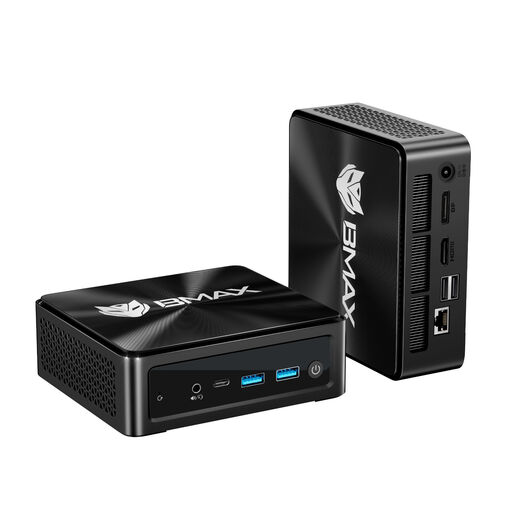
BMAX B8A Pro gaming mini PC with Ryzen 7 8745HS

BMAX B8A Pro – Ryzen 7 8745HS

The product name describes this as a gaming mini PC. Its suitability depends on the game you choose and its requirements.

AMD Ryzen 7 8745HS (8 cores/16 threads up to 4.9 GHz), 16 GB DDR5 RAM, 512-GB SSD, Wi-Fi 6, Triple-Screen 4K and Windows 11. The product description categorises its gaming use as Light Gaming.

View at Joybuy

FIREBAT AM02L mini PC with Ryzen 5 6600H

FIREBAT AM02L Mini PC – Ryzen 5 6600H

The product name lists Light Gaming as a potential use. Check the requirements of the ship game you actually want to play before choosing a configuration.

Ryzen 5 6600H, 16 GB LPDDR5 RAM, 512-GB M.2 NVMe SSD, Windows 11 Home, HDMI 2.1 and DisplayPort 1.4.

View at Joybuy

FIREBAT mini PC with Ryzen 7 7735HS and Radeon 680M

FIREBAT Mini PC – Ryzen 7 7735HS, Radeon 680M

This mini PC form factor could suit a limited space. Check the ports and the game requirements for your specific cockpit setup.

Ryzen 7 7735HS, Radeon 680M, 16 GB RAM, 512-GB SSD, dual M.2 slots, Triple Display and Wi-Fi 6.

View at Joybuy

Frequently asked questions

Does the term “gaming mini PC” prove it’ll run my ship game?

No. Ships At Sea and Seafarer: The Ship Sim are different games. Compare the requirements of the game you actually want to play with the CPU, GPU, installed RAM and operating system of the specific PC variant. This still doesn’t guarantee a particular frame rate.

What should I prepare before fitting a PC into a cramped cockpit?

Measure the available width, depth and height, and allow room for plugs and airflow. Also check that the documented video and USB ports match your monitor and existing input devices.

Can I add more storage later?

That depends on the specific variant. MSI lists two M.2 slots in total for the MPG Trident AS AI 2NVN7-011EU, one of which is free; ZOTAC lists an additional M.2 slot for the MAGNUS-EN275060TC-Windows model family. Check the exact variant and installation requirements before buying.

What are my rights when buying a PC online in Germany?

For a qualifying distance purchase from a business seller in the EU, you generally have 14 days from delivery to cancel; exceptions and return costs may apply. Your Europe distinguishes this right from the legal guarantee, which generally applies to goods for at least two years from receipt. A manufacturer’s warranty is separate.

What should I check for EU compliance on an electronic device?

The German Federal Network Agency lists a correctly displayed CE marking, an identifiable product and accurate manufacturer details among its market surveillance checks. A CE statement on a product datasheet doesn’t mean the individual device delivered to you has been inspected.