Which buying criteria matter most?
Start by deciding on your main game, screen resolution, detail settings and frame-rate target. Then compare the PC’s full specification with the requirements for your chosen game.
| What matters |
What to check before buying |
Who is this particularly important to? |
| Performance in your main game |
Identify the game and version; compare the CPU, RAM, GPU, operating system and storage of the exact configuration with the official requirements. |
If I’m planning large save files in my main game, I compare the CPU, RAM and graphics card with its requirements. Around 36% of consumers put suitability for their main game and large simulations first. |
| Native 4K display |
Note your resolution, detail settings and fps target; check the graphics output and display connection for the mode you want to use. |
If I want to use my big screen at native 4K, I decide on detail settings and frame rate before choosing a PC. Around 29% of consumers prioritise native 4K display. |
| Performance that suits your needs without a blanket 4K target |
Set separate targets for 1440p and 4K; compare only clearly identified configurations and their specifications. |
If 1440p is enough for my games, I don’t want to choose a 4K configuration just because of the screen size. Around 21% of consumers prioritise suitable performance without a blanket 4K target. |
| Setup and upgrade options |
Check the dimensions and connections of the exact model, along with its documented upgrade options. |
If the PC needs to fit in a particular space and I might want to change components later, I check its dimensions, connections and documented upgrade options. Around 14% of consumers prioritise setup and upgrade flexibility. |
Compact Joybuy PCs for a big screen
The Joybuy options below are compact mini PCs, not full-size tower configurations verified here. They’re worth considering only if the compact format suits your setup. Before buying, compare the exact CPU, RAM and graphics specifications with the requirements of your simulation game.
 No image available
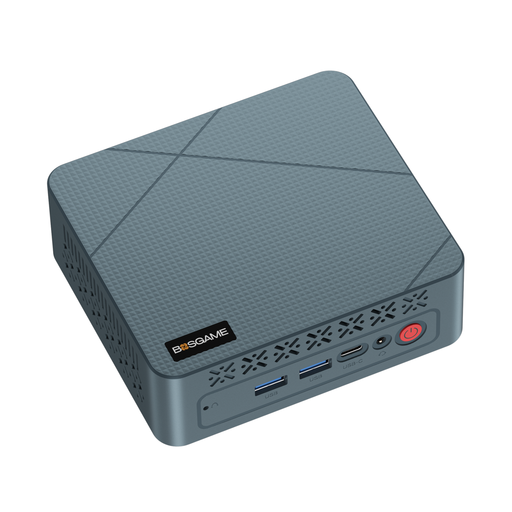
BOSGAME E2 neo mini PC, AMD Ryzen 5 3500U, 16 GB RAM, 256 GB SSD
Its compact size and the listed HDMI, DisplayPort and dual-display connections suit a space-saving setup with an external screen. This does not mean it’s suitable for demanding simulation games.
The product details list 16 GB RAM, a 256 GB SSD and integrated Radeon Vega 8 graphics.
For Anno 117, Ubisoft Help lists 32 GB of dual-channel RAM and an RTX 4080 Super or RX 7900 XTX for its 4K profile. This mini PC’s listed specifications do not match those components, so they don’t indicate a particular frame rate.
Joybuy
 No image available
FIREBAT F1 mini PC, Ryzen 5 7640HS, 24 GB LPDDR5, 512 GB PCIe 4.0 SSD
The title says it supports 4K output for up to three screens. This describes a connection option, not proof of performance in a 4K simulation game.
The product details list 24 GB LPDDR5, a 512 GB PCIe 4.0 SSD and Radeon 760M graphics.
For Anno 117, Ubisoft Help lists 32 GB of dual-channel RAM and an RTX 4080 Super or RX 7900 XTX for its 4K profile. The listed specifications for this mini PC differ, so they don’t indicate a particular frame rate.
Joybuy
 No image available
FIREBAT A8 mini PC, Ryzen AI 9 365, 24 GB DDR5, 1 TB PCIe 4.0 SSD
The title says it supports 4K output for up to four screens. This describes an output option, not performance in a particular simulation game.
The product details list 24 GB DDR5, a 1 TB PCIe 4.0 SSD and Radeon 880M graphics.
For Anno 117, Ubisoft Help lists 32 GB of dual-channel RAM and an RTX 4080 Super or RX 7900 XTX for its 4K profile. This mini PC’s listed specifications do not match those components, so its frame rate is not established.
Joybuy
Frequently asked questions
Is a big screen enough reason to choose a 4K PC?
No. What matters is the resolution you’ll actually use, along with your game, detail settings and frame-rate target. For example, Ubisoft Help lists Anno 117 profiles for 1440p at 30 or 60 fps, and 4K at 30 fps.
What should I check about connections and future upgrades?
Connect your screen to a suitable port on the graphics card actually supplied, and check the setup guidance for the specific PC. For future upgrades, check its documented slots and case capacity. Don’t assume that details for other configurations in the same range also apply to yours.
What rights do I have if the PC is faulty or I buy it online?
When buying from a trader in the EU, you have at least two years of statutory rights if the goods are faulty, starting from the date you receive them. An additional manufacturer’s warranty does not replace these rights. For a typical online purchase of goods, you generally have 14 days from delivery to cancel, subject to legal exceptions. Who pays the return costs when you cancel depends, among other things, on whether the seller told you about them before you bought.
What should I look for in electrical product safety?
For electrical and electronic products in scope, the Bundesnetzagentur (Federal Network Agency) lists requirements including correct CE marking, clear product and manufacturer details, and German-language instructions with any necessary warnings. A CE mark is not a performance test of the gaming PC.


