What should you look for when buying?
Start by choosing your game and preferred controls. Then compare the PC specification, space for your input devices, noise levels and your combined budget for the tower and control setup.
| What to consider |
What to look for |
Who should consider it? |
| Performance for your chosen game |
For Star Citizen, Roberts Space Industries recommends 32 GB of RAM and a DirectX 12-compatible graphics card with 8 GB of VRAM; at least 150 GB of SSD storage is required. This does not guarantee a particular frame rate. |
If I want to play a particular game with my preferred settings, I’ll compare its requirements with the exact PC configuration. Around 33% of consumers put suitability for their chosen game first. |
| Flight controls and desk space |
Check the device you want, the connections on your PC and the control mappings available in the game. The Thrustmaster T.16000M FCS HOTAS includes a joystick and throttle. |
If you want to practise joystick movements and throttle control, you’ll need space for the devices and a suitable setup. Around 27% of consumers prioritise their flight-control setup. |
| Noise in your gaming room |
Look for noise-level specifications or tests for the exact model on offer; COMPUTER BILD reports varying results for the PCs it tests. |
If the tower is in the same room while I’m playing, I want to keep distracting noise to a minimum. Around 20% of consumers prioritise quiet operation. |
| Total cost |
Check what’s included, which input devices you want and the terms of service for the specific offer. A HOTAS consists of additional control devices and isn’t automatically included with a PC. |
If I’m planning to buy flight controls as well as a tower, I’ll compare the cost of the complete gaming setup rather than just the PC. Around 20% of consumers prioritise this combined budget. |
Related products at Joybuy
This selection includes tower PCs, as well as portable and compact gaming PCs. For each form factor, compare the exact specification with your game’s requirements and consider whether it will suit your dedicated control setup.
 No image available
Acer Nitro 20 N20-100 desktop PC i5
As a desktop PC, this model is worth considering for a dedicated gaming setup; compare its exact specification with your game’s requirements.
Listed specifications include 32 GB of RAM, a 1 TB SSD, RTX 5060 and Windows 11 Home.
View at Joybuy
 No image available
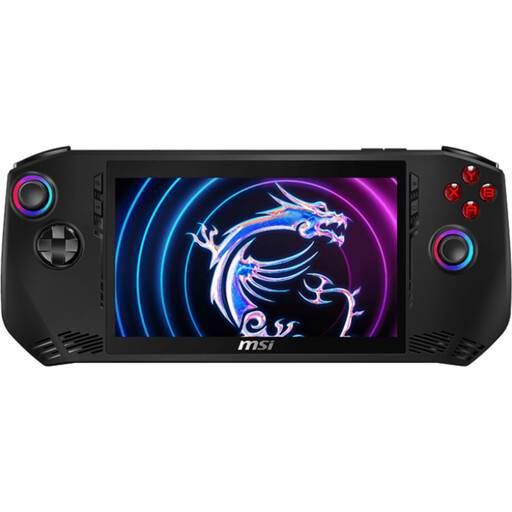
MSI Claw A1M-059
If you’re looking for a device with an integrated screen and controls, this model’s handheld design could be a good fit; compare the game’s requirements with the exact specification.
Listed specifications include an Intel Core Ultra 7 155H, 16 GB LPDDR5, a 1 TB SSD and a 7-inch FHD touchscreen with 120 Hz, as well as Windows 11 Home.
The integrated display measures 7 inches.
View at Joybuy
 No image available
THUNDEROBOT Radiant S16
This laptop has a built-in screen; if you use it at a desk for longer gaming sessions, make sure its vents are unobstructed.
Listed specifications include a 16-inch QHD+ display with 240 Hz, Ryzen 7 7745HX, 16 GB DDR5, a 1 TB SSD and RTX 5060.
The product description recommends using a hard, flat surface while gaming to avoid blocking the vents.
View at Joybuy
 No image available
Captiva Highend Gaming PC R89-503
As a tower, this model could suit a dedicated gaming setup; the listed components don’t replace checking it against your chosen game’s requirements.
Listed specifications include Ryzen 7 7800X3D, RTX 5070 Ti with 16 GB, 32 GB DDR5, a 2 TB SSD and Windows 11 Home.
For placement, the product description recommends keeping airways clear and leaving 10–15 cm of space behind the PC.
View at Joybuy
 No image available
FIREBAT F1 mini PC
Its compact design could be a good fit if you have limited space for your PC; check beforehand that the specific configuration meets your game’s requirements.
Listed specifications include Ryzen 5 7640HS, 24 GB LPDDR5, a 512 GB PCIe 4.0 SSD and Radeon 760M graphics.
For Star Citizen, Roberts Space Industries recommends 32 GB of RAM; this mini PC is listed with 24 GB LPDDR5.
View at Joybuy
Frequently asked questions
Do I need to buy a HOTAS straight away to learn spaceship controls?
No. If you’d like to try a game such as Star Citizen with a mouse and keyboard first, Roberts Space Industries describes several input methods and customisable control mappings. If you specifically want to learn to use a joystick and throttle, check compatibility, available space and control mappings for your particular device before buying.
How do I set up a joystick in Star Citizen?
Roberts Space Industries explains how to set it up through the in-game options and control mappings: select joystick or HOTAS, load an available device profile or assign the controls yourself. Check whether a profile is available for your specific model.
Will the recommended PC specifications deliver a particular frame rate in Star Citizen?
No. You can’t infer a particular frame rate from the recommendations. Roberts Space Industries recommends, among other things, 32 GB of RAM and a DirectX 12-compatible graphics card with 8 GB of VRAM; performance can vary depending on the game situation and background programmes.
What are my rights if I change my mind or receive faulty goods when shopping online?
For most online purchases by consumers in the EU, there is generally a 14-day cancellation period from delivery; exceptions may apply, for example, to goods made to the customer’s specifications. Your Europe, the European Union’s information portal, also states that consumers have a minimum of two years’ legal guarantee against the seller for faulty goods, regardless of any voluntary manufacturer’s warranty.
What should I know about product safety and disposal in Germany?
The Bundesnetzagentur lists CE marking, product identification and manufacturer details among the checks within its remit; this is not a certification for any specific model. The Umweltbundesamt advises that old electrical appliances should be collected separately and not disposed of with household waste.


