Choose your PC based on your animation software, the space you have and the games you actually want to play – not just the graphics card. You can put a laptop away with its screen, while a mini PC still needs a separate monitor and a tower takes up more floor space. For longer animations in Krita, RAM matters: the Krita documentation recommends 16 GB, whereas Aseprite alone doesn’t call for a powerful gaming graphics card.
Which form factor is right for you?
Sprite animator working with lots of frames
If you spend a lot of time on frame-by-frame animation, make sure you consider the RAM: Krita keeps frames in memory and recommends 16 GB of RAM. Aseprite saves working files locally, so you’ll also need to allow space for your projects.
Someone sharing a desk
If you need to clear your workspace after using it, you can put away a laptop and its screen together. A mini PC takes up less space than a tower, but you’ll still need a separate monitor.
Animator who also plays more demanding games
If you want to play specific games as well as work on sprites, base your choice on those games’ requirements. The requirements of animation software alone won’t tell you what graphics hardware you’ll need.
What should you look for when buying?
Gaming laptop
A good fit if: You want to put away both the computer and screen after work.
Keep in mind: Check the exact display, RAM and port specifications. A product range name doesn’t guarantee a consistent configuration.
Gaming mini PC
A good fit if: You can leave a monitor on your desk and want a computer case that takes up little space.
Keep in mind: The monitor and input devices are separate parts of your setup. A small case doesn’t necessarily mean quieter operation or make the PC suitable for every game.
Gaming tower
A good fit if: You can leave the computer in place and value ports or future upgrades more than being able to put it away quickly.
Keep in mind: Allow space for the case and monitor, and check the components and what’s included with the specific configuration.
| Buying priority |
What to check |
Who is it important to? |
| RAM for animation |
Check the RAM and upgrade options for the specific version. Krita recommends 16 GB; this isn’t a general minimum requirement for every sprite application. |
When I’m working on longer animations in Krita, I want to know whether there’s enough RAM for my workflow. That’s why around 36% of consumers put their animation workflow first. |
| Space and clearing away |
Check which devices need to be put away after a session, and where you can keep or store the monitor, power supply and input devices. |
When I share a desk, I want to clear it quickly after work or fit in just a small computer case. Around 29% of consumers prioritise clearing away their setup or saving space. |
| Gaming performance |
Compare the requirements of the games you actually plan to play with the full graphics and RAM specifications of the product. |
When I want to play specific games as well as work on sprites, I want a computer that suits those exact games. Around 21% of consumers say gaming performance is their top priority. |
| Noise in a shared space |
If you’re sensitive to noise, check how loud the exact model is under a comparable workload. The form factor alone isn’t enough to go on. |
When other people share my desk, I want to avoid distracting computer noise as much as possible. Around 14% of consumers prioritise keeping noise to a minimum. |
Common buying mistakes
-
Assuming a sprite programme has the same requirements as a demanding game
Aseprite lists low minimum requirements, but these don’t tell you what hardware you’ll need for any additional games you play. For longer animations in Krita, RAM is a separate consideration.
Choose your basic setup to suit your animation software, then check the requirements of the games you plan to play separately.
-
Looking only at the size of the computer case
A small mini PC doesn’t replace a monitor or input devices. A tower may not include all the accessories either: Lenovo explicitly states that a keyboard and mouse aren’t included with the specific configuration numbered 90YACTO1WWDE1.
Allow space to use and store your complete setup, and check what’s included with the exact version.
-
Assuming a compact design means quieter operation
A COMPUTER BILD test found differences in noise levels between specific tower models. The form factor alone therefore doesn’t tell you how loud a particular gaming PC will be.
If noise matters at a shared desk, look for a review of the exact model under load.
Brands to consider
Lenovo
Legion towers for a gaming PC that can stay in place, with a configuration you can check in detail.
- For product number 90YACTO1WWDE1, Lenovo lists 16 GB of DDR5 RAM and a 512 GB SSD.
- A keyboard and mouse aren’t included with this specific configuration. These specifications don’t automatically apply to other Legion versions.
ASUS
ROG NUC mini PCs are worth considering if you’re planning to use a separate monitor at your workstation.
- ASUS says the ROG NUC 16 can be positioned horizontally or vertically and comes with a detachable stand.
- Manufacturer performance claims aren’t independent comparative test results. Check the power supply and specifications of the exact version.
HP
OMEN 16 gaming laptops are an option if you want to put away the computer and screen together.
- HP lists an anti-glare display and a range of configurations for the series described.
- Specifications such as ‘up to’ 32 GB of RAM don’t describe the configuration of every individual product.
MSI
The MPG Trident AS 14th is a slimmer desktop form factor, sitting between a large tower and a mini PC.
- MSI lists dimensions of 396,57 × 137,06 × 410,39 mm and two RAM slots for the series.
- The international series specifications don’t confirm the specifications of a particular German version.
Acer
The Predator Orion 3000 PO3-650 is a specific tower configuration tested by COMPUTER BILD.
- COMPUTER BILD rated the tested model as quiet.
- The review notes limited upgrade options due to the 500-watt power supply. This verdict doesn’t apply to every Predator Orion model.
Joybuy products for animation and gaming
This selection includes gaming laptops that you can put away with their screens, and mini PCs for workspaces with a separate monitor.
 No image available
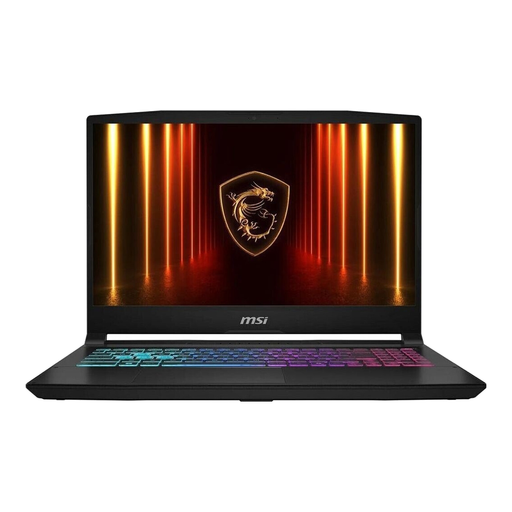
MSI Katana 15 HX B14WFK-487
The laptop combines the computer and screen in one device, so you can put them both away after use.
Intel Core i7-14650HX, 16 GB DDR5 RAM, 512 GB SSD, RTX 5060 and a matt 15,6-inch FHD display.
View at Joybuy
 No image available
MSI Cyborg 15 A13VE-1005
With its built-in screen, this laptop can be put away with the computer after use.
Intel Core i5-13420H, RTX 4050, 16 GB DDR5 RAM, 512 GB SSD and a 15,6-inch FHD display with 144 Hz.
View at Joybuy
 No image available
FIREBAT Mini PC AMD Ryzen 7 7735HS
This mini PC is suited to a workspace where you can leave a separate monitor in place.
AMD Ryzen 7 7735HS, Radeon 680M, 16 GB RAM and a 512 GB SSD. A separate monitor is required.
View at Joybuy
 No image available
FIREBAT F1 Mini PC AMD Ryzen 5 7640HS
This mini PC suits a desk where you can use a separate monitor.
AMD Ryzen 5 7640HS, Radeon 760M, 24 GB LPDDR5 RAM and a 512 GB PCIe 4.0 SSD. A separate monitor is required.
View at Joybuy
 No image available
FIREBAT A8 Mini PC AMD Ryzen AI 9 365
This mini PC is an option if you’re planning to use a separate monitor at your shared desk.
AMD Ryzen AI 9 365, Radeon 880M, 24 GB DDR5 RAM and a 1 TB PCIe 4.0 SSD. A separate monitor is required.
View at Joybuy
Frequently asked questions
Do I need a powerful dedicated graphics card just for Aseprite?
Aseprite’s published minimum requirements don’t mean you need a powerful gaming graphics card. If you also use specific games or other software, check their requirements separately.
How do I keep sprites editable and export frames for a game?
Keep the editable original file in Aseprite format and export sprite sheets separately when needed. As Aseprite saves files locally, you should make sure you have a backup of your original files.
What are my rights if the PC I bought develops a fault in Germany?
Statutory claims for defects generally become time-barred two years after the goods are delivered (§ 438 BGB). Subject to the statutory conditions, the buyer may request subsequent performance (§ 439 BGB); this is different from a voluntary manufacturer’s warranty.
Can I put an old PC in household waste in Germany?
No. Electrical and electronic waste must be collected separately. The German Environment Agency lists municipal recycling centres and retailer take-back schemes among the options. Specific take-back obligations depend on conditions such as the retailer’s sales area and the type of device.


