Strategy gamers playing on a TV
You want to make the most of your big screen, so check the PC’s resolution, connections and, if relevant, higher refresh rate against your screen.


Choose a gaming PC based on the strategy games you want to play and the actual resolution of your TV or monitor – screen size alone doesn’t tell you how much performance you’ll need. Compare the PC’s full specification with the games’ requirements, and check that the graphics output, screen and cable support the picture quality you want. A manufacturer’s stated game requirements don’t guarantee a particular frame rate, for example at 4K.
You want to make the most of your big screen, so check the PC’s resolution, connections and, if relevant, higher refresh rate against your screen.
If you want to play both older and more demanding games, compare each title’s requirements for graphics, memory and storage.
You want to weigh up the specification, case size and upgrade options rather than basing your decision on the graphics card’s name alone.
Start with the screen and the games you want to play. Then check the full specification, what’s included and how much space you have.
| Buying consideration | What to check | Who should pay particular attention? |
|---|---|---|
| Screen and signal | Check that the screen, PC output and cable support the same resolution and refresh rate. For 4K at 120 Hz, NVIDIA describes a connection via HDMI 2.1 to a compatible TV or receiver, using a suitable HDMI cable. | If I want to keep using my TV, I’ll first check which picture settings it actually supports. Around 40% of consumers are likely to focus above all on finding the right connection to their screen when making this buying decision. |
| Game requirements | For Baldur’s Gate 3 on Windows, Larian Studios recommends 16 GB RAM, an SSD and 150 GB of free storage. 2K Support recommends 8 GB RAM for XCOM 2. Compare the requirements for every title you want to play with the PC’s specification. | If I want to play several strategy games, I’ll compare the requirements for each title instead of assuming that what works for one will work for all of them. Around 30% of consumers are likely to put game requirements first. |
| Overall specification | Check the model number, memory, SSD capacity and included peripherals. For the article number 90YACTO1WWDE1 reviewed here, Lenovo lists neither a keyboard nor a mouse. | If I don’t want to pay for equipment I don’t need, I’ll first check what’s included in the specific package and how much storage will be left for my games. Around 20% of consumers are likely to focus above all on the overall specification and its cost. |
| Space and upgrades | Compare the case dimensions with the space available and check for free drive bays. MSI lists two free 2.5-inch drive bays for the MAG Infinite S3; the only M.2 slot is occupied in the variant described. | If I want to put the PC in a particular spot in my living room or upgrade its storage later, I’ll check the dimensions and slots for the exact variant. Around 10% of consumers are likely to consider space requirements and upgrade options first. |
Screen size is not the same as supported resolution or refresh rate. Playing a strategy game doesn’t automatically mean you need 120 Hz.
First check your screen’s actual resolution and refresh rate. Then make sure your chosen settings are supported by the PC’s graphics output and the right cable.
If your preferred settings aren’t supported, you may need a suitable cable or different equipment.
Specifications can vary within the same range. On the MSI MAG Infinite S3 described here, the only M.2 slot is already occupied.
Before buying, compare the full model number, the listed components and the slots that are actually free.
If you’re counting on a free slot that’s occupied on the specific variant, you may need to find another way to make the upgrade you want.
A warranty and your statutory rights are different claims, with different points of contact. For faulty goods, the Verbraucherzentrale generally advises contacting the seller.
Keep your proof of purchase and contact the seller first if there’s a fault. Check the warranty terms separately.
For the OMEN 35L GT16-0776ng, HP lists 32 GB RAM, a 1 TB SSD and an RTX 5070 with 12 GB.
For the MAG Infinite S3 14NVM5-2873EU, MSI lists an RTX 5060 Ti with 8 GB, 16 GB RAM and a 1 TB SSD.
For the Legion Tower 5i Gen 10 with article number 90YACTO1WWDE1, Lenovo lists an RTX 5060 with 8 GB, 16 GB RAM and a 512 GB SSD.
For the Predator Orion 3000 PO3-650 with reference DG.BK4EG.00F, Acer lists an RTX 4060 with 8 GB, 16 GB RAM and a 1 TB SSD.
This selection includes gaming desktops and a gaming laptop. For each model, check its exact specification against your games and screen.
 No image available
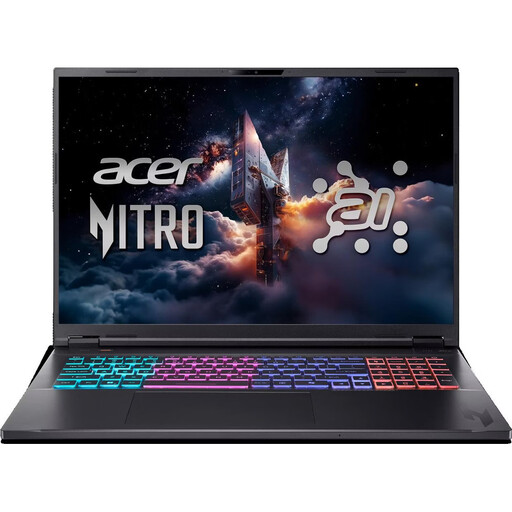
This gaming laptop is an option if you’re looking for a device with its own 18-inch display; check that its HDMI output is compatible with your TV.
18-inch WQXGA display with 165 Hz; Ryzen AI 7; RTX 5070 with 8 GB; 16 GB RAM; 1 TB SSD; HDMI 2.1. English international keyboard layout.
 No image available
This tower configuration may suit you if you want to factor in the case dimensions and the possibility of upgrading storage or memory later.
RTX 5060 with 8 GB; 16 GB DDR5, upgradeable to up to 32 GB according to the product listing; 512 GB SSD; case dimensions 378 × 190 × 438 mm.
 No image available
The listed connections and drives give you specific details to compare with your screen and planned game library.
RTX 5060 with 8 GB; 32 GB RAM; 1 TB SSD and 1 TB hard drive; HDMI and three DisplayPort outputs. The product description requires at least 10 cm of clearance on all sides for ventilation.
 No image available
Compare the listed specification with your games’ requirements, and check that the case and range of connections suit your setup and screen.
Core Ultra 9-285K; RTX 5080 with 16 GB; 32 GB DDR5; 2 TB SSD; HDMI and three DisplayPort outputs. The product description recommends 10 to 15 cm of clearance between the back of the PC and the wall for ventilation.
 No image available
Before choosing, check that the dimensions and required ventilation clearance suit the space where you plan to put it.
AMD Ryzen 7 7800X3D; RTX 5070 Ti with 16 GB; 32 GB DDR5; 2 TB SSD; HDMI and three DisplayPort outputs; case dimensions 430 × 210 × 445 mm. The product description specifies a hard, level surface and 10 to 15 cm of clearance behind the PC.
No. What matters is the resolution you’ll actually use and the refresh rate you want, not the screen size alone. For 4K at 120 Hz, NVIDIA describes additional requirements for the graphics output, TV, cable and settings. This isn’t essential for every strategy game.
Check the connections and supported settings on the specific PC and screen. If you want to use 4K at 120 Hz over HDMI, make sure the graphics card, TV and cable all support it, and check your TV’s settings; having an HDMI port alone doesn’t guarantee this mode will work.
Compare the available SSD storage with the requirements of each game. Larian Studios requires an SSD and 150 GB of free storage for Baldur’s Gate 3; a 512 GB SSD won’t have its full stated capacity available for games.
For a purchase from a retailer in Germany, statutory consumer rights are separate from a voluntary manufacturer’s warranty. As the Verbraucherzentrale explains, the seller is generally the point of contact for faulty goods. For an ordinary online distance purchase, you generally have a 14-day right to cancel from delivery, subject to statutory exceptions.
For a device that requires CE marking, check the CE mark and the required accompanying documents for the specific product listing. The Bundesnetzagentur also says that retailers should check for German-language instructions and safety information as part of the accompanying documentation. A CE mark doesn’t guarantee that an independent body has tested every PC.