Players with very little free desk space
If you want your monitor, mouse and keyboard to fit comfortably, make sure the PC, power supply, cables and ventilation clearance all fit your planned setup.


When choosing a PC for historical strategy games on a small desk, consider the requirements of the specific games and the space you actually have available. A mini PC with integrated graphics may be suitable if its GPU can handle your chosen settings; if you have higher graphics expectations, a model with a dedicated graphics card may be worth considering. For Civilization VII, 2K recommends 16 GB RAM and an RTX 2060, RX 6600 or Arc A750 for 1080p, 60 FPS and high graphics settings. This does not, however, confirm the frame rate of any particular PC. A compact computer takes up less desk space, while a tower beside or under the desk may leave more room for future upgrades.
If you want your monitor, mouse and keyboard to fit comfortably, make sure the PC, power supply, cables and ventilation clearance all fit your planned setup.
If you play long campaigns, compare the CPU, RAM and SSD with the requirements of the specific strategy games you play, rather than relying on a general gaming label.
If you want to set your resolution and graphics quality to specific levels, check that the exact GPU variant matches your chosen target.
Suitable if: desk space is your priority and you can check your games' requirements against the integrated GPU.
The trade-off: A small case solves the space problem, but by itself it tells you nothing about whether the PC can deliver your desired graphics quality.
Suitable if: you have limited space but are considering a dedicated GPU for your games.
The trade-off: Specifications and GPUs vary by model; desktop and laptop GPUs with similar names are not equivalent.
Suitable if: there is room beside or under your desk, with enough clearance for ventilation, and you want the option to change the memory or storage.
The trade-off: A tower takes up more space than the mini and compact PCs mentioned above.
Whatever the form factor, the specific configuration should suit your games, preferred graphics settings and planned setup location.
| Priority | What to check when buying | Who will find this especially important? |
|---|---|---|
| Space and ventilation | Dimensions of the exact variant, plus room for the power supply, connections and unobstructed ventilation openings. | If there’s little room left on my desk, I want to find a practical place for the power supply and allow for airflow too; around 36% of consumers put space and ventilation first. |
| CPU, RAM and storage | Compare the requirements of the games you want to play with the CPU model, installed RAM and SSD in the specific variant. | For long campaigns, I want to compare my games’ requirements with the actual specifications; around 29% of consumers prioritise CPU, RAM and storage for their games. |
| Graphics target | Compare the GPU type and full model name with the game, resolution and settings you want. | If graphics quality matters more to me than the smallest possible form factor, I want to choose a GPU that suits my target; around 21% of consumers put their graphics target first. |
| Upgrades and features | Check the RAM and SSD options, display connections and what’s included with the exact variant. | If I might want to change the storage later or connect existing devices, I’ll check the options available with the specific configuration; around 14% of consumers prioritise upgradeability and overall specifications. |
Games have different minimum and recommended requirements. A general gaming label doesn’t tell you whether a particular configuration will meet your target.
First decide which game you want to play, at what resolution and with which settings. Then check the exact GPU and RAM.
If the PC doesn’t meet your desired target, you may need to choose lower settings or consider a different device later on.
Even a small PC needs space for its power supply and cables, as well as clear ventilation paths.
Plan for the whole setup and don’t cover any ventilation openings. ASUS warns that blocked airflow can affect cooling and cause performance issues.
Depending on how you arrange your setup, you may need extra room for the power supply and cables, or a different position may work better.
For example, the MSI MPG Trident AS variants listed by MSI differ in their graphics cards and installed RAM.
Check the full model number, RAM, GPU, SSD and included items in the specific listing.
A variant with different specifications or a later storage upgrade could mean extra work.
The A8 Max is an example of a mini PC with a small footprint and integrated Radeon 780M graphics.
The MPG Trident AS 14th is a compact desktop with a dedicated graphics card; specifications depend on the exact model number.
The ROG NUC (2025) is a particularly small PC which, depending on the variant, uses a dedicated GeForce RTX laptop GPU.
The Legion Tower 5 Gen 10 (AMD) is a tower alternative if you have enough room beside or under your desk.
This selection features compact mini PCs with integrated graphics for limited spaces. Their small form factor doesn’t replace the need to check the specific GPU against your games’ requirements and settings.
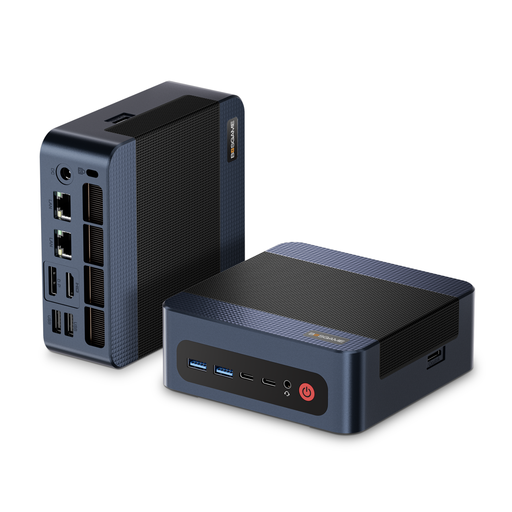 No image available
A mini PC may suit a tight space; check the integrated Radeon 780M against the requirements of your games.
 No image available
This compact design is made for limited spaces; check whether the integrated Radeon 660M suits the games and settings you want.
 No image available
If desk space is at a premium, this mini PC offers a compact option; check the integrated Radeon 680M against the target settings for your games.
 No image available
This compact design may suit a limited space; check the integrated Radeon 760M against your games and desired graphics quality.
 No image available
This mini PC may suit a limited space, but you should still check that the integrated Radeon 880M matches your desired gaming target.
You can’t decide based on form factor alone. For 1080p, 60 FPS and high graphics settings, 2K recommends 16 GB RAM and an RTX 2060, RX 6600 or Arc A750. Compare the specific integrated GPU with these target settings; this does not mean it is equivalent to those GPUs or guarantee a particular frame rate.
Measure the available space, including room for connections and the power supply, and keep the ventilation openings clear. In its support guide for desktop and mini PCs, ASUS warns that dust and blocked airflow can affect cooling and cause performance issues. Check the manual for your specific device to find out how much clearance it needs.
For a typical online purchase from a trader, the EU’s Your Europe portal generally states that you have 14 days from delivery to withdraw from the contract. Exceptions apply, for example, to goods made to the customer’s specifications. The statutory guarantee of at least two years is separate from a voluntary manufacturer’s warranty.
According to the German Federal Network Agency, CE marking is required for products covered by relevant EU harmonisation legislation and placed on the EU market by a manufacturer or importer. CE marking does not confirm gaming performance. According to the German Environment Agency, waste electrical and electronic equipment must be collected separately.