What should you look for when buying?
First, decide which games you want to play and which headset features you need. Then compare the specific PC configuration, taking its location and any potential future upgrades into account.
| Priority |
What to check before buying |
Who is this important to? |
| Performance for your games |
Compare the CPU, GPU, RAM and available storage with the requirements of the games you actually play. For example, 2K recommends 8 GB RAM and 45 GB of free storage for XCOM 2; these figures apply to this game. |
If I have a specific games list, I want to choose my PC’s specifications to match it, rather than deciding based on the gaming label alone. Around 33% of consumers rank gaming performance as their top buying priority. |
| Headset compatibility |
Check the connection type, whether you have a suitable socket or spare USB port, and the operating system. For stereo audio while using a Bluetooth LE Audio microphone, Microsoft lists Windows 11 version 24H2 or later, compatible hardware and manufacturer drivers as requirements. |
If I want to keep using my existing headset and microphone, I want to know in advance whether the connection I need will work. Around 27% of consumers put headset compatibility first. |
| Operating noise |
Look for reviews or noise-level information for the specific configuration under load. Consider where you plan to put it and make sure its vents are unobstructed. COMPUTER BILD described the Predator Orion 3000 PO3-650 it tested as quiet. |
In a quiet or shared room, I want to know whether the PC’s noise might disturb others – even if I’m wearing a headset. Around 27% of consumers rank quiet operation as their top buying priority. |
| Upgrade potential and specification |
For the exact product number, check the power supply, expansion slots, ports, operating system and what’s included. Acer lists a 500 W power supply for variant DG.BK4EG.00F; COMPUTER BILD reports upgrade limitations on the PO3-650 it tested. |
If I want to replace components later or use the accessories I need straight away, I want to know the exact specification in advance. Around 13% of consumers rank upgrade potential and a complete specification as their top priority. |
Joybuy PCs to compare with your games
These Joybuy PCs offer different starting points for comparing a system with the requirements of your tactical games. If you’re choosing a headset too, check that its connection type and the features you want are compatible with the specific PC variant.
 No image available
Acer Predator Orion 3000 Desktop i5 Ultra, 16 GB, 512 GB, RTX 5060, Windows 11 Home
Compare the specific specification with your tactical games’ system requirements, rather than assuming the gaming label alone guarantees the performance you need.
The product name lists an RTX 5060, 16 GB RAM, 512 GB and Windows 11 Home.
View at Joybuy
 No image available
Acer Nitro 20 N20-100 Desktop i5, 32 GB, 1 TB, RTX 5060, Windows 11 Home
Use the listed specification as a starting point, then compare it with the requirements of the games you actually want to play.
The product name lists 32 GB RAM, 1 TB storage, an RTX 5060 and Windows 11 Home.
View at Joybuy
 No image available
Dell Alienware Aurora ACT1250 1J3N5, Core Ultra 9-285K, 32 GB, 2 TB SSD, RTX 5080, Windows 11
Check the listed components against your games’ system requirements, and make sure the audio connection works with your headset.
The listed specifications include a Core Ultra 9 285K, RTX 5080, 32 GB RAM, 2 TB SSD and Windows 11 Home. The listed connection options include a combo jack and Bluetooth.
View at Joybuy
 No image available
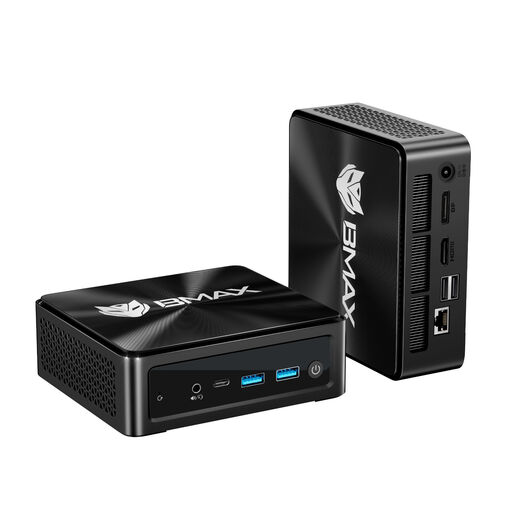
BMAX B8A Pro Mini PC, Ryzen 7 8745HS, 16 GB DDR5, 512 GB SSD, Windows 11
If a mini PC suits your setup, take particular care to compare its specific components with your games’ requirements.
Listed specifications include a Ryzen 7 8745HS, integrated Radeon 780M graphics, 16 GB DDR5 RAM and a 512 GB SSD. The mini PC is described as supporting three 4K displays.
View at Joybuy
 No image available
FIREBAT Mini PC, Ryzen 7 7735HS, Radeon 680M, 16 GB RAM, 512 GB SSD
A compact case can be useful if space is limited, but still compare the listed components with your games’ requirements.
Listed specifications include a Ryzen 7 7735HS, Radeon 680M, 16 GB RAM and a 512 GB SSD. Two M.2 slots are also listed.
View at Joybuy
Frequently asked questions
Are XCOM 2’s recommended requirements a good benchmark when buying a PC?
For XCOM 2 only: 2K recommends 8 GB RAM and 45 GB of free storage, among other requirements. Check each other game separately against the requirements for the specific version you want to play.
What should I do if my connected headset isn’t playing game audio?
In Windows, check that the correct audio output is selected and that the sound isn’t muted. Microsoft also suggests checking audio enhancements and drivers, as these could be causing the problem.
Is Bluetooth on my PC enough for stereo sound while using my headset microphone?
Not necessarily. For the Bluetooth LE Audio feature described, Microsoft lists Windows 11 version 24H2 or later, built-in LE Audio support and suitable manufacturer drivers as requirements. Also check that your specific headset supports this feature.
What rights do I have if my PC is faulty or I bought it online?
When you buy from a business seller in the EU as a consumer, you generally have a legal guarantee of at least two years from the date you receive the goods. This is separate from any voluntary manufacturer’s warranty. Online consumer purchases generally come with a 14-day right to cancel, although the conditions and any exceptions depend on the specific purchase.
What does CE marking mean on a PC sold in Germany?
The Bundesnetzagentur monitors electrical and electronic products, including devices with Wi-Fi or Bluetooth. CE marking does not mean that a product was made in the European Economic Area. Check the marking and product information for the specific device on offer.


