What should you look for when buying?
Start by deciding which software you’ll use and how large your projects will be. Then check the specifications you need and the ports for both monitors. Epic Games recommends 32 GB RAM and at least 8 GB of graphics memory for Unreal Engine, while Blender also recommends 32 GB RAM and 8 GB of graphics memory for Windows. These are software-specific benchmarks, not universal requirements for every terrain map.
| What you need |
What to check before buying |
Especially important for |
| Connect two monitors |
Check that the video outputs on the specific graphics card match the inputs on both monitors; allow for any cables you need. |
If I want to use my map and tools on separate displays, both monitors need to work with the specific configuration; around 33% of consumers prioritise connecting two screens. |
| Work on complex landscapes |
Decide which software version you’ll use and the scale of your projects; compare the RAM, graphics memory and graphics interface with the software specifications. |
For large landscapes in the Unreal Editor, I need enough headroom for my project and software; around 27% of consumers prioritise complex 3D scenes. |
| Match the specifications to your budget |
Check the requirements of the software you use and factor in your existing monitors and any cables you need. |
If my mapping projects are modest in scale, I don’t want to pay for graphics performance my software doesn’t require; around 20% of consumers prioritise specifications that suit their budget. |
| Keep it useful for longer |
Check the full model and configuration number, as well as the actual RAM and SSD specifications on offer; assess upgrade options using the specific product details only. |
If I want to work on larger projects in future, I look for a clearly specified configuration and documented upgrade options; around 20% of consumers prioritise long-term usability. |
Joybuy products for terrain maps and two monitors
This selection includes PCs for more demanding Unreal projects, as well as a compact model for smaller mapping tasks. For each listing, check that the ports match both monitors.
 No image available
Acer Nitro 20 N20-100 Desktop, i5, 32 GB, 1 TB, RTX 5060, Windows 11 Home
This version could suit more demanding Unreal projects. Compare its specific specifications with the software requirements and check the ports for both monitors.
Listed specifications: 32 GB, 1 TB, RTX 5060 and Windows 11 Home.
View at Joybuy
 No image available
Dell Alienware Aurora ACT1250 1J3N5, Core Ultra 9-285K, 32 GB, 2 TB SSD, RTX 5080, Windows 11
This version is an option for larger 3D projects. Before buying, check the specific configuration and the ports for your two monitors.
Listed specifications: 32 GB, 2 TB SSD, RTX 5080 and Windows 11.
View at Joybuy
 No image available
Captiva Highend Gaming PC R89-503, AMD Ryzen 7 7800X3D, RTX 5070 Ti 16 GB, 32 GB DDR5, 2 TB SSD, Windows 11 Home
You can compare this version with the requirements of your software for more demanding landscape projects. Also check that both monitors match the ports on the specific listing.
Listed specifications: RTX 5070 Ti with 16 GB of graphics memory, 32 GB DDR5, 2 TB SSD and Windows 11 Home.
View at Joybuy
 No image available
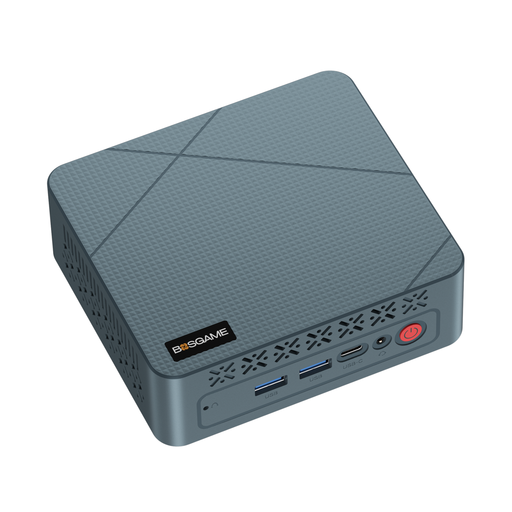
BOSGAME Mini PC E2 Neo, AMD Ryzen 5 3500U up to 3.7 GHz, 16 GB RAM, 256 GB SSD
This compact model could be an option for smaller mapping projects. Its listed specifications are below Epic’s recommendation for Unreal Engine, so check your software’s requirements especially carefully.
Listed specifications: AMD Ryzen 5 3500U up to 3.7 GHz, 16 GB RAM and 256 GB SSD.
View at Joybuy
Frequently asked questions
Do both screens have to show the same view?
No. If you want to show your map and tools separately, connect both monitors and select ‘Extend’ in Windows. Then arrange the detected displays to suit your workspace.
Do all terrain maps require 32 GB RAM?
No. Epic Games recommends 32 GB RAM for Unreal Engine, while Blender recommends 32 GB RAM for Windows. These aren’t requirements for every mapping programme or project; check the requirements for your software version.
What should I check first if I have display problems?
First, check that the cables and ports are connected properly. Microsoft Support recommends detecting the displays in Windows display settings and choosing ‘Extend’ rather than ‘Duplicate’ for separate desktop spaces.
Is a manufacturer’s warranty the same as your statutory rights?
No. Your statutory rights if a product is faulty and a voluntary manufacturer’s warranty are different things. The European Union states that goods bought from a trader have a minimum legal guarantee of two years from receipt. Also check the terms of any manufacturer’s warranty.
Can I cancel an online PC purchase in Germany?
In the EU, online purchases from a trader generally come with a 14-day right to cancel. Exceptions may apply, for example to certain personalised goods, so check the terms of the specific listing.


