What should you look for when buying?
Gaming tower with a separate monitor
A good fit if: You usually work at the same spot by a window and want to choose the screen area, size and positioning independently of the PC.
Bear in mind: You’ll need space for the tower and will need to factor the separate monitor into the cost.
Gaming laptop
A good fit if: You regularly change where you work or want to move when sunlight becomes distracting.
Bear in mind: The screen finish of the specific model needs to suit your workspace by the window. If reflections are distracting, you may need an external monitor.
Check the screen and workspace first, then look at the specifications your programmes and games need. The percentages below offer a rough guide to the concerns that may matter most to consumers.
| Priority |
What to look for when buying |
Who might care most? |
| Readability by a window |
Check the screen finish and adjustability; consider the position of your workspace and whether you can control the amount of daylight coming in. |
If I want to avoid distracting reflections by a window, I’ll assess the screen and its positioning together; around 40% of consumers are likely to put readability first. |
| Colour and workspace |
Check the colour gamut coverage, sRGB mode, resolution and scaling of the specific monitor. |
For consumers who assess colours in web interfaces, a suitable colour workflow and enough screen space are important; around 30% are likely to prioritise colour work. |
| Performance for programmes and games |
Check the operating system, memory and graphics features against the programmes you use; also check games against your target resolution. |
If I use design software and games on the same PC, I’ll choose specifications to meet the actual requirements of both; around 20% of consumers are likely to prioritise gaming performance. |
| Overall cost and future changes |
Check what’s included, the operating system, monitor connections and upgrade options for the specific model. |
Consumers looking to limit extra purchases and future changes should compare what’s included and the available connections before buying; around 10% are likely to put overall cost first. |
For example, BenQ lists 99% sRGB, 3840 × 2160 pixels, 60 Hz and an anti-glare finish for its PD3205U design monitor. These are the manufacturer’s specifications for this model, not the result of an independent comparison test, and they don’t prove how easy the screen will be to read by your window. So a single brightness or refresh-rate figure is no substitute for considering the screen finish, positioning and colour workflow.
The PC specifications you need depend on the software you actually use. Figma describes its basic graphics requirements as modest, but does require WebGL. For Photoshop on Windows, Adobe lists a minimum of 8 GB RAM and recommends at least 16 GB; for displays of 4K or higher, Adobe recommends a GPU with 4 GB of graphics memory. Also check the requirements of your games and the full specifications of the PC you’re considering.
Joybuy products for this setup
This selection includes gaming laptops for working in different places, as well as gaming desktop PCs for a fixed setup with a separately chosen monitor.
 No image available
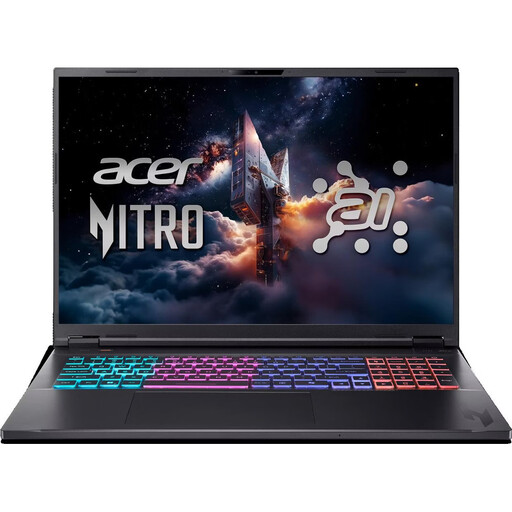
Acer Nitro 18 AI AN18-61-R40J, 18-inch, Ryzen AI 7 350, RTX 5070
For working in different places; the screen is listed with an anti-glare finish.
18-inch WQXGA IPS display, 165 Hz, 16 GB RAM, 1 TB SSD and Windows 11 Home. According to the product information, the memory can be upgraded to 32 GB; weight is 3.02 kg.
The keyboard has an English International layout.
View at Joybuy
 No image available
Acer Predator Orion 3000 i5 Ultra desktop PC
For a fixed workspace where you want to choose the monitor independently of your gaming PC.
Intel Core Ultra 5 225F, RTX 5060, 16 GB DDR5 RAM, 512 GB storage and Windows 11 Home. According to the product information, the memory can be upgraded to 32 GB.
View at Joybuy
 No image available
HP OMEN 16-ap1099ng, Ryzen 9 8940HX, RTX 5070
For design and gaming in different workspaces; the screen finish is described as anti-glare.
16-inch WQXGA IPS display, 240 Hz, 24 GB RAM and 1 TB SSD.
View at Joybuy
 No image available
Dell Alienware Aurora ACT1250 1J3N5, Core Ultra 9-285K, RTX 5080
For a fixed workspace with a separately chosen monitor; the product description lists multiple display outputs.
32 GB RAM, 2 TB SSD and Windows 11.
View at Joybuy
 No image available
Captiva Highend Gaming R89-085, Ryzen 7 9800X3D, RTX 5080
For a fixed workspace with a tower PC and separately chosen monitor.
64 GB RAM, 2 TB SSD, plus HDMI and DisplayPort outputs.
View at Joybuy
Frequently asked questions
Do I need a particularly powerful gaming graphics card for Figma?
No, using Figma alone doesn’t mean you need one. Figma describes its basic graphics requirements as modest, but it does require WebGL support. Check separately which graphics card your games or other programmes need.
How should I set up my workspace beside a window?
Check for distracting reflections from your usual seating position and see whether you can control the amount of daylight coming in. If needed, adjust the screen position or use sun protection. Workplaces with employees must follow the relevant rules on preventing glare and reflections; this doesn’t mean there’s a blanket legal product specification for every private purchase.
What should I consider when using an OLED screen for long design sessions?
If you display unchanged, high-contrast UI elements on an OLED screen for long periods, check the protection features and warranty terms for the specific model. ASUS notes that its OLED monitors may be susceptible to burn-in if static content is displayed for extended periods; this isn’t a statement about every individual display.
What rights do I have if a PC I bought as a private consumer in Germany is faulty?
When you buy as a consumer, you have statutory rights against the seller. The European Union’s consumer information states that these rights last for at least two years from receipt of the goods. A voluntary manufacturer’s warranty doesn’t replace these rights. Terms for business purchases and additional warranty cover are separate matters.


