
Lieferung heute & morgen

Qualitätsgarantie

Willkommens-Angebote freischalten: KOSTENLOSE Lieferung | Bis zu 80 % RABATT | Kostenlose 30-Tage-JoyPlus-Testphase
App herunterladen
A gaming room should do more than simply look good. Your desk, seating, lighting and accessories need to suit the available space, how you use the room and your budget. If you focus solely on RGB lighting or a striking carbon-fibre look, it is easy to overlook important details.
Three common purchasing problems occur particularly often:
Before buying, measure the available space. It is not just the width and depth that matter, but also the movement area in front of the desk. A PC desk measuring 120 × 60 cm may be sufficient for a single monitor. For two monitors, speakers and additional accessories, 140 × 60 cm provides more usable surface area.
Also pay attention to:
An L-shaped gaming desk can make efficient use of corners. However, you should check the shape of the room beforehand, as these models are less flexible to reposition.
Gaming furniture is often made from steel, engineered wood, plastic or coated surfaces. A steel frame can help provide stability; with engineered wood, the edges, surface coating and connecting elements are important. A carbon-fibre look often describes the surface rather than the load-bearing material.
So check the specific material information rather than relying solely on the product name. With shelving and monitor stands, the permitted load is important. Screws and fittings should be secure after assembly. Do not overload storage surfaces.
For seating, the upholstery, padding, base and maximum load capacity are all crucial. A folding floor chair requires a level, stable surface. A beanbag chair is easy to move around, but depending on its filling and shape, it may take up more floor space.
LED lighting for gaming rooms can add accents, but it should not shine directly into your eyes or onto the monitor. Indirect light behind the desk, on the wall or beneath a shelf reduces harsh contrasts in the room. With RGB lighting or LED lighting, you should consider the power supply, controls and mounting surface.
An LED light strip requires a clean, dry surface. If you add extensions, you should also check whether the existing system is compatible with the additional component. Motion or preset functions can be useful, but they do not replace well-planned general lighting.
The following selection categorises specific products by room type and intended use. Dimensions, materials and features are taken from the respective product information.
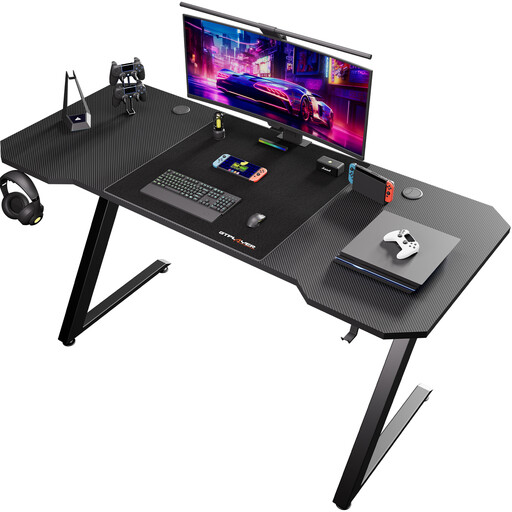
Why this product suits the profile: The compact desktop is suitable for smaller rooms and straightforward PC setups. A headphone hook creates extra space beside the work surface.
The stated dimensions of 120 × 60 cm make the available space clear. This lets you check in advance whether your monitor and accessories will fit on the desktop.
Carbon-fibre surface, headphone hook and a footprint suitable for smaller workspaces.
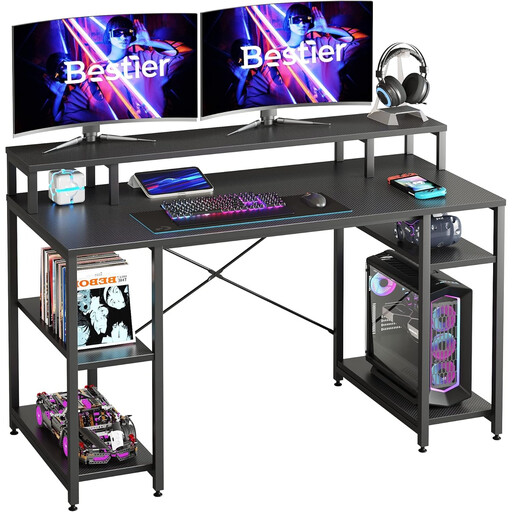
Why this product suits the profile: The 140 cm-wide desktop is designed for multiple devices and accessories. Adjustable shelves allow you to customise the layout for the PC tower or other items.
The construction specifies the load-bearing materials, including a metal frame, P2 engineered wood and X-bracing. This makes it easier to assess than purely visual marketing claims.
Raised monitor shelf, four shelving compartments, one drawer and a coated carbon-fibre surface.
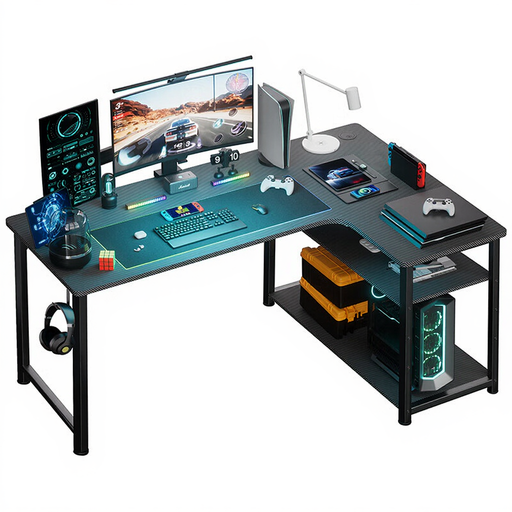
Why this product suits the profile: The L-shaped design makes use of a corner and combines a gaming workspace with storage. USB ports and a socket are provided for devices that are connected regularly.
The integrated shelves and side hooks help reduce loose items on the desktop. However, sockets and shelves should still not be overloaded.
L-shaped footprint, two adjustable shelves, USB charging ports and an integrated socket.

Why this product suits the profile: The compact ambient light can be attached magnetically, making it flexible to use in a gaming room, bedroom or living room.
The motion sensors and eleven preset effects are clearly specified. The light complements the room lighting, but should not be used as the sole source of workspace lighting.
USB-C battery, magnetic attachment, motion sensors and eleven preset lighting effects.
We have compiled a complete, regularly updated list of products that fully meet these strict selection criteria and the safety regulations applicable in the EU.
Once you have chosen your furniture, it is time to consider accessories and styling. A gaming mouse mat should match the size of your desk and have an anti-slip underside. The uRage Lethality 250 is described as featuring a textile surface, rubber base and compatibility with both optical and laser sensors.
Wall panels made from PVC can create an accent wall. The DIY 3D wall panel set includes 20 tiles measuring 30 × 30 cm each, with a stated coverage of 1,8 m². Before installation, check the condition of the wall, the bonding surface and whether the panels can be removed later.
For additional accent lighting, the Yeelight Obsid RGBIC Light Strip Extension is designed as a one-metre extension. Before ordering, check whether you already have a compatible base system.
For a single PC workstation, a desk measuring around 120 × 60 cm may be sufficient. You will also need space for the chair, legroom and access to sockets. If you use two monitors or extensive streaming equipment, a larger or L-shaped desk is often more practical.
A combination of indirect RGB lighting and neutral room or desk lighting is a practical choice. LED light strips should not shine directly onto the screen or into your eyes. Motion and colour effects are additional features, but they do not replace even general lighting.
Observe the maximum load capacity, carefully tighten the screws when necessary and protect surfaces from moisture. Clean textile upholstery according to the care instructions. With electronic lighting, cables should lie free from tension and power supplies should have sufficient ventilation.