
Lieferung heute & morgen

Qualitätsgarantie

Willkommens-Angebote freischalten: KOSTENLOSE Lieferung | Bis zu 80 % RABATT | Kostenlose 30-Tage-JoyPlus-Testphase
App herunterladen
Assembling a functional gaming setup requires a careful balance of performance, ergonomics, and aesthetics. Given the vast number of components on the market, selecting the right hardware can quickly become overwhelming. This article serves as an objective guide to highlight the essential elements of a modern setup. We will focus on the core components that significantly influence the gaming experience: the gaming desk, the gaming chair, and the gaming keyboard. The goal is to provide you with a solid foundation for your purchasing decisions.
Before you select individual products, a few fundamental criteria should be considered. These will help you create a cohesive and high-performance gaming room tailored to your individual needs.
Long gaming sessions can take a toll on your body. An ergonomic gaming chair and a matching gaming desk are therefore not luxury items, but a fundamental investment in comfort and well-being.
Input devices are the direct interface between the player and the game. A high-quality gaming keyboard can significantly enhance responsiveness and user comfort.
A well-thought-out PC setup also considers aspects like cable management and storage. A tidy gaming room not only enhances aesthetics but also improves functionality. Integrated cable routing, shelves, or dedicated monitor stands help maintain order and keep the work surface clear.
Based on the criteria mentioned, we have compiled a selection of components that stand out for their functional properties and thoughtful design.
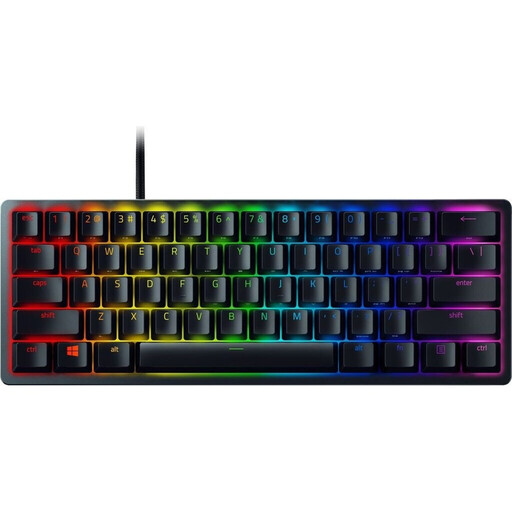
Razer Huntsman Mini (Red Switch) - Compact 60% Gaming Keyboard
Why It Stands Out The Razer Huntsman Mini is distinguished by its extremely compact 60% form factor. This maximises desk space for sweeping mouse movements. Razer's linear opto-mechanical switches use light for actuation, which, according to the manufacturer, enables higher speeds and a lifespan of up to 100 million clicks.
Advantages
Who Is It For? This model is aimed at gamers who prioritise maximum performance and ample mouse space. It is a compelling option, especially for players of fast-paced FPS or action titles and for users with limited desk space.
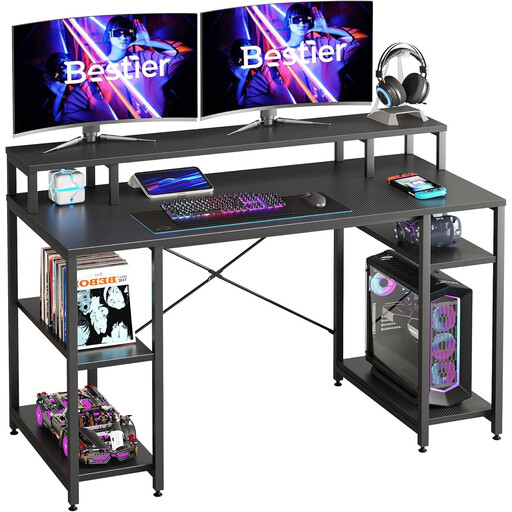
Bestier Large Desk, Computer Desk, PC Table, Gaming Table with 4 Shelves and Monitor Stand, 140 cm
Why It Stands Out The Bestier desk combines a generous 140 x 60 cm work surface with thoughtful ergonomic and organisational features. The integrated monitor riser positions the screen at a more comfortable eye level while creating additional space underneath. The flexibly adjustable shelves offer storage for a PC tower, books, or accessories.
Advantages
Who Is It For? This gaming desk is an excellent choice for users who want a comprehensive solution for organising their complete gaming setup. It is suitable for gamers, content creators, or home office users who need plenty of space and integrated organisational features.
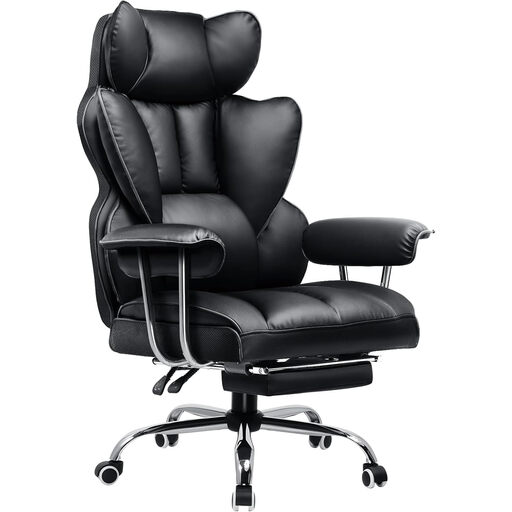
Gaming Chair, Ergonomic Office Chair with Retractable Footrest, Black
Why It Stands Out The GTPLAYER chair focuses on a combination of ergonomic support and comfort features. In addition to standard adjustment options like seat height and backrest (reclinable up to 135°), this model offers a retractable footrest. This feature allows for relaxing breaks between gaming sessions.
Advantages
Who Is It For? This ergonomic gaming chair is designed for gamers who sit for many consecutive hours and are looking for a chair that offers high comfort not only during gameplay but also during breaks. The footrest makes it a versatile seating option for any gaming room.
If the featured desk doesn't perfectly match your preferences, for instance, if you prefer a different colour or size, you can find more models in our dedicated category. Explore our selection of black gaming desks to find the right solution for your setup.
A good gaming setup consists of several core components. Besides a powerful PC and monitor, the key elements are the peripherals that directly impact comfort and the gaming experience. These include an ergonomic gaming chair, a spacious gaming desk, and responsive input devices like a mechanical gaming keyboard and a precision mouse.
The amount of space required depends heavily on your chosen components. A desk with a width of 140 cm provides a good foundation for most setups, even with two monitors. Additionally, plan for enough free space behind and next to the chair to ensure freedom of movement. The PC setup should also be positioned to allow for adequate airflow for hardware cooling.
Mechanical keyboards often offer advantages over conventional rubber-dome keyboards in terms of durability, response speed, and tactile feedback. Different switch types allow for customisation to personal preferences. Linear switches (e.g., Red) are popular with many gamers for their smooth and fast actuation, while tactile switches (e.g., Brown) provide noticeable feedback upon actuation, which can be pleasant for typing.