
Lieferung heute & morgen

Qualitätsgarantie

Willkommens-Angebote freischalten: KOSTENLOSE Lieferung | Bis zu 80 % RABATT | Kostenlose 30-Tage-JoyPlus-Testphase
App herunterladen
Building or upgrading a gaming setup can quickly become overwhelming. The market is flooded with products promising high performance, but not every expensive accessory actually enhances the gaming experience. Many gamers invest in over-hyped features that make little practical difference or run into compatibility issues.
This guide is designed to help you avoid the common pitfalls. We'll focus on the objective criteria that truly matter, so you can make an informed decision about your gaming accessories, whether for PC or console.
Before we dive into the key specifications, it's helpful to understand the most common marketing traps that often lead to buyer's remorse.
To avoid these traps, you should focus on verifiable technical specifications. Here are the three most important aspects to consider when choosing your equipment.
A good gaming mouse is defined by its precision and responsiveness. Instead of just looking at the maximum DPI, the following factors are more crucial:
With a mechanical keyboard, the switch type is the most important decision. The three main categories are:
A gaming headset must not only sound good but also be compatible and provide clear communication.
Based on these objective criteria, we have selected a few products from our range that suit different needs and budgets.
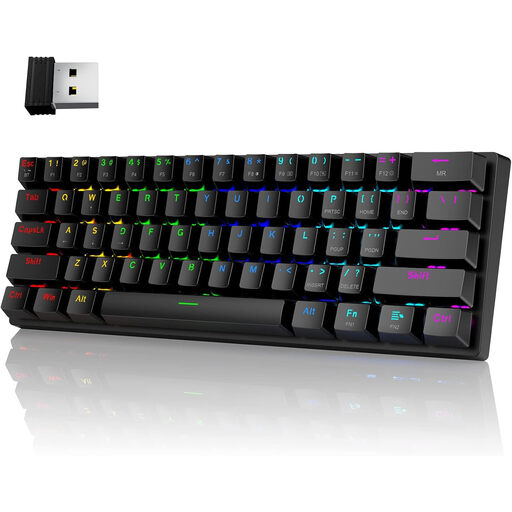
Why This Fits Their Persona: This set is ideal for getting started. It offers a mechanical keyboard with the tactile and audible feedback of blue switches, popular with many gamers, along with wireless freedom (2.4G/Bluetooth). The compact 60% format saves desk space and is easy to transport.
Instead of focusing solely on aesthetics, this keyboard delivers genuine mechanical switches and flexible connection modes. It avoids the trap of paying for a "gaming" look without any functional benefit.
Advantage: Excellent value for a wireless, mechanical entry-level model. Pros: Tri-mode connectivity (2.4G, Bluetooth, USB-C) and a space-saving layout.
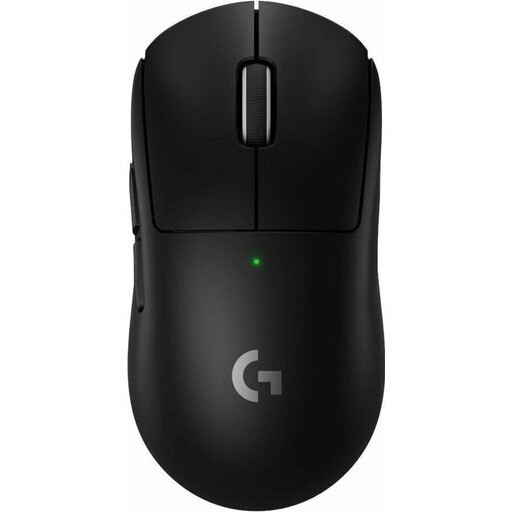
Why This Fits Their Persona: For gamers where every millisecond counts. According to Logitech, this mouse was developed in collaboration with esports pros and is designed for maximum performance at a minimal weight. It's a staple tool in the professional scene.
This model sidesteps the DPI myth by combining a high-precision sensor (HERO 2) with other performance-critical features like an ultra-low weight of 60g, a high polling rate, and durable switches.
Advantage: Competition-proven performance for the highest level of precision. Pros: Only 60g in weight, HERO 2 sensor, LIGHTFORCE hybrid switches, and a long battery life of up to 95 hours.
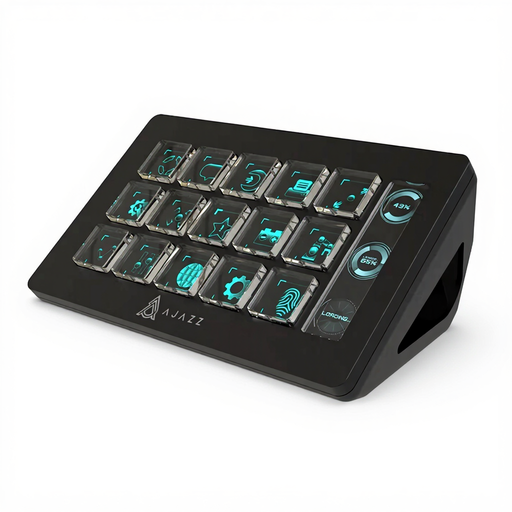
Why This Fits Their Persona: For streamers and content creators, fast control over software like OBS, Twitch, or video editing programs is crucial. This macro pad, with its 15 customizable LCD keys, centralizes complex commands and makes the workflow more efficient.
This is a specialised tool, not a rebranded standard product. It solves a specific problem for streamers—simplifying actions—and doesn't fall into the trap of being a generic "gaming" product.
Advantage: A massive boost in efficiency for streaming and content creation. Pros: 15 programmable LCD keys, one-click actions for complex commands, and broad software compatibility (OBS, Twitch, Adobe, etc.).
We've compiled a complete, up-to-date list of products that fully meet these strict selection criteria and safety regulations.
For most use cases, including competitive gaming, a range of 800 to 3,200 DPI is perfectly sufficient. Higher values are often difficult to control and offer no practical advantage. More important than a high maximum value is a high-quality sensor that ensures flawless tracking across the entire DPI range.
Yes, a mechanical keyboard can be a worthwhile investment even for beginners. It offers a more precise and durable typing experience than conventional rubber-dome keyboards. The key is to choose the right switch type for your needs. Tactile switches (e.g., Brown) are often a good compromise to start with, as they provide noticeable feedback without loud clicking noises.
When choosing a headset for the PlayStation 5, compatibility is key. Models with a 3.5mm jack that plugs directly into the DualSense controller will generally work without issue. For wireless models, you should check if they use a special USB dongle that is compatible with the PS5. For example, the official PlayStation Link USB Adapter ensures a lossless and low-latency connection for compatible headsets.