First, choose a tablet that supports the adventure game you want to play and can launch it in the conditions you’ll encounter on your journey. Before you set off, also test offline access to the game and your save file. If you’ll be holding the device for a long time and space is limited, a compact model may suit you better. A larger display, meanwhile, can make dialogue and puzzle screens easier to view. Manufacturers’ battery capacity and refresh rate figures don’t prove how long the battery will last or what frame rate your particular game will achieve.
Which tablet is right for you?
For players who want to carry on offline
If your connection may drop while you’re travelling, check that the specific game is available, can start without a connection and lets you access your save file. Apple describes offline play options within Apple Arcade, while Google Play notes that some games can be played offline.
For players with limited space at their seat
If you’ll mostly be holding the tablet, weigh up its weight and dimensions against the screen space available for text and controls. Apple and Lenovo list compact models; it’s also worth checking the exact version of larger devices such as the Galaxy Tab S10 FE.
For players on longer journeys
If you want to play for longer stretches, compare the battery specifications and charging options, and check whether the accessories you need are included. Xiaomi and OnePlus publish technical specifications for their devices, but these don’t tell you how long a particular game will run.
What should you look for when buying?
First check that your game is available and can be played offline. Then consider how easy the tablet is to handle at your seat, followed by the display, power supply and requirements of the game you want to play.
| Priority |
What to check before buying |
Who is it most important to? |
| Offline access to the game |
Check that the operating system supports the game you want to play. Before your journey, launch the installed game without a connection and check that you can access any save file you need. |
If I might lose my connection while travelling, I still want to be able to open my game and save file. Around 26% of consumers prioritise offline access. |
| Handling the tablet at your coach seat |
Compare the weight and dimensions of the exact version, and allow for the space needed by the tablet and its case. |
If I’ll be holding the device for a long time and have little room to put it down, a comfortable size matters most to me. Around 21% of consumers prioritise a compact design that’s easy to handle. |
| Power for longer journeys |
Check the battery specifications and what’s included in the box. Test how long the tablet lasts with your own game and a realistic charging option. |
On longer journeys, I want to plan my play time and charging more easily. Around 21% of consumers prioritise power. |
| Reading dialogue and puzzles |
Look at a typical game screen on the display size you’re considering. Don’t decide based on resolution alone. |
For games with lots of text or maps, I want to be able to read dialogue and see puzzles comfortably, even if the device takes up more space. Around 16% of consumers prioritise a clear, easy-to-read game screen. |
| Performance for your particular game |
Compare the game’s requirements with the processor and memory in the exact version. Don’t assume the display’s Hz rating equals the frame rate you’ll get in the game. |
If my adventure game has higher requirements, I want to compare them carefully with the device specifications. Around 16% of consumers prioritise performance for the game they want to play. |
Avoid common misconceptions
-
A downloaded game won’t necessarily work offline
Offline access depends on the specific game or service. You may also need to consider signing in and accessing your save files.
Before setting off, launch the installed game in the conditions you expect to encounter and check that your save file is available. If you use Apple Arcade, remember that you’ll need a subscription.
-
Video playback time isn’t the same as gaming time
Manufacturers’ video playback figures don’t show how long your adventure game will run with the settings you’ve chosen.
Use battery specifications as a point of comparison, then test your own game at a brightness level you’d typically use.
-
A large display or a high Hz rating won’t tell you everything
Larger tablets need more space at your seat, and a high display refresh rate doesn’t prove that a game will achieve the same frame rate.
Check a typical game screen and try handling the tablet in the space available before comparing performance figures.
-
The charger you need may not be included
Xiaomi states explicitly that the Pad 8 Pro does not come with a power adapter.
Check what’s included with the exact version and whether your existing charging accessories are compatible.
Brands to consider
Apple
The iPad mini is a compact iPadOS option, provided the game you want to play is available on it.
- Apple lists the Wi-Fi version as 8.5 inches and 255 g. These figures are useful for comparing size and weight, but they don’t tell you how comfortable you’ll find it to hold.
- The smaller display may feel restrictive for games with lots of dialogue and controls. Apple Arcade is a separate gaming subscription, and offline play isn’t guaranteed for every iPad game.
Lenovo
The fifth-generation Legion Tab is a compact Android option designed with gaming in mind.
- For the listed version, Lenovo specifies an 8.8-inch display, 165 Hz and 12 GB of RAM.
- These manufacturer specifications don’t prove that an adventure game will run at a particular frame rate or that the display will be large enough for every type of game.
Samsung
The Galaxy Tab S10 FE is a larger Android option if having more screen space matters to you.
- For the Wi-Fi version of the Galaxy Tab S10 FE, Samsung lists a 10.9-inch display, up to 90 Hz and a weight of 497 g.
- These figures apply to this model and version. Whether its performance is enough for your game depends on the title.
Xiaomi
The Pad 8 Pro is an 11.2-inch Android option between especially compact and very large tablets.
- Xiaomi lists a Snapdragon 8 Elite, 144 Hz, a weight of 485 g and a typical battery capacity of 9,200 mAh.
- The manufacturer’s specifications don’t tell you how long a particular game will run. Xiaomi says that no power adapter is included.
OnePlus
The Pad 3 offers a large display, making it a good option if you’d rather prop your tablet up than hold it.
- OnePlus lists a 13.2-inch display, a weight of 675 g and a Snapdragon 8 Elite.
- The larger design needs more space at your seat. The manufacturer’s video playback time isn’t the same as gaming time.
REDMAGIC
The Astra 2 is a compact Android option designed with gaming in mind.
- REDMAGIC lists a 9.06-inch display, a weight of 363 g and a refresh rate of up to 185 Hz.
- These display specifications don’t tell you what frame rate a particular adventure game will achieve or whether it will launch offline.
Joybuy product selection
This selection features Android tablets for comparing size and platform when gaming on the go. It doesn’t make any claims about performance in a particular adventure game.
 No image available
Blackview Active 5 rugged tablet, 24 GB expandable RAM + 128 GB ROM
The 8.68-inch display gives you a useful size to compare when considering how much room you have at your seat.
Android 15; 24 GB expandable RAM (6 GB + 18 GB virtual RAM); 128 GB ROM; 6,600-mAh battery; T615 processor.
View at Joybuy
 No image available
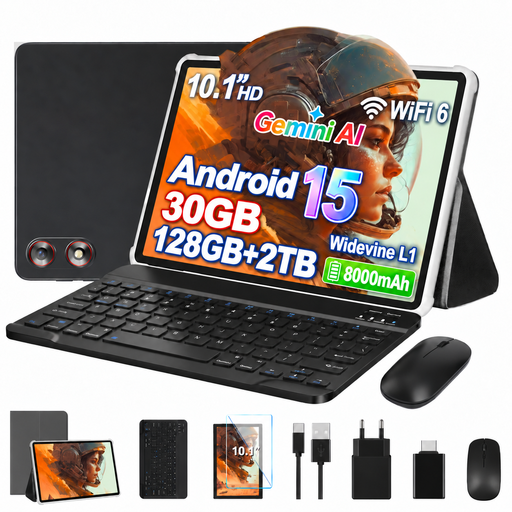
GOODTEL G10, 10.1 inches, 30 GB RAM + 128 GB ROM
The 10.1-inch display is a useful size comparison if you’re considering more screen space than a compact tablet offers.
Android 15; 30 GB RAM (8 GB + 22 GB virtual RAM); 128 GB ROM; expandable up to 2 TB; 8,000-mAh battery; keyboard and mouse listed.
View at Joybuy
 No image available
Android 16 tablet PC, 10.1 inches, 36 GB RAM + 256 GB ROM
The listed display size helps you decide how much screen space you’d like to use at your seat.
Unisoc T310; 36 GB RAM; 256 GB ROM; 6,000-mAh battery; keyboard set listed.
View at Joybuy
 No image available
10.1-inch tablet with keyboard and stylus, Android 16, 36 GB RAM + 256 GB ROM
The 10.1-inch display gives you a useful size comparison for using the tablet at your coach seat; a keyboard and stylus are listed as accessories.
Unisoc T310; 36 GB RAM; 256 GB ROM; 6,000-mAh battery; expandable with a TF card up to 1 TB.
View at Joybuy
Frequently asked questions
Can I play any downloaded adventure game offline on the coach?
No. It depends on more than just the tablet. Apple describes offline play for Apple Arcade, while Google Play notes that some games can be played offline. Test the game you want to play, along with your save file, before setting off.
Do 165 Hz or 185 Hz mean my game will show the same number of frames per second?
No. These figures refer to the stated display refresh rate of the relevant models, not a verified frame rate for a particular game.
Will I need to buy extra accessories for charging?
That depends on the model and the accessories you already have. Xiaomi explicitly states that the Pad 8 Pro does not come with a power adapter. Check what’s included and the charging requirements of the version you choose before budgeting for accessories.
What are my rights if a tablet I buy from a trader is faulty?
Your statutory guarantee is different from a voluntary warranty. The European Union’s consumer information states that, for covered purchases from a trader, you have a minimum two-year legal guarantee from the date you receive the goods. It also explains that you’re initially entitled to a free repair or replacement. These rules don’t apply to purchases from private individuals.
Do I need to wear a seat belt when playing on a tablet on a coach?
Yes. If wearing a seat belt is compulsory, it must be worn while the vehicle is moving, in accordance with Section 21a(1) of the German Road Traffic Act (Straßenverkehrs-Ordnung). Playing on a tablet doesn’t remove this requirement.


