What to look for when buying
Compact OLED TV
A good fit if: you tend to play in the evening, sit at an angle to each other and have room for a model around 42 inches.
Things to weigh up: LG Germany lists the OLED42C6ELB as having a native refresh rate of 120 Hz and VRR up to 165 Hz. Philips limits its 144 Hz HDMI VRR claim for gaming to a connected PC.
Compact Mini LED TV
A good fit if: windows or lamps cause glare and there’s room for a TV around 43 inches.
Things to weigh up: Samsung promotes a Glare-Free screen on the GQ43QN90FATXZG. Check how it performs in the spot where you plan to set it up.
Larger Mini LED TV
A good fit if: several players will be sitting further away and there’s enough room on the wall or furniture.
Things to weigh up: The TCL 55C7K has a larger screen, but needs more space. TCL lists a native refresh rate of 144 Hz for this model; that isn’t the frame rate of a split-screen game.
The proportions below refer to consumers considering a gaming TV for bedroom split-screen racing. Each figure reflects their top buying priority.
| Priority |
What to check when buying |
Who it matters to |
| Clarity of both racing images |
Decide where everyone will sit and how far from the screen; check that both images are clearly visible from each seat. |
When we sit at an angle to each other, I want to be able to see both halves of the race from my seat. Consumers who prioritise clear split-screen images account for around 31% of those interested. |
| Size and placement |
Check the space available and viewing distance for the specific model; include its dimensions with the stand. |
If a larger TV won’t fit in the space, the extra screen area won’t help much. Consumers who put available space first account for around 25% of those interested. |
| Game signal and responsiveness |
Check the HDMI input, game mode and supported signal formats against your console or PC; check support for the specific game separately. |
For a racing game, I want to know which gaming settings my setup can actually use with my console and game. Around 19% of consumers prioritise a compatible game signal. |
| Reflections and room lighting |
Consider the light sources where you’ll set up the TV and check the screen finish of the specific model. |
If windows or lamps reflect on the screen, I want to be able to see both images clearly under my usual lighting. Around 13% of those interested place the greatest importance on reflections. |
| Upfront and ongoing costs |
Compare the total price, delivery and installation if applicable, and the energy information for the specific TVs. |
I want to compare the purchase price and running costs with my budget before choosing a model. Around 12% of consumers put these costs first. |
Joybuy products for split-screen racing
The models below range from compact 43-inch TVs to larger screens. Check that the screen size suits your room and seating, then compare the gaming specifications with your console and game.
 No image available
LG 43QNED86B6B 43-inch gaming TV
The 43-inch screen is a compact size to consider for a bedroom, depending on the space you have available.
The product name lists 144 Hz VRR, AMD FreeSync and Mini LED; the split-screen output you can use depends on your console and game.
View at Joybuy
 No image available
TCL 55Q7D PRO 55-inch 4K SQD Mini LED TV
The 55-inch screen could work well for several seating positions, but it needs more space in a bedroom than a compact model.
The product name lists 4K and 144 Hz; this doesn’t mean it will achieve the same frame rate in split-screen.
View at Joybuy
 No image available
LG OLED77C67LA 77-inch OLED 4K Smart TV
A 77-inch TV needs considerably more room than a compact bedroom model, so check the space available and viewing distance before choosing.
The product name lists OLED, 4K and 120 Hz. Actual output depends on the connected device and the game.
View at Joybuy
 No image available
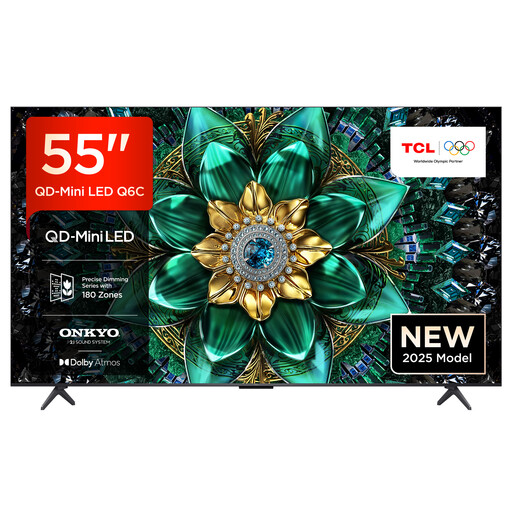
TCL 55Q6C 55-inch 4K QLED Mini LED TV
At 55 inches, this model takes up more space than a compact TV. Measure the area you have in your bedroom before choosing.
The product name lists 4K and 144 Hz. This doesn’t confirm whether the game will output that frame rate in split-screen.
View at Joybuy
 No image available
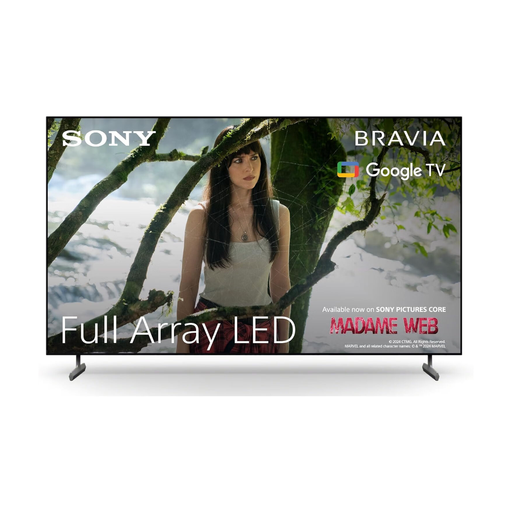
Sony BRAVIA X85L 65-inch Full Array LED TV
The 65-inch screen needs more room than a compact bedroom model, so check the setup location and viewing distance carefully.
The product name lists 4K HDR at 120 Hz, along with HDMI 2.1, ALLM and VRR. Which features are available depends on the game and connected device.
View at Joybuy
Frequently asked questions
Do I need a 144 Hz TV for split-screen racing?
No. First check that the game and console support the local multiplayer mode and the signal you want. Sony lists 4K output at 120 Hz on the PS5 with a compatible display; a higher specification from the TV manufacturer doesn’t prove that you’ll get a higher frame rate in split-screen.
Does the TV itself create the split-screen?
In Gran Turismo 7, for example, split-screen is a game feature, as described in Polyphony Digital’s official manual. Each player needs their own controller. Check whether another racing game offers local split-screen in that specific title.
What should I check when connecting a PS5?
To help narrow down picture problems, connect the console directly to the appropriate HDMI input first, then check the selected input and cable. Sony recommends using the HDMI 2.1 cable supplied with the PS5. Then check the game mode on your specific TV.
How can I compare the energy use of different TVs?
Compare the energy information for the specific models on their EU energy labels. The European Commission includes electronic displays such as TVs in its energy labelling and ecodesign requirements. Running costs also depend on how you use the TV and your electricity tariff.
What are my rights when buying a new TV in Germany?
If a product is faulty, statutory rights against the seller are different from a voluntary guarantee. The German consumer advice centre says new goods generally have a two-year statutory warranty period. For purchases made from 31 July 2026, it describes an extension to three years under certain conditions if the product is repaired rather than replaced due to a fault within the two-year period. Most online purchases of goods also generally come with a 14-day right to cancel, starting from the day you receive them; the conditions and exceptions for each case still apply.


